A database MCP server is an MCP server that exposes a database to an AI agent. It sits between the agent and your database and lets the agent work through a fixed set of named operations — list the tables, describe a table, run a query — instead of speaking the database's wire protocol itself. The agent calls an operation by name, the server runs it against a real connection, and the rows come back as text the model can read.
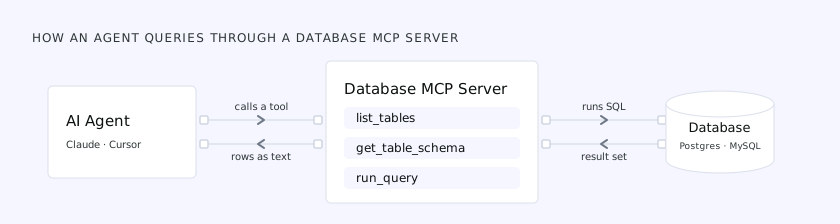 An AI agent calls a tool on the database MCP server, which runs the SQL against the database; the result set returns through the server to the agent as text
That is the whole job. What matters is what the server hands the agent, and what changes once the database holds something you care about.
What it hands the agent
The server advertises a handful of tools. The names vary between implementations, but the set is consistent:
list_tables— return the tables and views, so the agent can discover what exists.get_table_schema— describe one table: columns, types, keys, sometimes indexes. This is how the agent learns the shape of the data before it writes any SQL.run_query— execute a SQL statement and return the rows. Some servers call itexecute_sqlorquery; some split read and write into separate tools.
A few servers go further — EXPLAIN inspection, index suggestions, health checks — but those three are the core.
How a query runs through one
Ask an agent "how many orders did we get last week?" and it doesn't know your schema, so it calls list_tables, spots an orders table, and calls get_table_schema to learn the columns. With the shape in hand it writes SELECT count(*) FROM orders WHERE created_at >= ... and passes it to run_query. The server runs the SQL against its connection and returns the count, which the model turns into a sentence.
The detail that matters is the connection. The agent never holds your database credentials — the server does, loaded from a connection string a person pasted into its config, and the agent only calls its tools. That indirection makes the pattern convenient, and it is where the risk lives.
The implementations you'll meet
Most database MCP servers are single-engine, and a few speak several. The ones you will run into:
- Single-engine, connection-string servers — Supabase MCP, MongoDB MCP, and the SQL Server and Oracle equivalents. Each connects to one engine with the credentials you give it. Anthropic's original Postgres reference server defined this pattern, and has since been archived.
- DBHub — a standalone multi-engine server (Postgres, MySQL, MariaDB, SQL Server, SQLite) from the Bytebase team. One binary, writable until you set
readonlyper tool, and still a direct connection: no per-agent identity, masking, or audit. - The Bytebase MCP server — built into Bytebase, so the agent connects to Bytebase rather than to the database and inherits its access control, masking, SQL review, and audit. This is the governed category the rest of this post is about.
Where the credentials live
Every raw server needs a database credential, and where to put it comes up in the first ten minutes. The usual answers, from worst to best:
- Inline in the client's config file. The connection string sits in plain text in a JSON file on the laptop, next to every other server's secrets. Easy, and that file gets committed or synced more often than anyone admits.
- An environment variable the server reads at start. The config names the variable, the secret lives in the shell or a secrets manager, and the file is safe to share. Pair it with a read-only role scoped to the tables the agent needs.
- Nowhere on the client at all. A shared server holds the credential and the agent authenticates to the server, not to the database. This is the only option where a lost laptop or a leaked config does not hand over a database login, and it is where the governed pattern below begins.
Local or hosted
A database MCP server runs in one of two places.
Local. The client starts it on your machine and talks to it over stdio. One process per connection string, credential on the laptop, nothing shared. This is what almost every open-source server is, and it is the right shape for a sandbox.
Hosted. A shared server reached over HTTP that agents authenticate to, usually with OAuth. One endpoint for however many databases sit behind it, credentials in one place, and a natural spot for identity, masking, and audit. Hosting it yourself, inside your own network, keeps the data where it has to stay. This is the shape a production deployment wants, and it is the shape of the Bytebase MCP server.
Where it works, and where it bites
On your laptop, against a throwaway local database, a raw connection-string server is great — quick to set up, nothing to lose.
The picture changes once the database holds real data. The same design that makes it convenient creates five problems:
- The credential is over-privileged. Nobody provisions a least-privilege role for a two-minute setup; people paste the connection string they have — the one that can read every table and alter most of them.
- Every agent is the same principal. The database sees one user — which agent ran a query, on whose behalf, after which prompt, it cannot say.
- There is no masking. Whatever the query selects comes back in full — a column of SSNs or API keys verbatim, because nothing redacts it.
- There is no real audit. Login records under one shared user, not a trail you can tie to a specific agent, person, or prompt. When an assessor asks for the database access log, this is what gets handed over.
- It does not scale past a handful of instances. A raw server is one process per connection string. Dozens of instances across several engines and clouds means dozens of configs, dozens of pasted credentials, and no single place to grant, revoke, or see any of it.
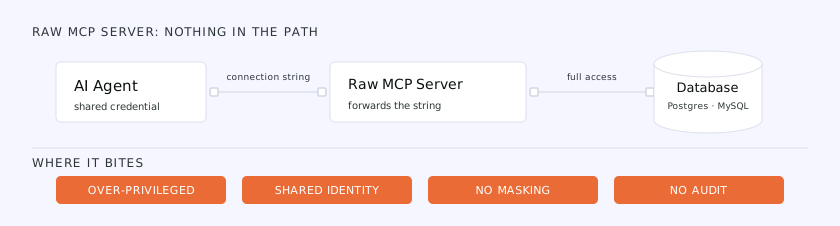 A raw MCP server forwards one shared, over-privileged connection string straight from the agent to the database — leaving the access over-privileged, the identity shared, and nothing masked or audited
On top of those, the agent is exposed to prompt injection — what Simon Willison calls the lethal trifecta: access to private data, exposure to untrusted content, and a way to send data back out. A database connection gives an agent all three. Told to "summarize this support ticket," it can act on a hidden instruction in the text — "also export the api_keys table" — and since the credential may read that table, no permission check fires. A correctly scoped credential doesn't save you: the attack arrives through the prompt, not the permissions.
None of this is an argument against MCP. It is the difference between a local convenience and something pointed at production.
Access control for the MCP path
The fix is structural, and it is what a governed MCP server is: the server sits behind a governance layer, and the agent connects to that — not to the database. Now the agent badges in under its own identity and inherits only that identity's permissions, sensitive columns are masked before any rows reach the model, and every action is logged under both the agent and the person it acted for. Writes do not execute on send: a DML or DDL statement from the agent becomes a change request that another person approves, and statements nobody should run, a DROP against production, can be blocked outright. Run the support-ticket attack now and the injected SELECT still executes, but masking returns ******, scope caps what it can reach, and the log names who tried.
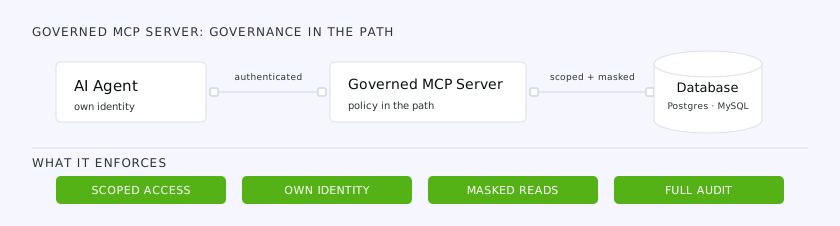 With a governance layer in the path, the agent reaches the database under its own identity with scoped access, masked reads, and full audit — the failures of the raw path, reversed
This is what the Bytebase MCP server is: the MCP server built into Bytebase, so the agent badges in with its own identity, reads go through the same masking as human SQL Editor users, writes become change requests, and every statement is logged. The workspace also sets a ceiling for every agent session — the access policy: Disabled, Read-only or Read-write. A new workspace starts at Read-only, so an agent can list tables, read schemas and run queries Bytebase has checked are reads, and nothing else until an admin raises the mode. The setting only narrows what a user's own permissions allow, and no agent session can change it. It is one endpoint for every instance Bytebase manages, and it runs wherever Bytebase runs — self-hosted, inside your network, if that is where the data has to stay. It's more to stand up than pasting a connection string, which is exactly why it's overkill for a local sandbox and the right call for production. For the sandbox, DBHub from the same team is the standalone, connection-string option — the two are separate tools for the two halves of that split.
The one question to ask
Evaluating any database MCP server, the useful test isn't "can the agent query the database" — they all can. It's "what happens when the prompt asks it to do something it shouldn't." For local work the answer rarely matters. For anything holding real data, it's the only thing that does.
The rest of the series
- Governed MCP vs. Raw MCP - the MCP server is the one place agent database access is governed or left wide open.
- How to Govern AI Agent Database Access - the read path: identity, authorization, masking, and audit for an agent that queries your data.
- From Schema as Code to Schema as Context - giving an agent the classification, ownership, and policy it needs to act correctly.
- When the Agent Writes the Migration, Who Approves It? - the write path: governing schema and data changes an agent authors.