A schema compare tool identifies structural differences between MySQL databases (tables, columns, indexes, constraints, views, routines) and generates the SQL to reconcile them. Teams reach for one in a few recurring situations:
- Merge schema changes from a private branch into the team's main branch
- Keep staging and production consistent after a hotfix
- Stand up a new test environment from a known-good schema
- Promote a change to production and confirm what will actually run
- Diagnose an incident where the schema is not what anyone expected
The seven tools below all do the diff. They differ in what they do with the result, what they cost, and where they stop.
Which one fits
| Tool | Interface | Licensing | Best when |
|---|---|---|---|
| MySQL Workbench | Desktop GUI | Free, GPL | You want the official tool and a one-off visual diff |
| dbForge Schema Compare | Desktop GUI + CLI | Commercial, Windows only | Very large schemas, and scheduled comparisons |
| Navicat | Desktop GUI | Commercial, per seat | You already use it as your day-to-day admin client |
| Liquibase | CLI | Open source core, commercial tiers | Diffs should become versioned changesets |
| Atlas | CLI | Community build Apache-2.0; most CI features are Pro | You want declarative schema-as-code |
| Skeema | CLI | Community Apache-2.0; Premium for views, triggers, events | Your schema lives in a git repo as plain CREATE TABLE |
| Bytebase | Web GUI + API | Open source; most schema-sync on the Free plan | The diff needs review and approval before it runs |
The split that matters is not GUI versus CLI. It is whether the tool hands you SQL and steps back, or carries the change through review, approval, and an audit trail.
MySQL Workbench
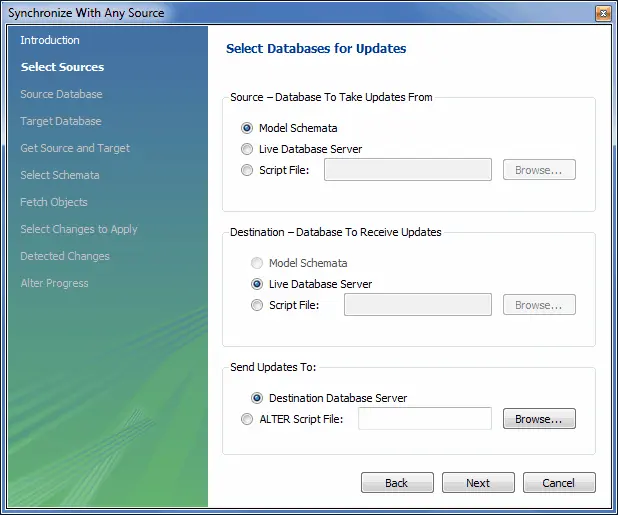
MySQL Workbench is Oracle's official GUI for MySQL. Its schema synchronization utility compares models, live databases, and SQL files in any direction. A model can be the source and a database the target, or the reverse.
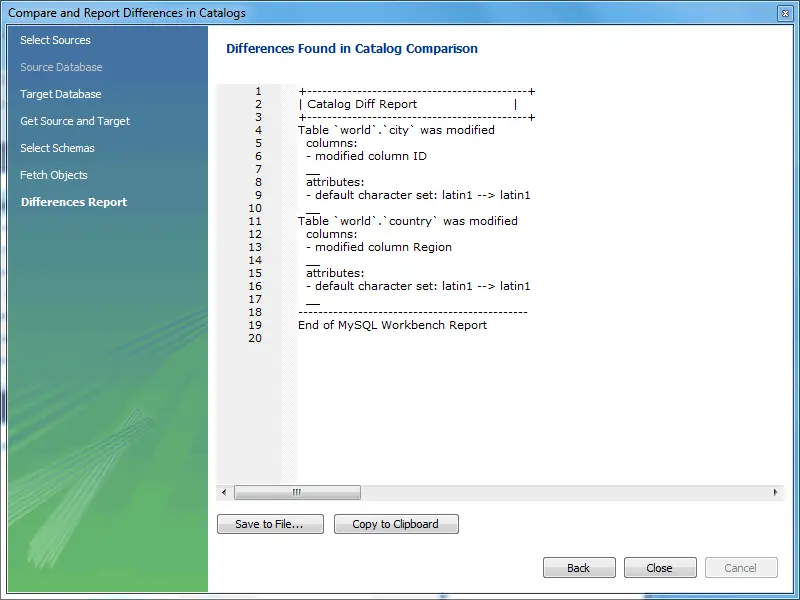
It also produces a catalog diff report listing the differences between compared objects.
Licensing: free, GPL. Available on Windows, Linux, and macOS.
Where it stops: the comparison is a desktop operation between one pair of endpoints. There is no scheduling, no API, and no record of who ran a sync or approved it. Workbench tells you what differs and offers to apply it; everything around that is your process, not the tool's.
dbForge Schema Compare for MySQL
dbForge Schema Compare for MySQL is Devart's dedicated comparison product. Two things distinguish it: it stays responsive on very large schemas, and it exposes a command line so comparisons can be scheduled rather than run by hand.
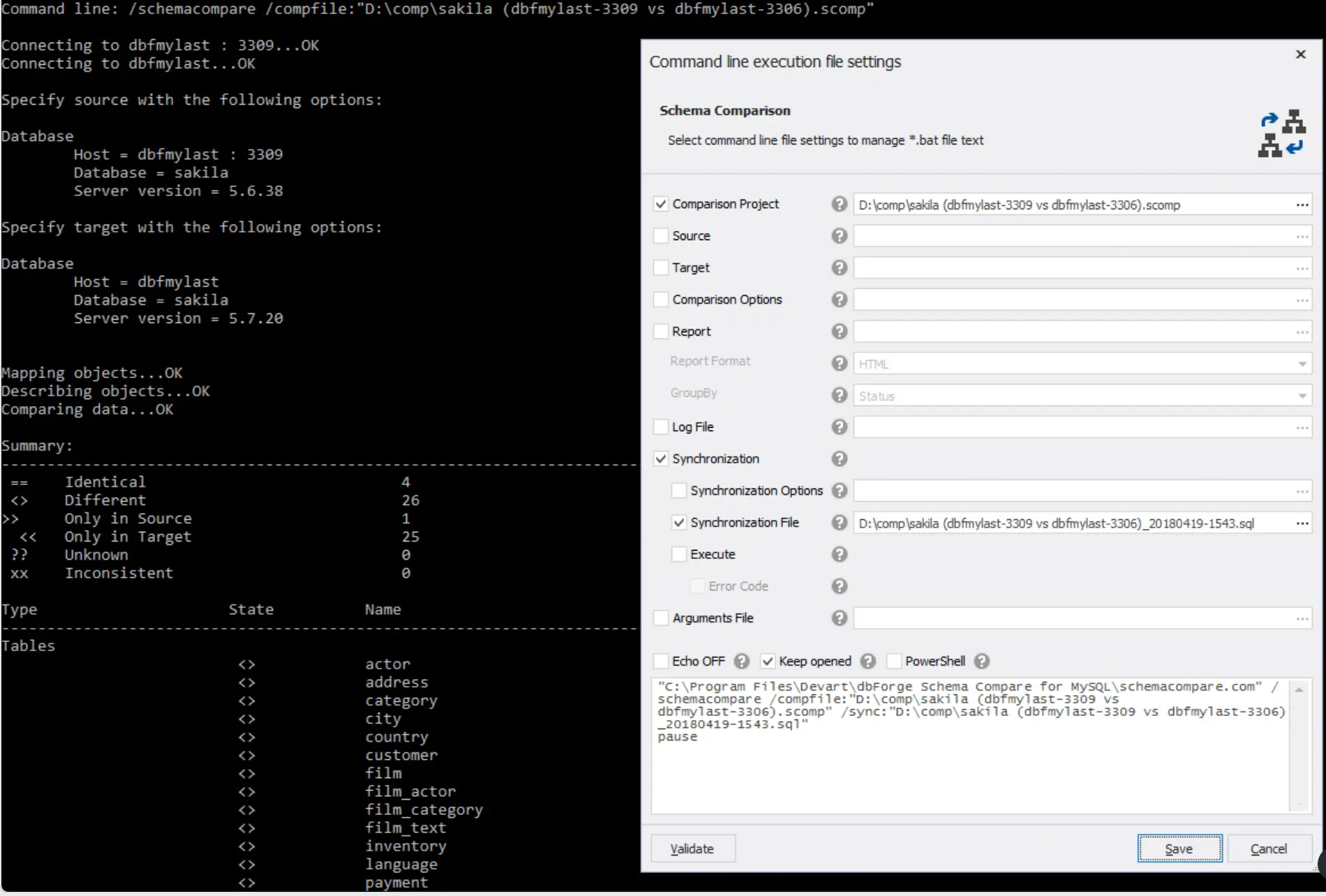
Licensing: commercial, per seat. Windows only.
Where it stops: the platform constraint is the deciding factor for most teams. If your developers are on macOS or Linux, a Windows-only tool cannot be the shared answer, however good the diff engine is.
Navicat
Navicat is a commercial cross-platform database client with strong MySQL support. Its Structure Synchronization feature compares two databases, shows the structural differences, and generates the SQL to bring the target in line with the source. It also handles data synchronization and general administration.
Licensing: commercial, per seat. Windows, macOS, and Linux.
Where it stops: schema compare is one feature inside a general-purpose admin client, not the product's focus. That is fine if Navicat is already on every desk. It is an expensive way in if comparison is the only thing you need.
Liquibase
Liquibase tracks and deploys database changes through a changelog. It offers three diff-oriented commands: diff reports differences, diff-changelog writes those differences into your changelog, and generate-changelog captures an existing database as a starting changelog. See the database inspection commands for the full set.
The advantage is continuity. A diff does not end as a one-off script. It becomes a versioned changeset that travels with the rest of your history and runs the same way in every environment.
Licensing: open source core, with commercial tiers for advanced capabilities.
Where it stops: the changelog is a commitment. You adopt Liquibase's model of change, in XML, YAML, JSON, or SQL, and everything downstream assumes it. Diff fidelity also varies by object type, so verify generated changesets for stored programs rather than trusting them blind.
Atlas
Atlas manages schemas declaratively. You define the desired MySQL schema in HCL or plain SQL, and Atlas computes the difference against a live database and emits the migration to reconcile them. atlas schema diff compares two states; atlas migrate diff produces a versioned migration from them. Sources and targets can be databases, schema files, or migration directories.
Licensing, and read this before you plan around it. Atlas ships in two builds. The Community Edition is Apache-2.0 but deliberately minimal: it carries the core engine and omits many commands, drivers, and integrations. The standard distribution unlocks Atlas Pro after atlas login, with a 30-day trial and a paid licence after that. In October 2025, atlas migrate lint moved into Pro. Migration linting is the feature most teams adopt Atlas for, so budget for it rather than assuming it comes free. Atlas also offers a Hacker License for students, open-source contributors, and hobby projects, which excludes commercial use.
Where it stops: declarative workflows are a genuine shift in habit, and the HCL dialect is another thing to learn. The payoff is real if your team already thinks in desired-state terms. It is friction if they don't.
Skeema
Skeema takes the declarative idea and keeps it in plain SQL. Your schema lives in a git repo as ordinary CREATE TABLE statements. skeema pull imports the current database into that repo, skeema diff compares repo against live database and generates the DDL, and skeema push applies it. Multiple environments — dev, staging, production — are first-class configuration rather than a separate setup each time.
One detail makes Skeema unusually honest about its own limits: it does not implement online schema change itself. It configures an external tool (pt-online-schema-change, gh-ost, or Spirit) to perform the ALTER. Diffing and applying are treated as different jobs, which is exactly the distinction the next section is about.
Licensing: the Community edition is Apache-2.0 and manages tables and routines. The paid Premium edition adds views, triggers, and events, plus a native Windows build, built-in SSH tunnelling, and seed data management.
Where it stops: MySQL and MariaDB only. And if your schema depends on views, triggers, or events, the Community edition will not manage them. Check your object inventory before adopting it on the free tier.
Bytebase
Bytebase is an open-source database DevOps platform with a web workspace shared by developers and DBAs. Its comparison feature differs from the others in what happens after the diff.
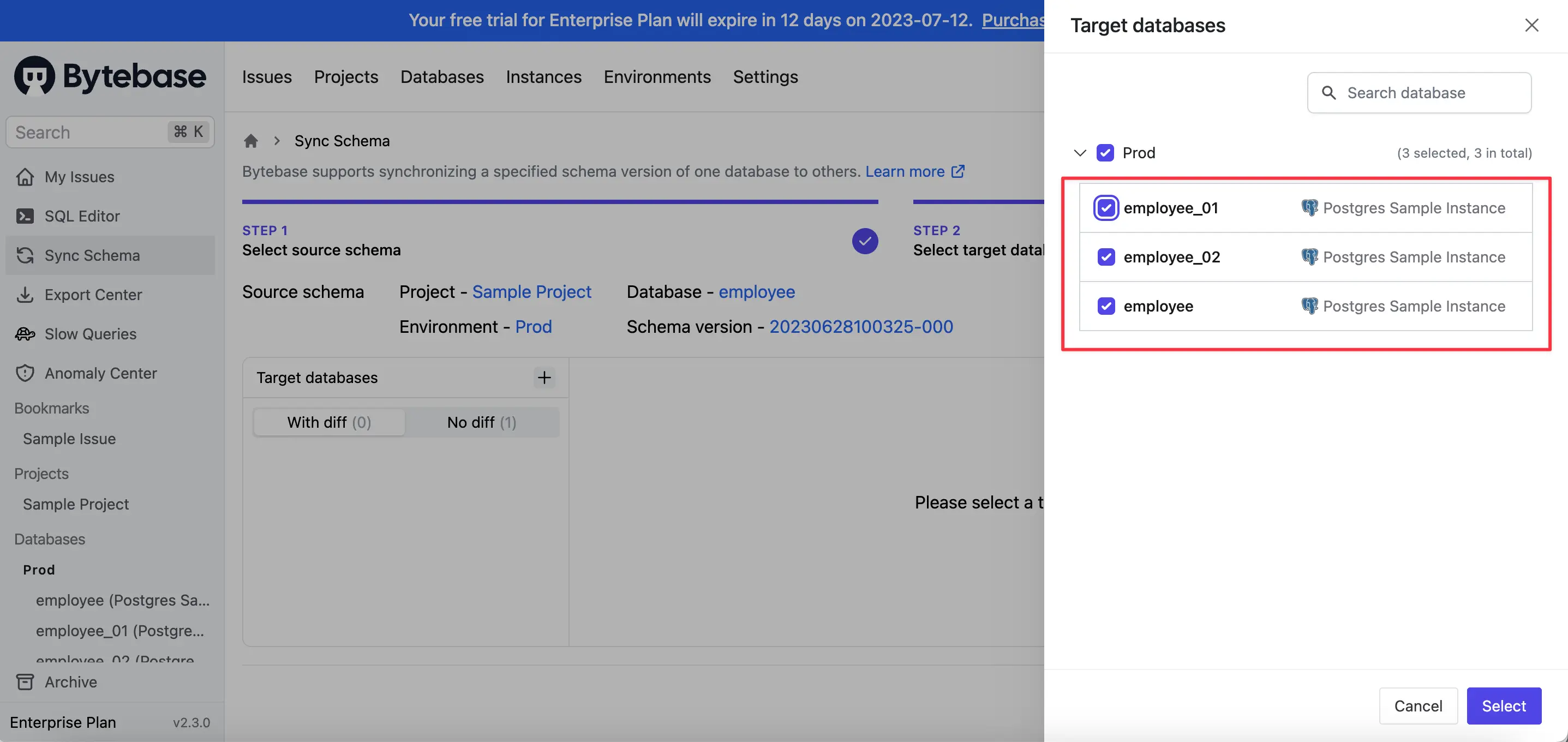
- Compare and synchronize one source schema against multiple target databases
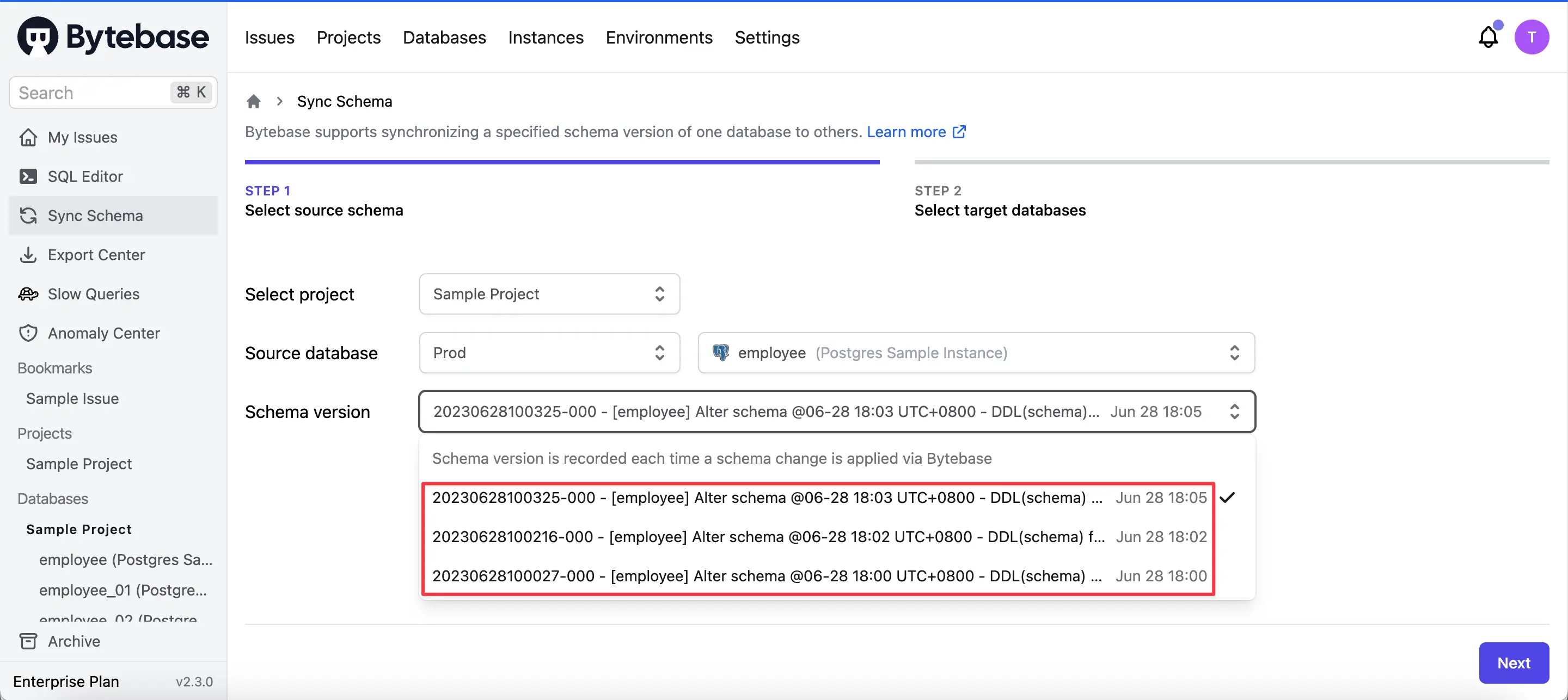
- Use any schema version from the database's change history as the source
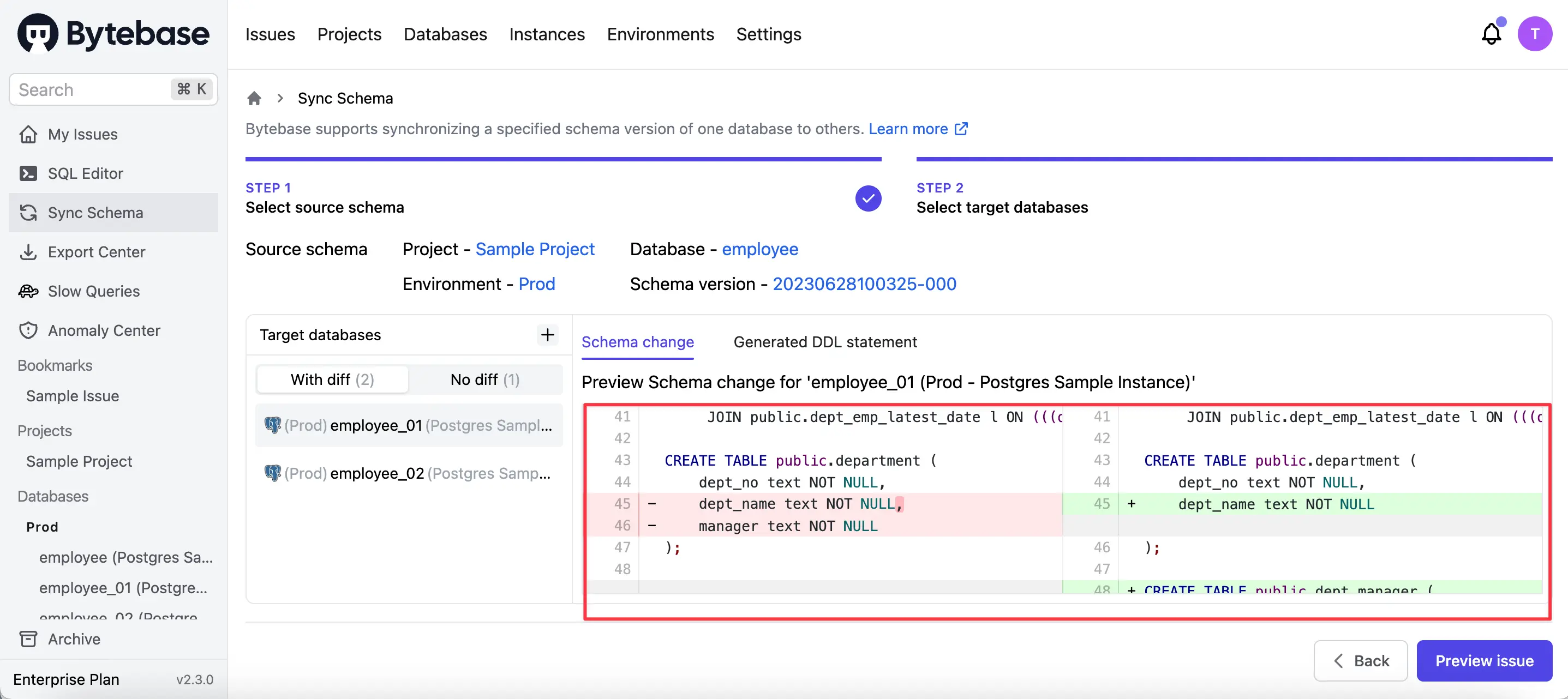
- Read the differences in a rendered diff rather than a raw script
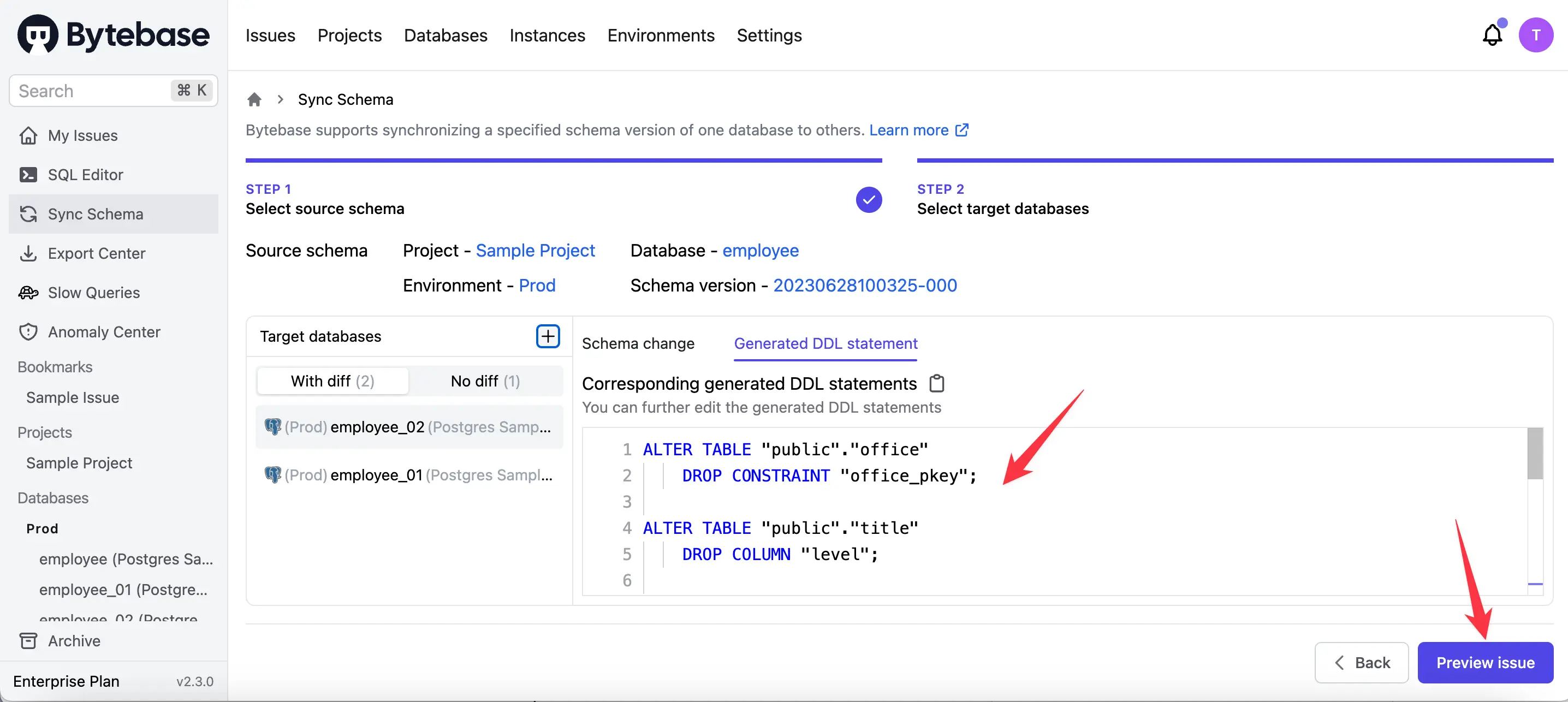
- Turn the diff into a change that goes through review and approval before it runs
Licensing: open source. Most schema compare and sync capability is available on the Free plan.
Where it stops: it is a platform, not a desktop utility. If you want a quick visual diff on your laptop and nothing else, a GUI client is a lighter answer.
Diffing is not applying
Three tools come up constantly in MySQL schema discussions and belong in a different category. They matter here because reaching for the wrong one wastes a day.
gh-ost, pt-online-schema-change, and Spirit are appliers, not diff tools. They solve the problem of running an ALTER TABLE on a large table without locking it — copying rows into a shadow table, tracking ongoing writes, then swapping. None of them tells you what differs between two schemas. Skeema's design makes the division explicit: it computes the diff and hands the resulting ALTER to one of these to execute.
pt-table-sync synchronizes data, not schema. The name invites the mistake. It resolves row-level differences between tables that already share a structure. If your schemas have diverged, it is not the tool you want.
The practical sequence is: a compare tool tells you what changed, an online-DDL tool runs the change safely on a large table, and a governance layer decides whether it should run at all.
Summing it up
Pick by what has to happen after the diff.
For code-first automation, Liquibase suits teams that want versioned changesets, Atlas suits teams that want declarative desired-state (with the Pro licensing above factored in), and Skeema suits teams that want their schema in git as plain SQL with no new dialect.
For hands-on control during synchronization, MySQL Workbench is free and official, dbForge is the strongest engine if everyone is on Windows, and Navicat makes sense when it is already your daily client.
When the diff has to be reviewed and approved before it runs, and recorded afterwards, Bytebase covers that path end to end.
If you run Postgres alongside MySQL, the same comparison for that engine is in Top Postgres Schema Compare Tools.
FAQ
What is a MySQL schema compare tool?
It detects structural differences between two MySQL schemas (tables, columns, indexes, constraints, views, stored procedures, triggers) and generates the SQL to synchronize them. Teams use it to keep environments consistent and to promote changes safely.
Which MySQL schema compare tool works best in CI/CD?
Command-line tools automate most cleanly. Liquibase fits scripted pipelines, Skeema fits git-based workflows, Atlas offers a declarative CI/CD workflow (note that migration linting requires Atlas Pro as of October 2025), and dbForge exposes a CLI for scheduled comparisons. Bytebase adds review and approval on top for team workflows.
Are there free MySQL schema compare tools?
Yes, with caveats worth checking. MySQL Workbench is free and GPL. Skeema's Community edition is Apache-2.0 but covers tables and routines only. Atlas has an Apache-2.0 Community Edition, though it is a minimal build and much of the CI tooling sits behind Atlas Pro. Liquibase has an open-source core. dbForge and Navicat are commercial, and dbForge is Windows-only. Most of Bytebase's schema-sync capability is on its Free plan.
Do I still need gh-ost or pt-online-schema-change?
They answer a different question. A compare tool tells you what to change; an online-DDL tool runs that change on a large table without a long lock. Skeema explicitly delegates the ALTER to one of them.