This post is maintained by Bytebase, an open-source database governance platform that is a Liquibase/Flyway alternative. We update the post every year.
When looking for a database CI/CD and schema migration tool, Flyway and Liquibase are the two names that come up first. Both have a long open-source history, both are Java-based, and both solve the same core problem: getting schema changes into production in a repeatable, versioned way. The differences are in how they get there.
This guide breaks down every aspect — interface, database coverage, orchestration, rollback, pricing, and the recent 2026 releases — so you can decide which database migration tool fits your team. If you're in a hurry, start with the decision guide below.
Flyway or Liquibase: which should you choose?
Most comparisons bury the recommendation at the bottom. Here it is up front. Read the table, then dig into the sections that matter for your case.
| Choose Flyway when… | Choose Liquibase when… |
|---|---|
You want the simplest possible model: numbered SQL files, flyway migrate, done. | You need database-agnostic changelogs and want to target 50+ databases from one definition. |
| Your team is comfortable with SQL and doesn't want a changelog abstraction. | You need fine-grained control over ordering with preconditions, contexts, labels, and flows. |
| You're a single team or small set of apps and can live with CLI-first workflows. | You're standardizing migrations across many heterogeneous databases and teams. |
For most teams the choice comes down to SQL-first simplicity (Flyway) versus changelog flexibility and broader database coverage (Liquibase). They're also popular alternatives to each other, so the rest of this guide is a fair, feature-by-feature breakdown.
What Flyway and Liquibase have in common
- Java-based, providing Java SDK and CLI.
- Provide open-source community version and closed-source commercial version.
- Native SQL supported, however Liquibase requires XML changelog to define the changes.
- Database CI/CD with version control system #GitOps (see Database GitOps configuration).
- Auto SQL check (see Auto SQL check).
- Schema Synchronization (see Sync schema).
- Tiered pricing, offering both free and paid plan.
- Open source, both has long history.
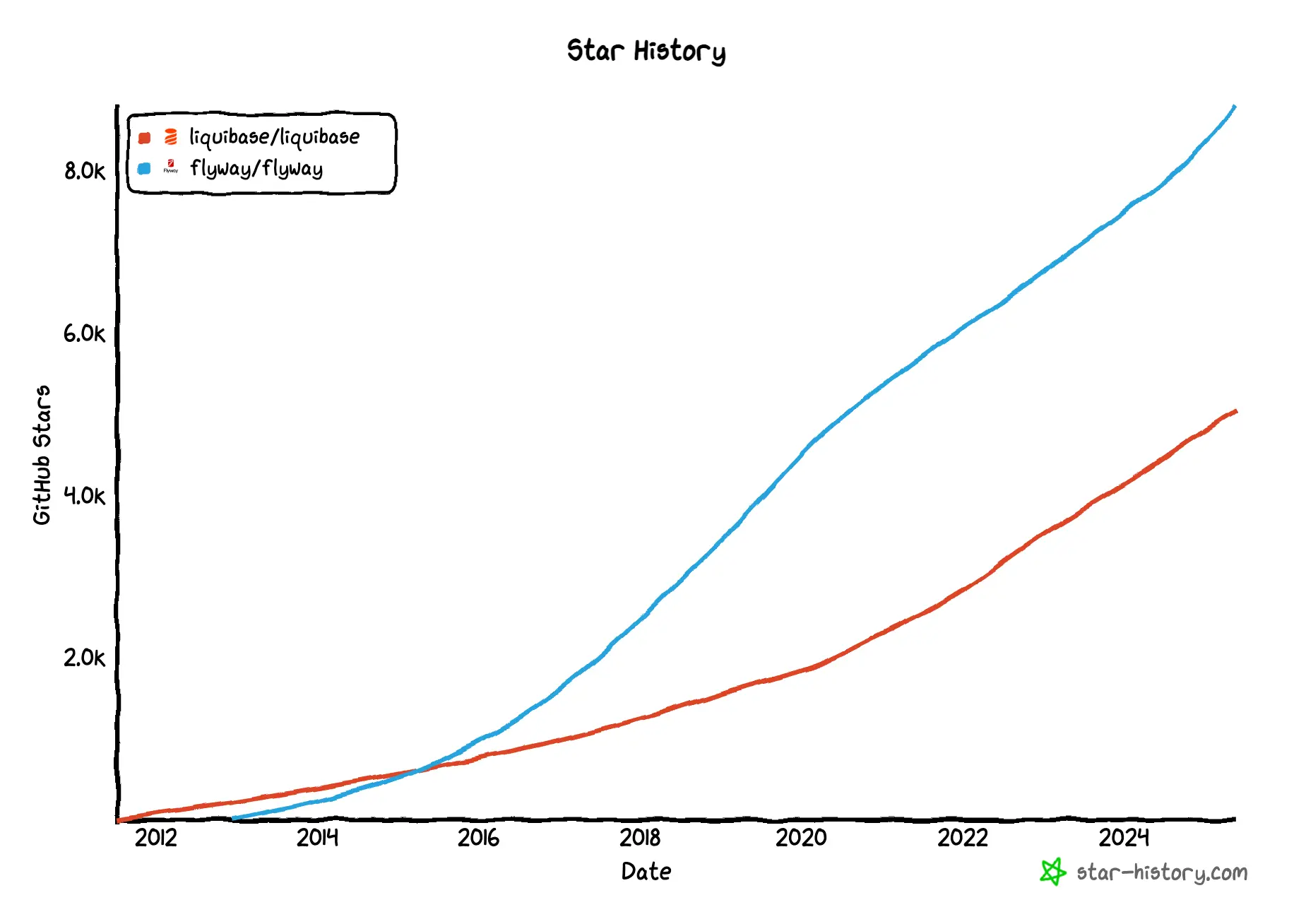
What are the differences between Flyway and Liquibase?
While both Flyway and Liquibase are tools for database CI/CD, there are some key differences between the two. The following table summarizes the differences between Flyway and Liquibase.
| Flyway | Liquibase | |
|---|---|---|
| Product position | Schema Change & Version Control | Schema Change & Version Control |
| Developer interface | CLI + Flyway Desktop | CLI; Secure adds a central view |
| Supported databases | 30+ engines incl. Native Connectors | 60+ SQL & NoSQL DB |
| Programming language and installation | Java + JVM | Java + JVM |
| Change execution | SQL script + CLI | Changelog (SQL, XML, JSON, YAML) + CLI |
| Change orchestration | Numbering of SQL files | Changelog + Flow |
| Database GitOps | ✅ | ✅ |
| SQL auto check | ✅ | ✅ |
| Change history | ✅ | ✅ |
| Sync schema | ✅ | ✅ |
| Rollback | ✅ | ✅ |
| Schema drift detection | ✅ | ✅ |
Product position
-
Flyway: A database schema change and version control tool.
-
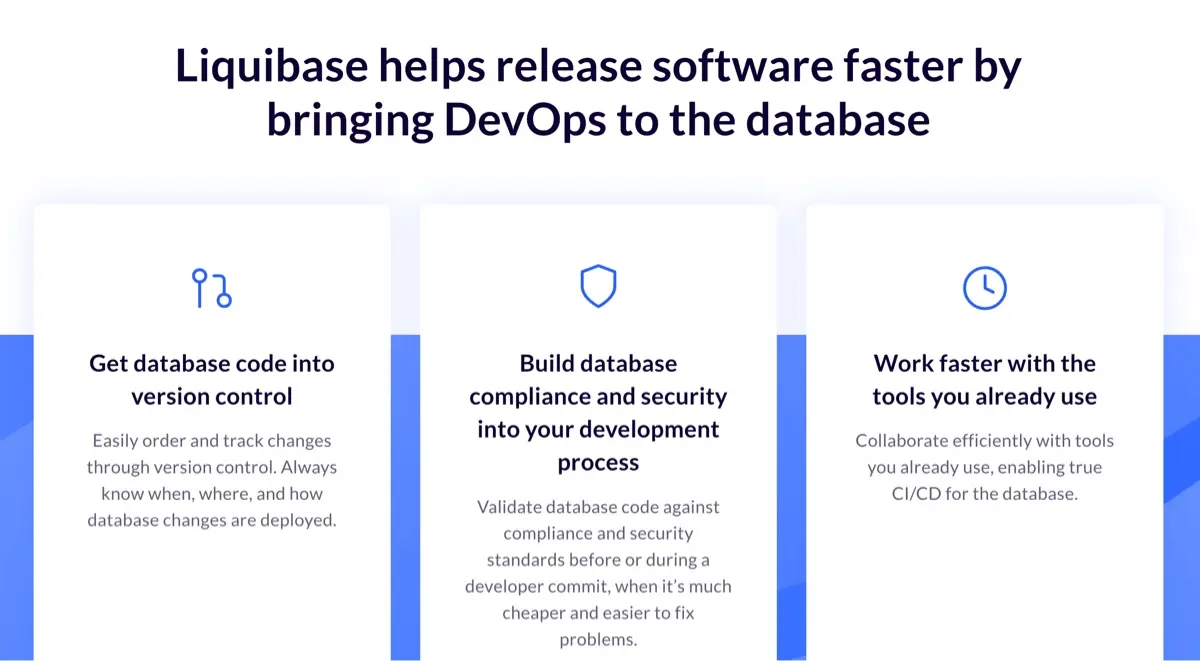
Liquibase: A database schema change and version control tool. It helps you track, manage, and automate changes to your database.
Developer interface
-
Flyway: A command-line tool with Java API, Maven plugin, and Gradle plugin. Flyway Desktop has been enhanced with full Schema Model view and Git history tracking, available for SQL Server, PostgreSQL, MySQL, and other supported databases.
-
Liquibase: Primarily a command-line tool. The Liquibase Hub GUI was sunset in 2023, with focus shifting to CLI and integration capabilities. Liquibase Secure 6.0 (September 2026) adds Change Intelligence, a central view of deployments, policy outcomes, drift, and failures, and a visual policy center; changes still run from the CLI or a pipeline.
Supported databases
-
Flyway: 30+ database engines (50+ platforms counting managed-cloud variants), including a growing set of Native Connectors for non-JDBC engines:
- MongoDB (Native Connectors mode only; JDBC support removed in 2025)
- Cassandra (Native Connectors mode as of Flyway 12.5.0; the JDBC approach is deprecated)
- SinglestoreDB
- Google Cloud Spanner
- EnterpriseDB
- TimescaleDB
- Postgres 18, SQL Server 2025, Oracle 26ai (added 2025)
- Full compatibility for all databases in Community version
-
Liquibase: 60+ SQL and NoSQL databases with enhanced support for:
- Databricks (added 2025)
- Google BigQuery (including DATABASECHANGELOGHISTORY table support)
- Continued MongoDB support
- Snowflake with OAuth/PKI authentication
Installation
-
Flyway: Java-based tool requiring JVM installation. In 2025, configuration has moved to unified flyway.toml format, deprecating the older JSON format.
-
Liquibase: Java-based tool requiring JVM installation. Liquibase 5.0+ requires Java 17 minimum (Java 8/11 deprecated). MacOS .dmg installer was deprecated in favor of Homebrew installation.
Change execution
-
Flyway: CLI or GitOps. Users write SQL files and then run command
flyway migrate. In 2025, enhanced capabilities for script migrations and callbacks have been added to the Community version. -
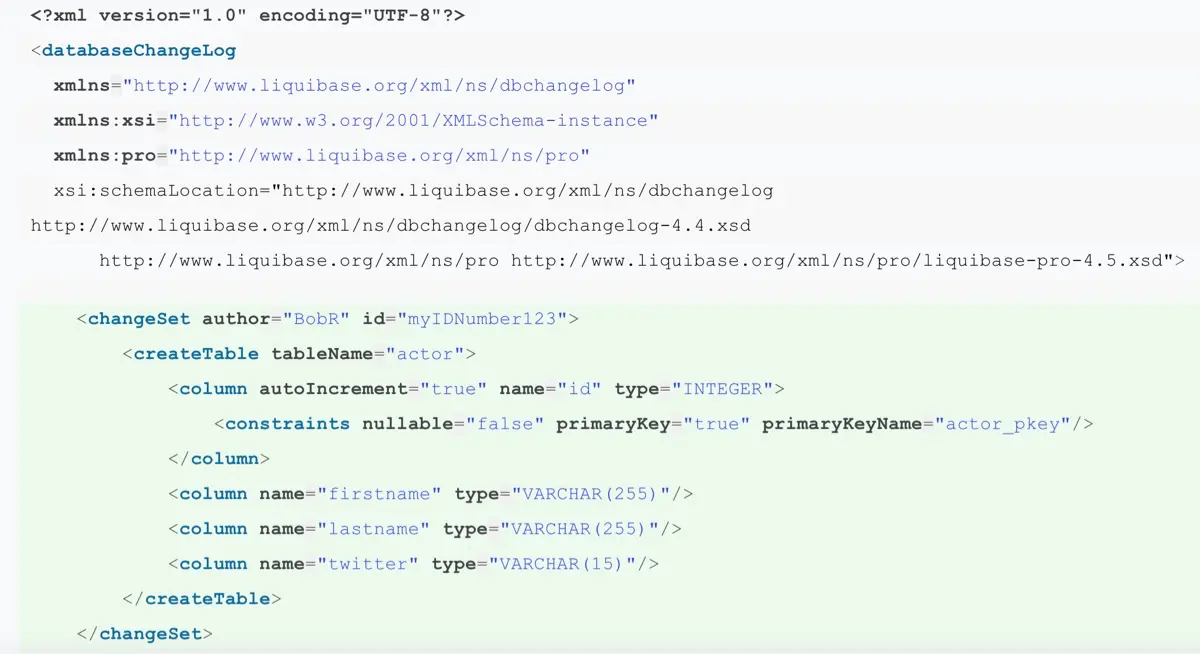
Liquibase: CLI or GitOps. Users specify the changes by defining a
changelogand then run a command. In 2025, flow enhancements provide more sophisticated orchestration capabilities.

Change orchestration
-
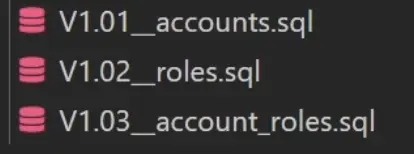
Flyway: Number the SQL files in the order you want them to be executed.
-
Liquibase: Specify the order of changes in the changelog file. In 2025, Flow capabilities have been enhanced with conditionals and more advanced orchestration features.
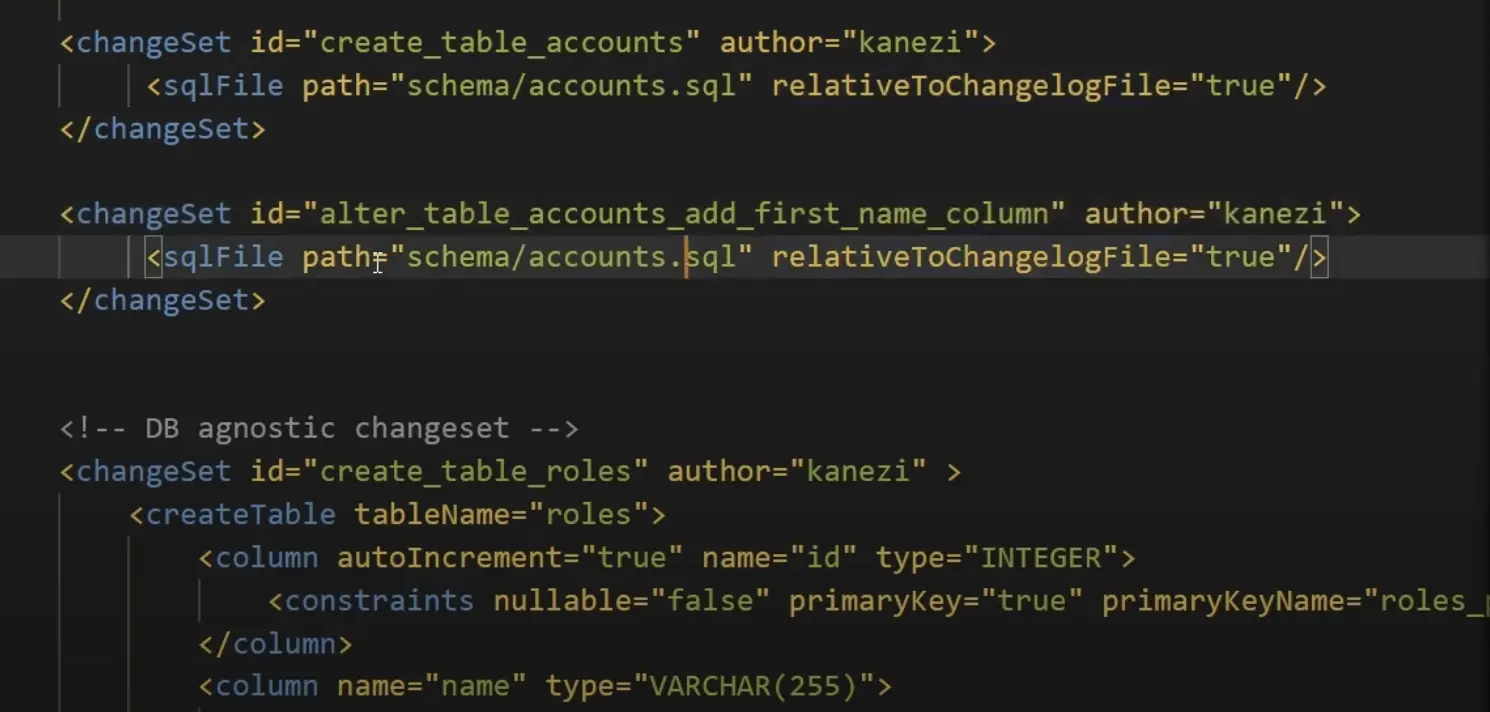
Liquibase continues to be more flexible as it can specify arbitrary orders, and the enhanced flow file capabilities in 2025 make orchestrating complex steps even more powerful.
Database GitOps configuration
-
Flyway: Configure with VCS CI/CD workflow manually. In 2025, integration with Test Data Manager and Docker for dedicated development databases improves the GitOps workflow.
-
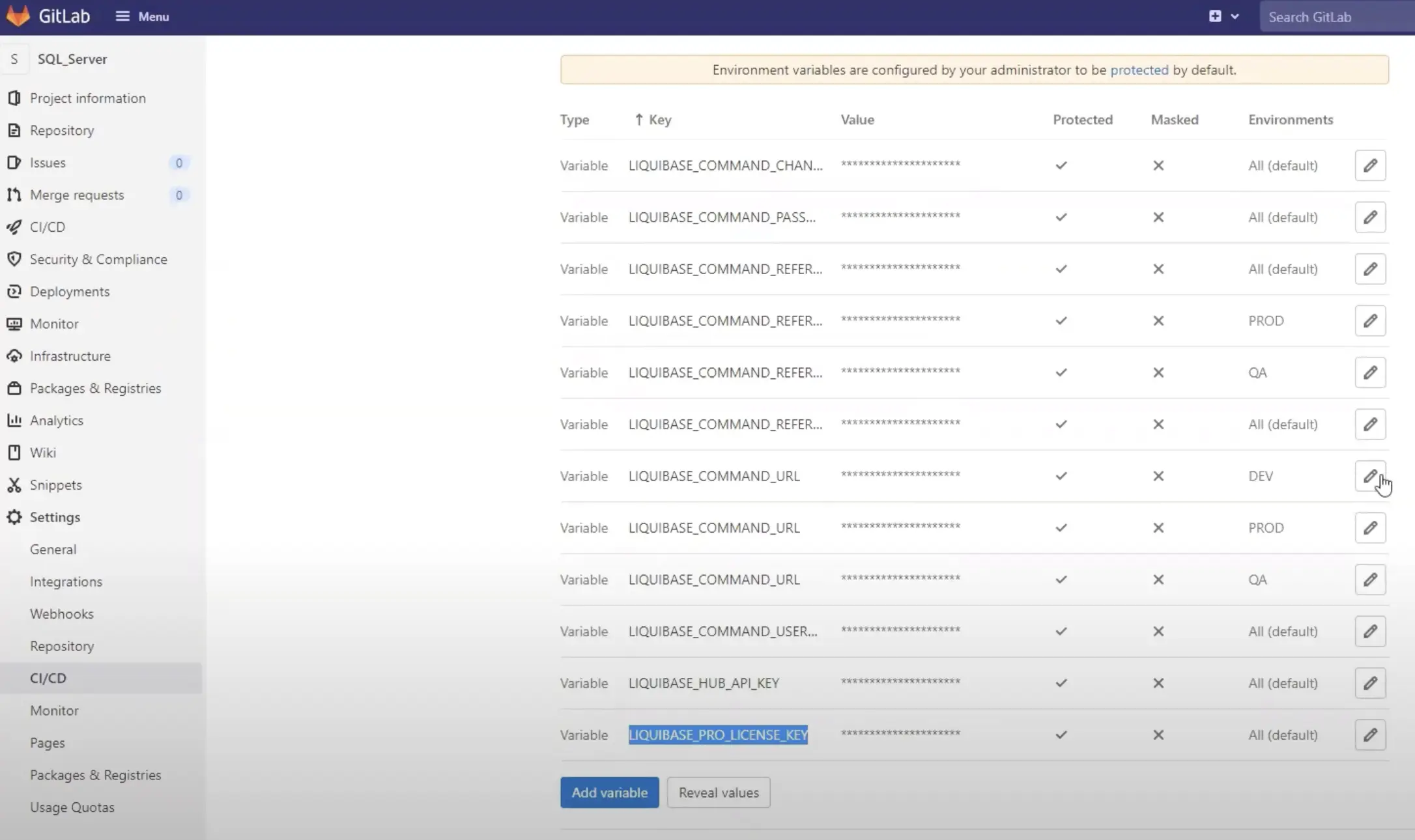
Liquibase: Configure with VCS CI/CD workflow manually. In 2025, enhanced validation and error messaging improve the GitOps experience.
SQL auto check
SQL auto check helps developers write less buggy SQL and save DBAs manual review efforts.
- Flyway: Code Analysis with enhanced drift detection in 2025
- Liquibase: SQL Quality check with improved Policy Checks in 2025
Supported plan
- Flyway: Community runs checks through a SQLFluff install you manage yourself; Enterprise bundles SQLFluff, adds Redgate's own rules, and can fail CI on a violation
- Liquibase: Paid tiers only (Starter and above)
Number of rules
- Flyway: SQLFluff's rule set, plus Redgate's rule library (RG01 to RG23 at the time of writing) in Enterprise, and custom SQLFluff rules
- Liquibase: 50+ prebuilt policy rules in Secure 6.0's policy center, plus custom Python and regex checks
How to configure
-
Flyway: Predefined, users may set them active or not. In 2025, improved configuration through unified flyway.toml.
-
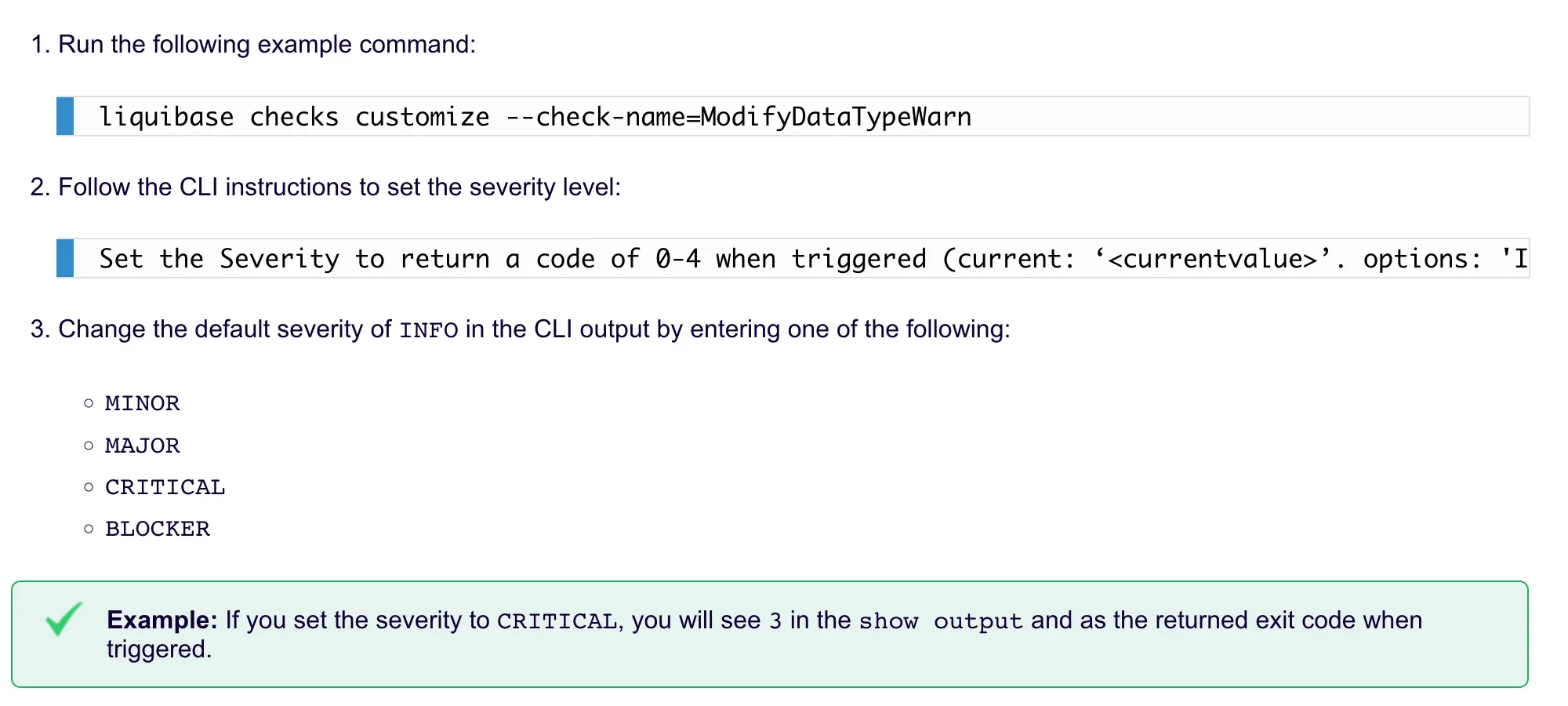
Liquibase: Predefined, users may set levels while calling. Python-based Custom Policy Checks available in paid tiers.
How to trigger
-
Flyway: Run
flyway check -code ....command to produce a report. -
Liquibase: Run
checkcommand or manually integrate this command in automation. Users may go to admin console to view logs.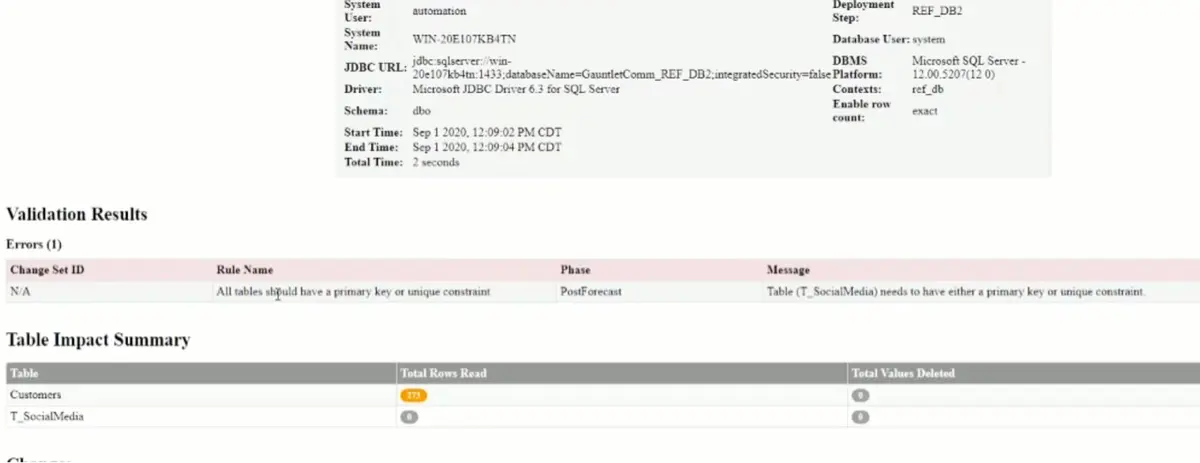
Change history
-
Flyway: Run
flyway infoto showflyway_schema_historytable. In 2025, enhanced info filters provide more granular control. -
Liquibase: Simple Database Change Logs. In 2025, new parameters for the
historycommand and improved Operation Reports.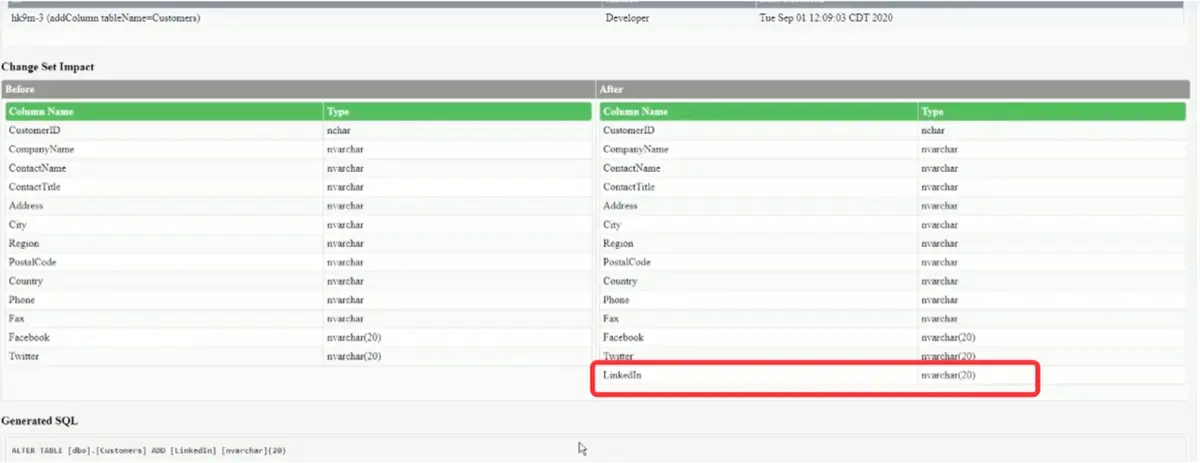
Sync schema
-
Flyway: Via Flyway Desktop, generate a migration script to bring the target database schema in sync. In 2025, the new backup-based baseline approach allows restoring a backup file instead of creating a database from scratch in the baseline script.
-
Liquibase: Support
diff-changelogto compare databases and create a deployable changelog to sync. In 2025, enhanced Drift Report capabilities improve schema synchronization.
Rollback
-
Flyway: Undo migrations (
Uscripts that reverse aVscript) in paid editions; Flyway Enterprise can also generate the undo scripts. Community does not support undo. -
Liquibase: Support
rollback-one-changesetorrollback. Enhanced Rollback Report in paid tiers.
Schema drift detection
-
Flyway: Run
flyway check -drift ...to produce a report indicating difference between target database and the one created by the migrations applied by Flyway. Enhanced in 2025 with more comprehensive code analysis. -
Liquibase: Run
liquibase diff --format=jsonto produce a report indicating difference between target database and source database. In 2025, improved Drift Report capabilities with better visualization.
Flyway enhancements in 2025-2026
Key features released in 2025:
- State-based deployments - Work the way you want with declarative schema definitions
- Backups as baseline - Use database backups instead of lengthy baseline scripts, solving issues with invalid objects or external server references
- Improved drift detection - Snapshots and drift resolution scripts to identify and resolve schema drift
- Database support - Added support for Postgres 18, SQL Server 2025, Oracle 26ai
January 2026 updates:
- AI-powered migration descriptions - Flyway Desktop 8 generates descriptions based on migration script contents
- New shadow database dialog - Option to let Flyway create shadow databases automatically
- Schema model view - View all object definitions in Flyway Desktop
- SQLFluff 4.0.0 - Upgraded from 3.5.0
The spring 2026 release train (Flyway 12.5.0 through 12.10.0, with 12.9.0 landing June 18 and 12.10.0 on June 30, 2026) added a run of engine-level changes worth calling out:
- Cassandra Native Connectors (12.5.0) - Cassandra joins MongoDB as a non-JDBC Native Connectors target; the older JDBC approach is deprecated
- Azure Key Vault secrets resolver (12.5.0) - Pull credentials directly from Azure Key Vault
- Native Connectors for the Deploy command (12.6.0) - Deploy now works against Native Connectors engines, not just Migrate
- Custom SQLFluff rules for Check (12.7.0) - Load your own SQLFluff rules into the Check command
- Distinct CLI exit codes (12.9.0) - The CLI now returns specific exit codes derived from Flyway's error codes, so CI pipelines can branch on the exact failure
check.driftResolutionFolder(12.9.0) - Configure where drift-resolution scripts are written, plus phase-level progress reporting for check, drift, changes, and dryrundocker-composeprovisioner (12.10.0) - The previewdockerenvironment provisioner was renamed todocker-compose, spinning up throwaway databases from a Docker Compose file for shadow/build steps (existingdockerconfigs that use a Compose file keep working)- Smart docker provisioner (12.10.0) - A
keepAliveoption reuses the build-database container across Flyway commands instead of recreating it each run
The 13.x line, from July 2026, turned to AI agents and reporting:
- Flyway MCP server (13.0.0, July 20) - Development-time tools for AI agents, in Flyway Enterprise and still labeled preview
- Test Migrate and 3-sided diff in MCP (13.7.0, September 15) - An agent can run pending migrations against a shadow database, and a 3-sided diff takes a schema model checkpoint before updating
- Drift results in Flyway Pipelines (13.8.0, September 24) - Drift checks with
publishResultenabled publish to Flyway Pipelines; Snowflake gains snapshot history - New Flyway Report (13.9.0, October 1) - A new report implementation, on by default, plus a preview Oracle option to keep identifier case in deployment scripts
That 12.9.0 drift-resolution and exit-code work is squarely aimed at teams wiring Flyway into CI/CD pipelines — the same audience deciding between Flyway, Liquibase, and a governance layer.
Edition lineup: Redgate's product and pricing pages list two editions, Community (free) and Enterprise (paid), with undo script generation, bundled code analysis, and drift detection in Enterprise. Redgate's licensing documentation still names a Teams edition, so treat the lineup as in flux and confirm with Redgate before planning around a specific edition.
Liquibase enhancements in 2025-2026
Liquibase 5.0 was released in September 2025 as a major release:
- Java 17 minimum requirement - Java 8 and 11 deprecated for improved performance and security
- Liquibase Secure 5.0 - Certified enterprise distribution with integrated extensions, drivers, and policies
- Liquibase Secure Developer - New VS Code extension for enterprise users
- AI Changelog Generator - MCP Server powered tool to convert natural language to production-ready changelogs (Liquibase Secure; private preview at launch)
- Databricks support - Added database connection support
Flow and automation enhancements:
- Conditional Flow File logic - Based on action exit codes with new
continueOnErrorproperty - Snowflake OAuth/PKI authentication - Simplified authentication for Snowflake's token-based requirements
- New policy check -
FormattedSqlHeaderRequiredensures proper SQL file formatting - Python checks enhancements - New
get_config_value()helper function
Liquibase Community follows a quarterly cadence (February, May, August, November), and the 5.0 line has picked up three maintenance releases since:
- Liquibase 5.0.2 (March 2026) - Cross-database bug fixes and refreshed JDBC driver versions
- Liquibase 5.0.3 (May 2026) - Input sanitization for
generate-changelogthat closes two reported vulnerabilities, plus more accurate PostgreSQL sequence discovery - Liquibase 5.0.4 (August 2026) - A security release: credentials are redacted from error messages and logs, and new opt-in lockdown flags restrict changelog features that execute code
Liquibase Secure 6.0 reached general availability on September 30, 2026:
- Change Intelligence - One view of deployment activity, environment status, policy outcomes, drift, failures, and change history (Team tier and up)
- Policy center - More than 50 prebuilt policy rules, organized into reusable policy packages and assigned across applications and environments
- Role-based access control - Controls who can create, modify, assign, and administer policies (Business tier and up)
- Policy exceptions - Scoped, documented exceptions that stay in the audit history
Important licensing change: Liquibase Community has adopted the Functional Source License (FSL) to ensure long-term sustainability while keeping the software free for developers.
Pricing
Flyway uses a per-user licensing model, while Liquibase licenses by database types and database targets.
| Aspect | Flyway | Liquibase |
|---|---|---|
| Free Tier | Community | Community (FSL license) |
| Paid Tiers | Enterprise only | 4 tiers: Starter, Team, Business, Enterprise |
| Licensing Model | Per-user | Database types + database targets |
| Entry-Level | Enterprise (contact for quote) | Starter: under $1B revenue, 1 DB type, 250 targets |
| Mid-Tier | — | Team (1 DB type, 500 targets), Business (2 DB types, 750 targets) |
| Enterprise | Unlimited (custom pricing) | 4 DB types, 2,000 targets, 24/7 SLA |
| Pricing | Contact sales | Contact sales (all tiers) |
Summary
Both Flyway and Liquibase are Java-based, ship SDKs and a CLI, and follow a migration-based approach to schema changes. They also lean on the same open-source monetization strategy. Flyway is generally considered more developer-friendly; Liquibase offers a broader set of advanced features and 50+ databases.
The key difference is that Liquibase introduces the Changelog and Flow concepts, enabling explicit migration ordering, preconditions, labels, and contexts. Flyway determines migration order from file naming conventions alone. Both saw meaningful 2026 releases. Flyway 12.9.0 sharpened CI/CD ergonomics with distinct exit codes and drift-resolution controls, and the 13.x line added an MCP server for AI agents. Liquibase 5.0 reset its baseline with a Java 17 requirement and the FSL license, and Secure 6.0 added Change Intelligence and a policy center.
Pick Flyway for simplicity or Liquibase for flexibility. Both give you a Git-like experience for schema changes; if you also want a web GUI and team collaboration on top of either engine, Bytebase is our own take — see the side-by-side comparisons:
For a wider field, see our roundup of open-source Postgres migration tools, which covers Atlas, pgroll, Reshape, and others alongside Flyway and Liquibase.
FAQ
Which is better, Flyway or Liquibase?
It depends on your team. Flyway is simpler and SQL-first, so it fits teams that want plain versioned SQL scripts. Liquibase is more flexible thanks to its changelog and flow concepts, supports more databases, and gives you finer control over migration ordering. Teams that need a GUI, approval workflows, and audit logging on top of either engine tend to reach for a governance layer like Bytebase.
Is Flyway free?
Flyway Community Edition is free, and the Flyway engine is open source under Apache 2.0. Redgate's product pages list one paid edition, Flyway Enterprise, which carries undo script generation, bundled code analysis, and drift detection. Its licensing documentation still names a Teams edition, so check with Redgate if you are comparing paid options.
Is Liquibase free?
Liquibase Community Edition is free under the Functional Source License (FSL) adopted in Liquibase 5.0. Paid tiers (Starter, Team, Business, Enterprise) unlock policy checks, advanced orchestration, and support; Change Intelligence starts at Team, and role-based access control at Business.
Does Flyway support rollback?
Flyway supports undo migrations in its paid editions, and Flyway Enterprise can generate the undo scripts for you; Community does not support undo. Liquibase supports rollback in Community with the rollback commands and rollback SQL you write, and its paid tiers add rollback reports and automated rollback for changes it can reverse.
What are the alternatives to Liquibase and Flyway?
Common alternatives include Bytebase, Atlas, SchemaHero, and Skeema, and they solve different problems. Atlas and SchemaHero lean toward declarative, Kubernetes-native schema management, and Skeema is a declarative tool for MySQL. Bytebase, which we build, sits at a different layer: it runs migrations too, but it is aimed at teams that also need governance around them. Changes pass SQL review and approval before they reach production, access to production data is controlled with roles, just-in-time access, and data masking, and changes and data operations are recorded in an audit log. Flyway Enterprise and Liquibase's paid tiers add policy checks and deployment reports, but neither ships an approval workflow or controls over who can query production data.