SSNs, credit cards, emails, addresses. These columns still have to be queryable for support, analytics, and development, but nobody should be handing out cleartext access to get there. That is what data masking is for. For GDPR, HIPAA, and PCI workloads it is not optional, it is the law.
BigQuery ships dynamic data masking as part of column-level security, built on policy tags managed in Dataplex Universal Catalog. Bytebase Dynamic Data Masking sits in front of it: one policy model across every BigQuery dataset and every other engine in the fleet, with Request, Review, Approve on the human query path. This post compares the two.
BigQuery Dynamic Data Masking
Dynamic data masking is GA. It extends column-level security and carries no separate license charge, so every BigQuery project already has it. (Snowflake, by contrast, gates masking behind an Enterprise upgrade.) One caveat: masking may not apply under reservations created with certain BigQuery editions, so verify against your slot configuration.
Masking is configured in three steps:
- Create a taxonomy of policy tags.
- Attach a policy tag to a column.
- Define a data policy that binds a masking rule and a set of principals to that tag.
At read time, BigQuery rewrites the column for principals who hold the Masked Reader role. The stored data is unchanged.
BigQuery ships a set of built-in masking rules, plus custom routines for anything they don't cover. The same three steps in commands:
# 1. Create a taxonomy and a policy tag (Dataplex Universal Catalog).
gcloud data-catalog taxonomies create \
  --location=us --display-name=pii

gcloud data-catalog taxonomies policy-tags create \
  --location=us --taxonomy=$TAXONOMY_ID --display-name=ssn

# 2. Attach the policy tag to a column through the table schema.
#    schema.json:
#    [{ "name": "ssn", "type": "STRING",
#       "policyTags": { "names": ["projects/$PROJECT/locations/us/taxonomies/$T/policyTags/$P"] } }]
bq update --schema schema.json $PROJECT:sales.customers

# 3. Create a data policy that binds a masking rule to the policy tag.
#    There is no SQL DDL or bq command for this. Use the Data Policy API.
curl -X POST \
  "https://bigquerydatapolicy.googleapis.com/v1/projects/$PROJECT/locations/us/dataPolicies" \
  -H "Authorization: Bearer $(gcloud auth print-access-token)" \
  -H "Content-Type: application/json" \
  -d '{
    "dataPolicyId": "ssn_mask",
    "dataPolicyType": "DATA_MASKING_POLICY",
    "policyTag": "projects/'"$PROJECT"'/locations/us/taxonomies/'"$T"'/policyTags/'"$P"'",
    "dataMaskingPolicy": { "predefinedExpression": "LAST_FOUR_CHARACTERS" }
  }'

# 4. Grant the principal the Masked Reader role.
gcloud projects add-iam-policy-binding $PROJECT \
  --member="user:analyst@example.com" \
  --role="roles/bigquerydatapolicy.maskedReader"
The console drives the same flow under Manage Data Policies. For policy-as-code, the Terraform google_bigquery_datapolicy_data_policy resource wraps step 3.
Permissions: three states
Access to a policy-tagged column resolves to one of three states, decided by the IAM role the principal holds:
- Fine-Grained Reader (
datacatalog.categoryFineGrainedReader) sees cleartext. The role sits above masking, so grant it sparingly and audit changes. - Masked Reader (
bigquerydatapolicy.maskedReader) sees the masked value the data policy defines. - Neither: the query is denied. Column-level security blocks the read outright.
A column carries one policy tag, and that tag maps to a single masking rule. Masking is per column, per tag. There is no second rule to layer on top.
What BigQuery data masking does not do
- Stop Fine-Grained Readers. The role returns unmasked values. It is a plain IAM grant, so limit who holds it and audit the grants.
- Apply more than one rule per column. One policy tag per column, and the tag's data policy selects one masking rule. No composition.
- Subject direct or service access to review. BI tools, scheduled jobs, and application service accounts query the warehouse with whatever role they carry. A service account granted Fine-Grained Reader reads cleartext, with no request or review.
- Provide an approval workflow or an unmask audit trail. Granting Fine-Grained Reader is an IAM edit. There is no Request, Review, Approve path, and the grant is not a first-class, audited masking event.
- Work with legacy SQL, wildcard (
*) table queries, or copy jobs. Masking is incompatible with all three. - Mask partitioning or clustering columns via custom routines. A custom masking routine does not apply to a column used for partitioning or clustering.
- Filter rows. Masking is column-level. For row-level control, use row-level security (row access policies).
Bytebase Dynamic Data Masking
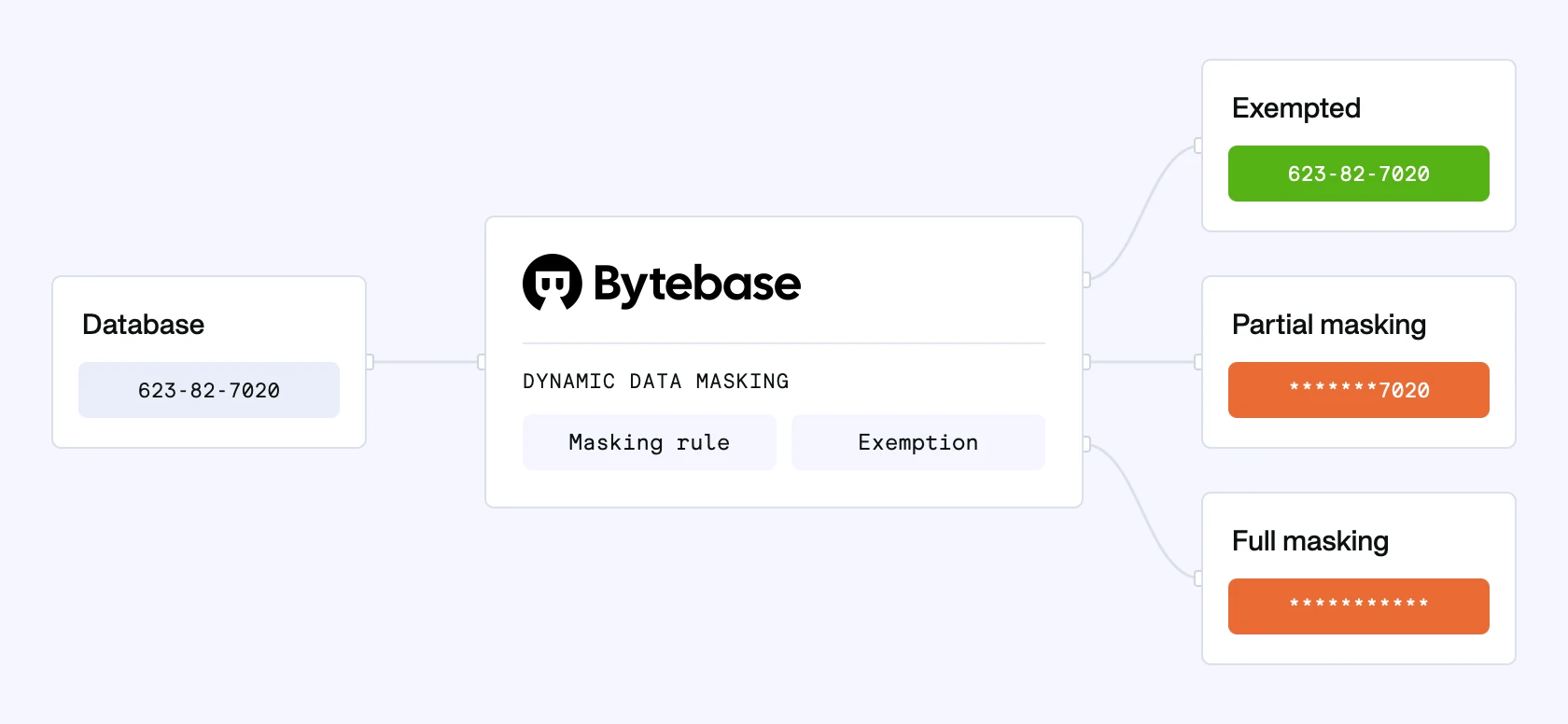
Native masking has a documented gap. Fine-Grained Reader grants return cleartext, and they are plain IAM edits: no request, no review, no audited unmask event. Granting access and proving who saw what are separate, manual steps. The cause is structural. Masking rewrites the column inside the warehouse, but the role grant that bypasses it lives upstream, in IAM. To close the gap you have to govern the query itself, not just the column.
Bytebase Dynamic Data Masking governs the query. Queries route through Bytebase's SQL Editor, and Bytebase masks results before they leave the editor. A Fine-Grained Reader grant on the backing project does not bypass the policy. Unmasking becomes an access decision: granting Query rights runs through a built-in workflow (Request, Review, Approve), every step audited.
Policies compose from three layers, evaluated in fixed precedence: Masking Exemption > Global Masking Rule > Column Masking.
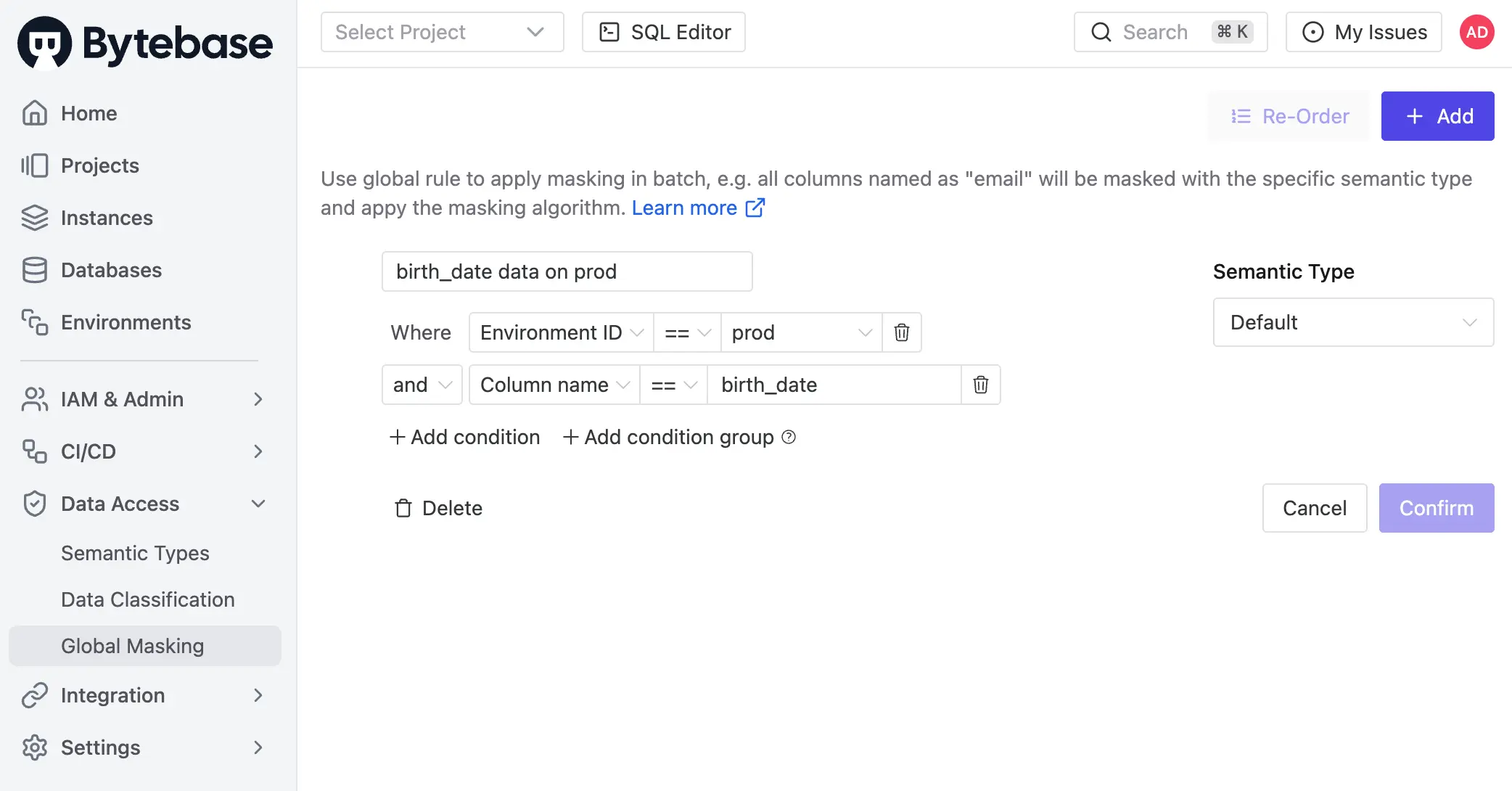
- Global Masking Rule. Workspace-level. Rules evaluate top-down and first match wins. Match conditions span environment, project, database, and data classification. Each match applies a Semantic Type, which selects a masking algorithm: full, partial, MD5, range, or custom.
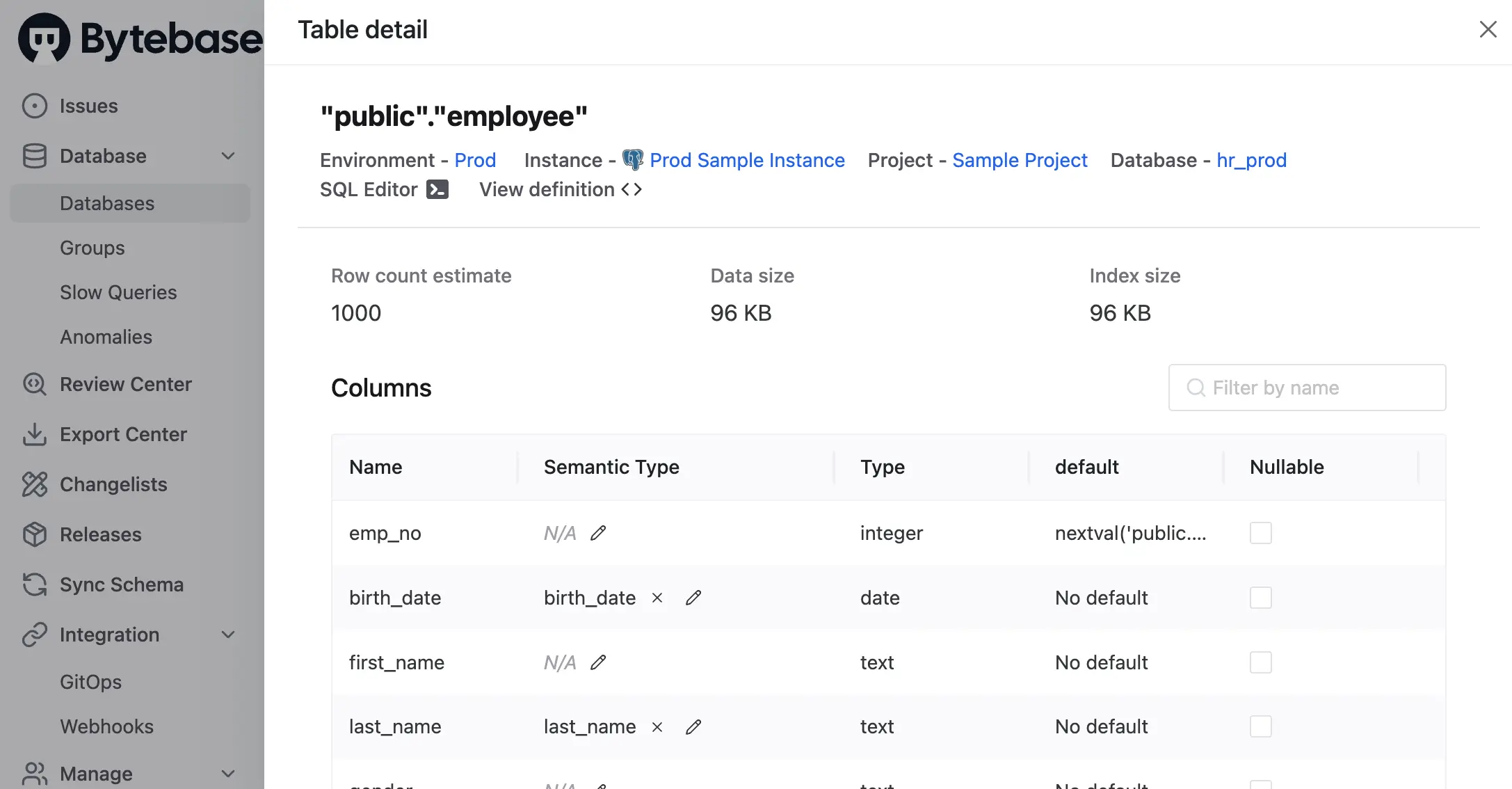
- Column Masking. Project-level override on a specific column when the global rule does not apply.
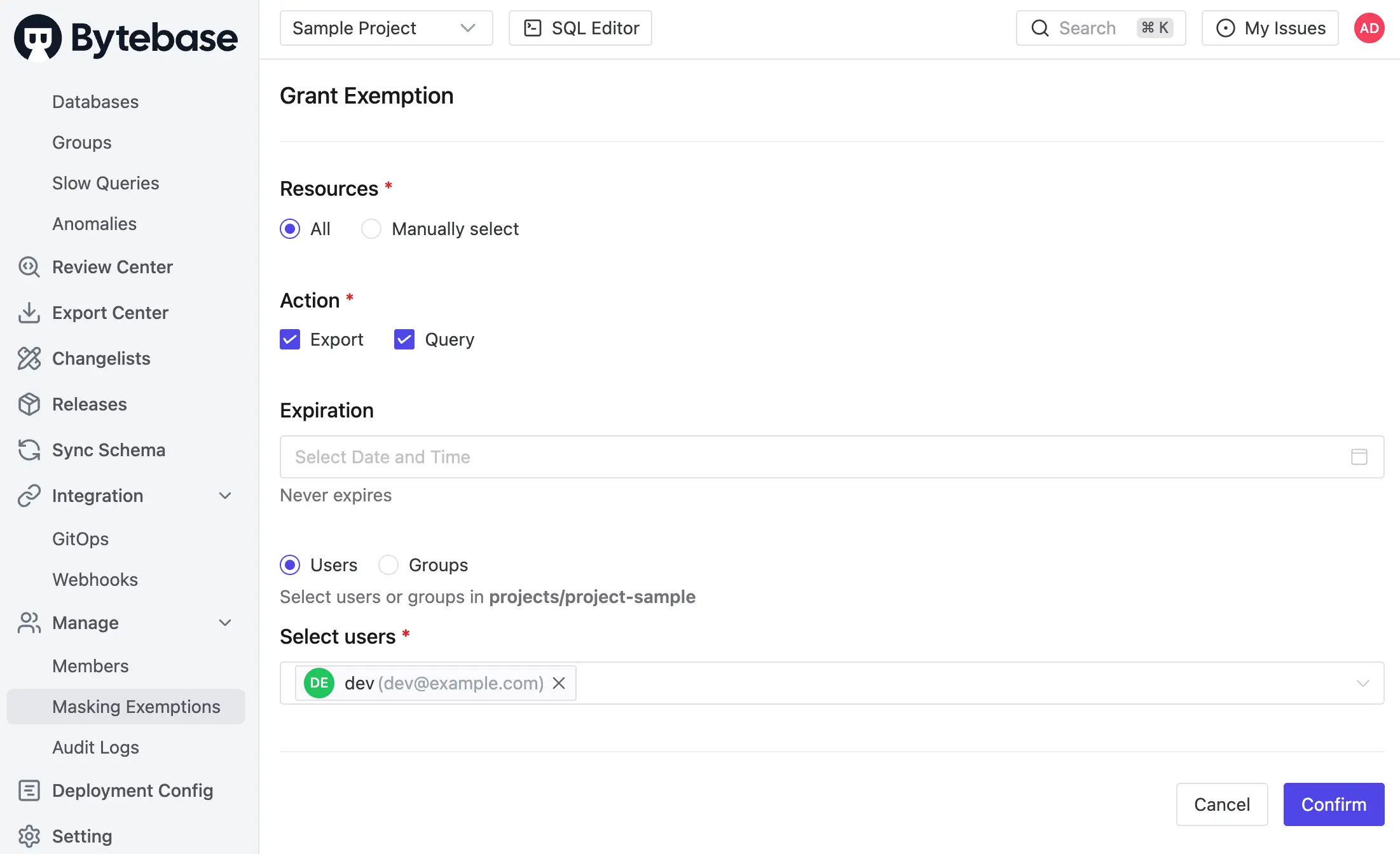
- Masking Exemption. Named users receive time-bound
QueryorExportexemptions to specific databases or tables. Service accounts are not eligible. Every grant logged, every access logged.
Masking propagates. When a column is masked, the policy extends to every view and derived structure that depends on it. Expressions over masked columns stay masked.
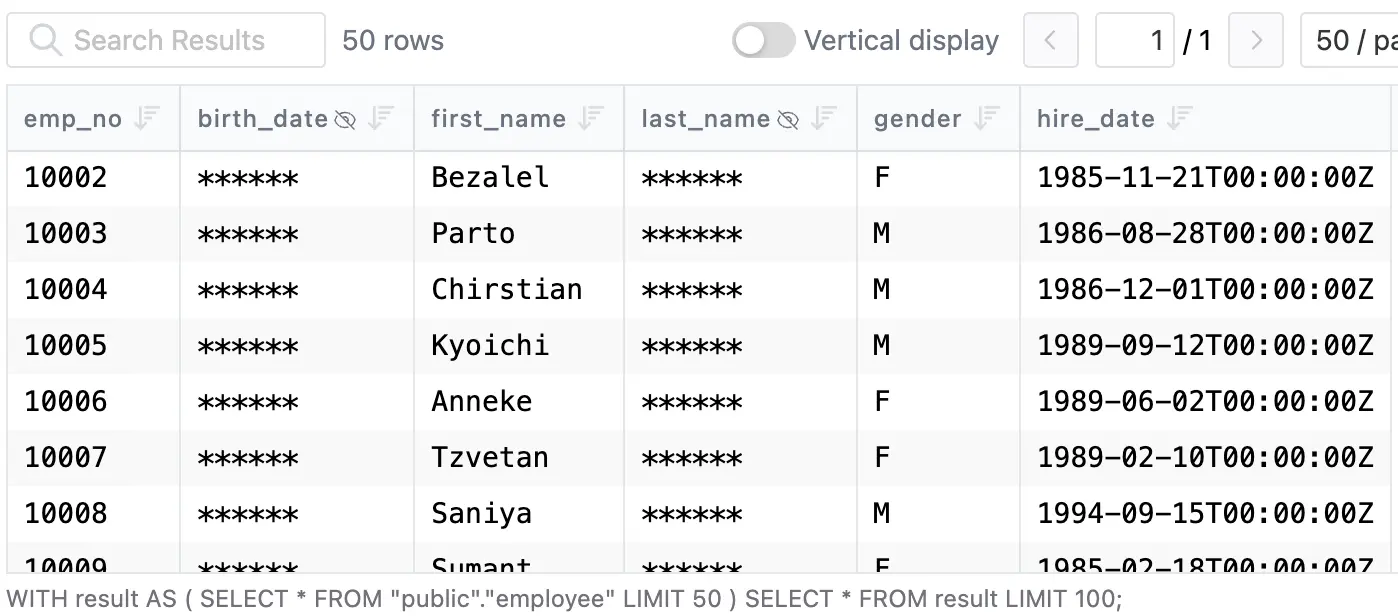
Policies can also be codified via GitOps.
Masking decisions are recorded in the audit log. Every SQL execution entry carries per-column masking metadata (masked columns, Semantic Type, matching rule) alongside user, source IP, statement, and row count. Granted exemptions, used exemptions, and policy edits are first-class audit events. The access decision and the proof of enforcement share the same record.
One thing to be clear about: the enforcement boundary. Bytebase masks queries routed through the SQL Editor. Traffic that hits BigQuery directly bypasses it (BI tools, scheduled jobs, and service accounts), and native data masking plus IAM cover those. The split is symmetric: native masking at the warehouse, Bytebase on the human query path, where approval and audit are what matter. One policy applies across BigQuery and the Postgres, MySQL, SQL Server, Oracle, and Snowflake instances next to it.
Comparison
| BigQuery Dynamic Data Masking | Bytebase Dynamic Data Masking | |
|---|---|---|
| Compatibility | BigQuery only | All engines including BigQuery ⭐️ |
| Mechanism | Policy tag + data policy per column ⭐️ | Policy in Bytebase, applied at SQL Editor |
| Enforced at | Warehouse, every read path ⭐️ | SQL Editor |
| Masking rules | Built-in rules + custom routine ⭐️ | Full, partial, MD5, range, custom |
| Policy mgmt | Console / Data Policy API / Terraform | Centralized UI, grants, audit log ⭐️ |
| Permission scope | Column (one policy tag) | Project, database, table, column ⭐️ |
| Workflow | IAM grant only | Request. Review. Approve. ⭐️ |
| Row-level filter | No (pair with row access policies) | No (pair with access policy) |
| Cost | Included with BigQuery ⭐️ | Bytebase Enterprise |
Picking one
- Single BigQuery estate, and masking must hold across every client. Use native data masking. It enforces in-warehouse on every read path, including the BI tools, scheduled jobs, and service accounts that connect directly. Pair with row access policies for row-level control, and keep
Fine-Grained Readergrants few and logged. - You need an approval workflow and an unmask audit trail. Native masking grants are plain IAM edits. Use Bytebase on the human query path (Request, Review, Approve), with every exemption and access logged.
- Mixed fleet, BigQuery alongside Postgres, MySQL, SQL Server, Snowflake. Use Bytebase. One policy model, every engine, audited grants for every unmask, recorded in the same place as your access logs.
- Both. Native masking at the warehouse handles direct connections, BI tools, and service accounts. Bytebase governs the human query path through the SQL Editor with approval and audit. They compose.
Try Bytebase Dynamic Data Masking with this tutorial.