This post is maintained by Bytebase, an open-source database governance platform. We update the post periodically.
PostgreSQL keeps topping the popularity charts (DB-Engines named it DBMS of the Year in 2023, runner-up in 2024). And yet doing a schema migration in Postgres is still a PITA. A small industry of tools has grown up to make it less so, and they don't all solve the same problem. The ones that apply your SQL fall into three camps: the versioned-migration tools that run your scripts in order, the declarative tools that diff a desired schema against the live one, and the zero-downtime specialists that rewrite big tables without taking a lock. Bytebase is the odd one out: it can run the migration too, but what it adds is the governance layer around the change.
Here's the full list, all open source and actively maintained as of October 2026:
Four Postgres questions to ask any of them
Most migration-tool roundups are written as if the database didn't matter. For Postgres it does: Postgres has transactional DDL and MySQL doesn't, and most of the real differences between these tools come down to how they handle that. Four questions I'd ask of any tool on the list.
1. Does it wrap each migration in a transaction, and can I opt out? Postgres can roll back a half-applied ALTER TABLE, which is a gift. The catch is CREATE INDEX CONCURRENTLY: it refuses to run inside a transaction block. So does ALTER TYPE ... ADD VALUE before Postgres 12. A tool that always wraps will fail on exactly the statement you need for a hot table, and a tool that never wraps throws away the gift. You want the default to be "wrap", with a per-migration escape hatch.
2. Does it set a lock timeout? Most forms of ALTER TABLE take an ACCESS EXCLUSIVE lock. If a long-running query holds a conflicting lock, your ALTER waits, and every query behind it queues up. Without lock_timeout the whole app stalls until the slow query ends.
3. What is the rollback story? Postgres gives you a transaction rollback for a migration that fails mid-flight. It does not give you an undo for one that succeeded. The tools answer this three ways: hand-written down scripts, generated reverse diffs, or (the expand/contract camp) a window during which the old schema is still live and rollback is one command.
4. What happens when two developers' migrations land out of order? On a team, V7 merges before V6. The versioned tools either refuse, apply it anyway, or track dependencies explicitly. Declarative tools don't have the problem, because there is no order, only a diff.
Here is how the ten tools answer:
| Tool | Transaction per migration | Lock timeout | Rollback after success | Out-of-order |
|---|---|---|---|---|
| Flyway | Yes; executeInTransaction=false per script (Community) | Your SQL | Undo scripts, paid | Rejected by default; outOfOrder=true |
| Liquibase | Yes per changeset; runInTransaction:false | Your SQL | Auto for modeled XML/YAML changes; hand-written for SQL | Applied (changesets are keyed by id) |
| Sqitch | Template writes BEGIN/COMMIT into each script; delete them to opt out | Your SQL | Hand-written revert script, always | Dependency graph; refuses if unmet |
| graphile-migrate | Yes; --! no-transaction marker | Your SQL | None by design (roll-forward only) | Linear, single committed history |
| DBLift | Yes where the engine supports it | Your SQL | Paired U undo scripts, free | Applied by default; --strict to refuse |
| Atlas | Yes; -- atlas:txmode none directive | Pro lint flags locking statements | Reverse diff in versioned mode | N/A declarative; versioned mode checks |
| pgschema | Adaptive: wraps, except CONCURRENTLY and VALIDATE steps | --lock-timeout with retry | Re-plan from the old schema file | N/A, plus fingerprint check at apply |
| pgroll | Per-operation, with backfill in batches | --lock-timeout, default 500 ms | pgroll rollback until you complete | Linear migration history |
| Reshape | Per-action | Fixed 1 s, with retry | reshape migration abort until you complete | Linear, file-name sorted |
| Bytebase | Yes by default; per-plan toggle off | Review rule flags locking DDL | Data: backup + rollback; schema: earlier version | Issue order, reviewed |
"Your SQL" means the tool runs what you give it, so SET lock_timeout = '5s'; at the top of the file works, if you remember it. Only pgroll and Reshape set one unprompted; pgschema has a flag for it.
The versioned camp
Flyway
Flyway is the one your CI probably already runs. You write each change as a numbered SQL file, Flyway applies them in order, and it records what ran in a flyway_schema_history table. It's Java, and ships as a CLI, a library, Maven and Gradle plugins, and a Docker image. The CLI download bundles a Java runtime, so you don't install a JVM first.
A Postgres migration in Flyway is a file plus, when you need it, a sidecar config:
sql/V12__add_orders_email_idx.sql
sql/V12__add_orders_email_idx.sql.conf
-- V12__add_orders_email_idx.sql
CREATE INDEX CONCURRENTLY idx_orders_email ON orders (email);
# V12__add_orders_email_idx.sql.conf
executeInTransaction=false
Without the .conf, the CONCURRENTLY fails inside Flyway's default transaction. The sidecar is in the free edition, which is the right call.
Redgate bought Flyway in 2019 and, to their credit, kept the developer-first feel while stacking paid tiers on top. The lineup is now two editions: Community (free, the engine is Apache-2.0) and Enterprise (quote-only). Teams stopped being sold to new buyers in May 2025. Enterprise adds undo scripts, drift detection, policy checks, change reports, and script generation from Redgate's comparison engine. It's on the 13.x line, shipping roughly monthly. ~10,100 stars.
Where it stops: Flyway runs migrations, full stop. Undo is paid. Review, approval, and audit are yours to solve elsewhere. More in Bytebase vs. Flyway.
Liquibase
Liquibase is the enterprise incumbent. Changes live as a changeset inside a changelog, and because of its Java roots the canonical format is XML (YAML, JSON, and plain SQL came later).
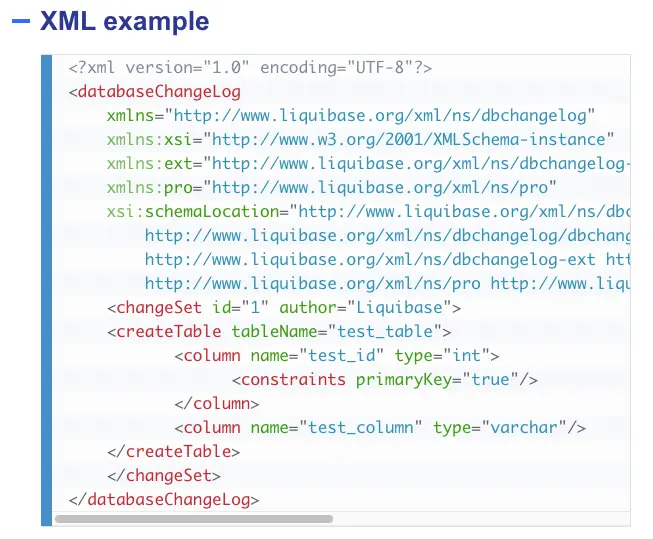
To be honest, the XML is the part I'd push back on. It takes a paragraph of markup to add one column. The formatted-SQL changelog is the version I'd actually use on Postgres, and it answers question one in a header comment:
--liquibase formatted sql

--changeset tianzhou:12 runInTransaction:false
CREATE INDEX CONCURRENTLY idx_orders_email ON orders (email);
--rollback DROP INDEX IF EXISTS idx_orders_email;
For SQL changesets, that --rollback line is the whole rollback story: you write it, or there isn't one. Modeled XML and YAML changes (createTable, addColumn, createIndex) get an auto-generated reverse in the free edition.
Liquibase 5.0 shipped in September 2025 and moved the Community edition from Apache-2.0 to the Functional Source License (it converts to Apache-2.0 after two years). The core stays free to use; Liquibase Secure, now at 6.0, is the paid tier with policy checks, drift detection, and role-based control over who may change those policies. Community sits at 5.0.4. ~5,600 stars.
Where it stops: if your shop already standardized on Liquibase changelogs, it's a fine default and the integrations are unmatched. If you're starting fresh, the verbosity is a tax you're choosing to pay, and the FSL change is worth a read by whoever signs off on licenses. More in Bytebase vs. Liquibase.
Sqitch
Sqitch is for people who just want SQL and nothing else. No version numbers, no framework. You write three scripts per change (deploy, revert, verify), and Sqitch tracks dependencies between changes in a plain-text sqitch.plan instead of a linear counter. Perl, MIT-licensed, no paid tier, and still releasing (1.6.1 in January 2026). ~3,200 stars.
sqitch add orders_email_idx --requires orders -n 'Index orders by email'
That one command creates deploy/orders_email_idx.sql, revert/orders_email_idx.sql, and verify/orders_email_idx.sql, and appends a line to the plan declaring that this change needs orders first. The verify script is the underrated piece: a SELECT that fails if the change didn't take, run right after deploy, so a silently skipped statement doesn't surface three environments later.
Sqitch rides directly on psql, so there's almost nothing to learn if you already write SQL by hand, and psql variables and \set work as expected. FWIW, this is what I'd reach for when a project wants reversible plain-SQL migrations without a heavyweight.
Where it stops: the revert script is mandatory, which is a discipline and a chore. There is no linting and no notion of a review. And Perl means the install story on a locked-down CI image is occasionally a conversation.
graphile-migrate
graphile-migrate is the framework-native member of the versioned camp: opinionated, roll-forward, and written in TypeScript for the Graphile and PostGraphile crowd. Its signature is a git-like local loop. You edit migrations/current.sql, graphile-migrate watch re-applies it to your dev database on every save, and when you're happy, commit moves it into the committed/ folder and resets a shadow database. uncommit backs it out while you iterate. The current migration has to be idempotent, since watch runs it on every save:
--! no-transaction
CREATE INDEX CONCURRENTLY IF NOT EXISTS idx_orders_email ON orders (email);
The opinions page is worth reading even if you never use the tool, because it's a tidy summary of how Postgres migrations should behave: wrap in a transaction by default, mark the exceptions explicitly, use SET LOCAL not SET, never edit a committed migration, keep roles out of migrations. Rollbacks are rejected on principle: the author's line is that in ten years of API development he has never run one in production.
It sat on 1.4.1 for a long while; 2.0 is in release candidates as of September 2026. ~840 stars.
Where it stops: if you're not already in PostGraphile land, there's little reason to reach for it. The two-database dev setup (main plus shadow) is a real requirement, not an option. If you are in PostGraphile land, it fits like a native.
DBLift
DBLift is the only Python tool on this list, built for one annoyance: a Python team keeping a JVM patched just so Flyway can apply SQL files. DBLift reads the same V1__init.sql naming convention, installs with pip, and runs as a CLI or as a library inside your app or your pytest suite. dblift import-flyway copies an existing flyway_schema_history, so switching doesn't reset anyone's history.
pip install "dblift[postgresql]"
dblift migrate --dry-run --show-sql   # prints every statement, applies nothing
dblift migrate
dblift undo                           # runs U12__..., if you wrote one
The dry run that prints the exact SQL, paired U undo scripts, checksums, a lock table that serialises concurrent runners, and an offline validate-sql that grades each script SAFE, REVIEW, or UNSAFE all ship in the Apache-2.0 package. The Pro tier is now narrow: drift detection (dblift diff) and schema export. One default to know before you migrate: DBLift applies out-of-order migrations unless you pass --strict, the opposite of Flyway.
Where it stops: the repo went public in June 2026, has about 10 stars against Flyway's decade of production mileage, and is one vendor's project, so the weekly release cadence (4.11 in October) cuts both ways. The validate-sql grader is a heuristic pass over the text, not a schema-aware lint. Alternatives: Alembic, if your schema is driven by SQLAlchemy models and you want autogenerated revisions instead of hand-written SQL.
Also in this camp
Every language has its own plain-SQL runner, and they answer the four questions much the same way: a transaction per file with a per-file opt-out (golang-migrate is the exception: it leans on Postgres's implicit transaction and wants CONCURRENTLY in a file of its own), no lock timeout, hand-written down scripts. golang-migrate (~19,000 stars), goose (~11,600), dbmate (~7,500, language-agnostic), and node-pg-migrate (~1,500, Postgres-only) are the ones I see most. ORM migrators (Django, Rails, Prisma, Drizzle) generate the SQL from models and belong to a different conversation. One tool worth adding to any of them: Squawk (~1,200 stars), a linter that fails CI on the Postgres footguns in questions one and two: a non-concurrent index, a constraint added without NOT VALID, a volatile default, a migration that never sets lock_timeout.
The declarative camp
Atlas
Atlas brings the Terraform model to database schema. You declare the schema you want (in HCL, SQL, or straight from an ORM), Atlas plans the diff against the live database, then applies it. It also does versioned migrations, so you can work declaratively and still generate files for review. Go, from the Ariga team, v1.3 as of August 2026. ~8,800 stars and moving fast.
atlas schema apply \
  --url "postgres://app@localhost:5432/app?sslmode=disable" \
  --to "file://schema.sql" \
  --dev-url "docker://postgres/17/dev"
The --dev-url is the part people trip on: Atlas spins up a scratch Postgres (typically in Docker) to validate the desired state before it diffs. In versioned mode, a -- atlas:txmode none directive at the top of a migration file is the CONCURRENTLY escape hatch.
The core is Apache-2.0, but the Community Edition is a deliberately minimal build. On Postgres it diffs tables, columns, indexes, constraints, foreign keys, enums, and comments. Views, functions, triggers, partitions, sequences, extensions, domains, and row-level security policies need Atlas Pro. So do drift detection and the migrate lint rules beyond the open set (destructive, backward-incompatible, data-dependent, naming). Pro is $9 per seat per month. If you love terraform plan, you'll feel at home immediately.
Where it stops: for a Postgres schema with any PL/pgSQL or RLS in it, the free edition isn't going to see half of it, so price Pro in from day one. Its diffing also overlaps with the dedicated Postgres schema compare tools, so decide up front whether you want one tool doing both jobs.
pgschema
pgschema (Go) does the same declarative, Terraform-like flow, but Postgres-only:
pgschema dump → edit schema.sql → pgschema plan → pgschema apply
Postgres-only is the feature. Instead of the lowest-common-denominator abstraction a multi-engine tool settles for, it diffs the objects generic tools tend to skip, across Postgres 14 through 18: row-level security policies, partitioned tables, constraint triggers, aggregates, domains, default privileges, column-level grants, materialized views with their indexes. All of it is in the Apache-2.0 build; there is no gated tier.
The apply step is where it answers the four questions directly. plan emits Transaction: true or false per plan, and apply is transaction-adaptive: CREATE INDEX CONCURRENTLY runs outside a transaction, and an online constraint add splits ADD ... NOT VALID and VALIDATE CONSTRAINT into separate commits. --lock-timeout 30s retries with exponential backoff instead of failing on the first contended lock. And a plan carries a fingerprint of the schema it was computed against, so if someone changed the database between plan and apply, apply refuses and tells you to re-plan. No shadow database to provision either; it embeds one.
It launched in mid-2025, is past 1,000 stars, and is on the 1.x line (1.13 in September). Full disclosure: Bytebase sponsors it, so weigh this entry accordingly. It's still the Postgres-only option I'd point a desired-state team to.
Where it stops: no Windows build (use WSL), and declarative means a DROP you didn't intend shows up as a line in a plan rather than a file you wrote. Read the plan.
The zero-downtime specialists
pgroll
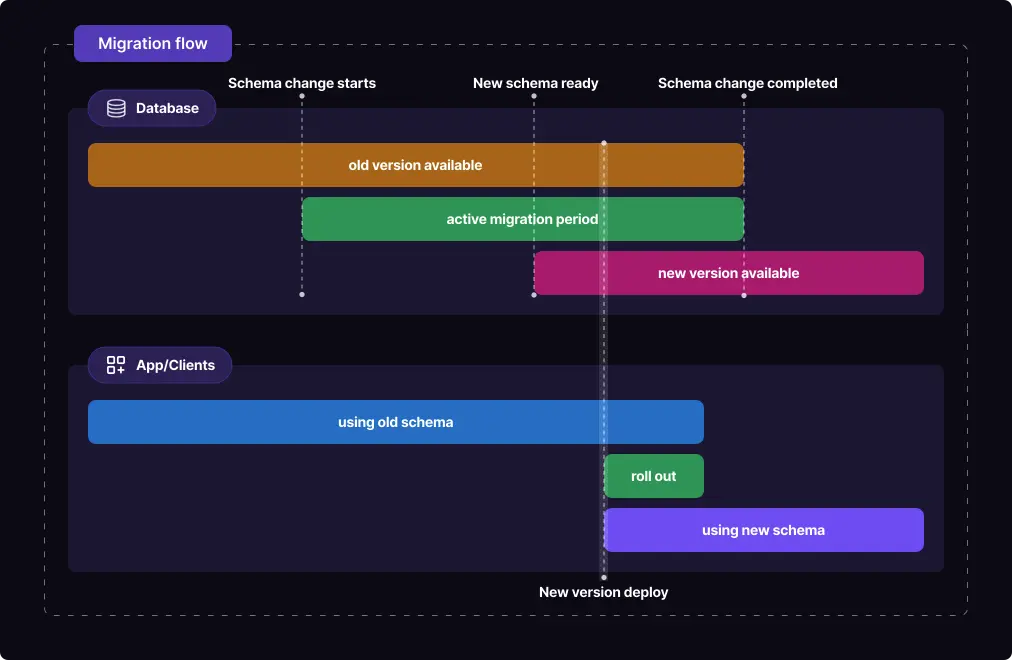
pgroll (Go, from Xata) tackles the genuinely hard one: schema change with zero downtime. It uses the expand/contract pattern, keeping both the old and new schema valid behind versioned views so the old and new versions of your app run side by side during a rollout.
Migrations are JSON or YAML operations, not SQL:
{
	"name": "13_set_email_not_null",
	"operations": [
		{
			"alter_column": {
				"table": "orders",
				"column": "email",
				"nullable": false,
				"up": "SELECT CASE WHEN email IS NULL THEN 'unknown@example.com' ELSE email END",
				"down": "email"
			}
		}
	]
}
pgroll start creates a shadow column, backfills it in batches using the up expression, installs triggers so writes to either column propagate to the other, and exposes the new shape in a new versioned schema (public_13_set_email_not_null). Your new app release sets search_path to that schema; the old release keeps using the old one. When the rollout is done, pgroll complete drops the old column and the triggers. Until then, pgroll rollback is one command and loses nothing.
The operation set covers the common cases (add, drop, rename, alter column, constraints, indexes, tables, replica identity) and a sql escape hatch for the rest, with the honest caveat that raw SQL comes with no zero-downtime guarantee. Postgres 14 and up, including RDS and Aurora. Apache-2.0, ~6,600 stars, releasing steadily on the 0.16 line.
Where it stops: your app has to set search_path per connection, which is a code change, and the view layer means \d orders in psql doesn't show you what the app sees. You don't need it until a plain ALTER TABLE on a hot 40-million-row table would page someone, and then you very much do.
Reshape
Reshape got there first with the same view-based, zero-downtime idea, written in Rust. A migration runs in three phases: start sets up the views and triggers so both schemas work, you roll out the app gradually, and complete drops the old schema. Migrations are TOML or JSON actions, and helper libraries for Rust, Ruby, Python, and Go run the schema-selection query on connect. The same NOT NULL change as the pgroll example:
[[actions]]
type = "alter_column"
table = "orders"
column = "email"
up = "COALESCE(email, 'unknown@example.com')"

	[actions.changes]
	nullable = false
I said in the July version of this post that Reshape was winding down. The release log says otherwise. The author restarted in January 2026 after a two-year gap, shipped 0.9 in February (with a reshape docs command meant to be read by coding agents), and put out 0.9.3 through 0.11.2 between August and September, adding partial and expression indexes, check constraints, and foreign-key actions, then fixing NOT NULL handling across in-flight columns. There's also a hosted platform (Specific) that runs the start/complete dance on deploy. Postgres 12 and up, MIT, ~1,900 stars.
Where it stops: one maintainer against Xata's team, and a smaller operation catalog than pgroll's. If you're choosing today, pgroll is the safer bet. But Reshape is the one to watch if you want an agent to own the expand/contract loop.
The governance layer
Bytebase
Full disclosure: Bytebase is ours, so read this with the appropriate grain of salt. Think GitHub or GitLab for database changes, where developers and DBAs collaborate through a GUI or a GitOps workflow. Go and TypeScript, ~14,600 stars, 3.23 as of October 2026.
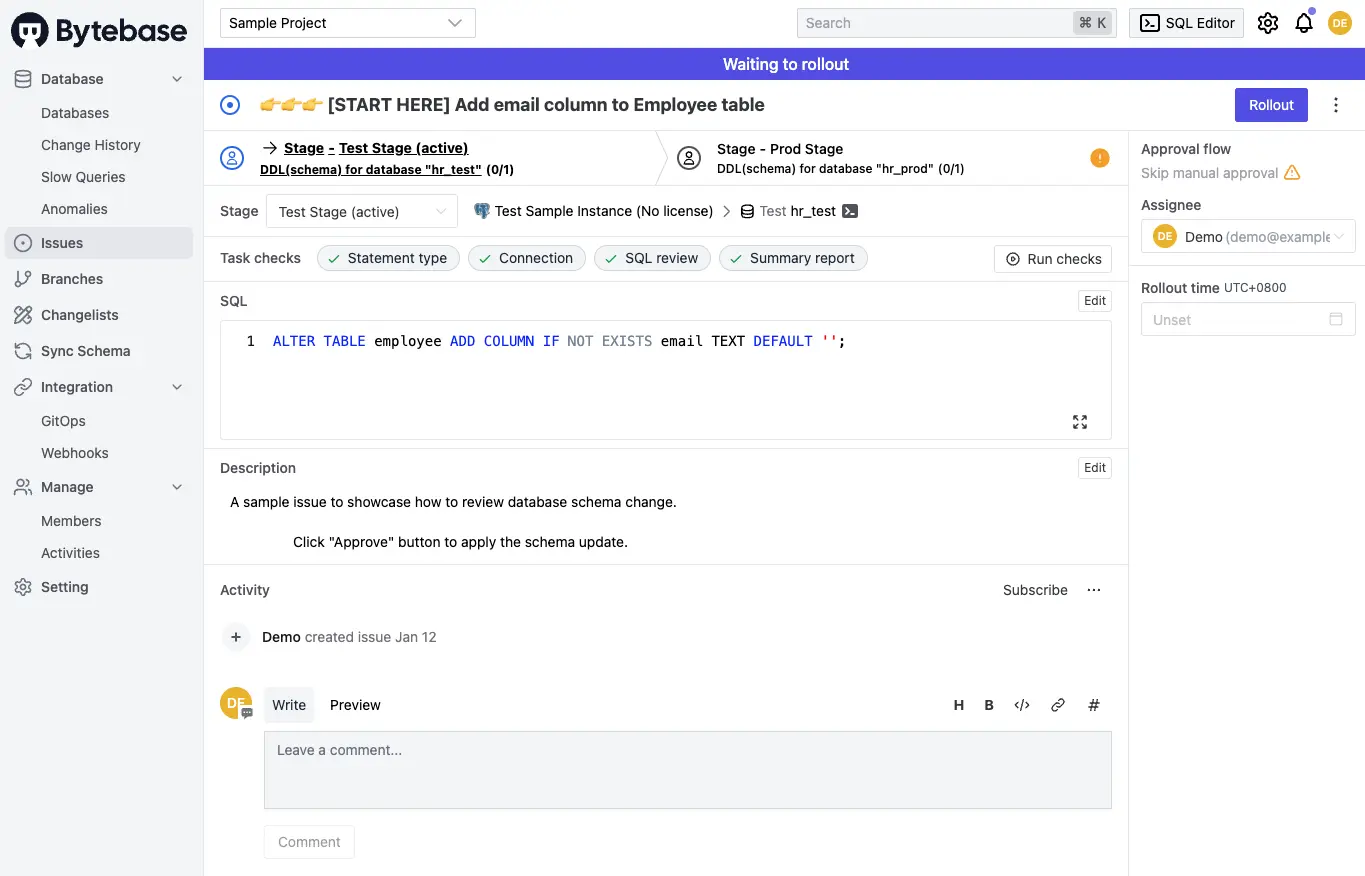
On Postgres specifically, the SQL review rules are the part that maps to the four questions above. They catch the same Postgres footguns Squawk lints for (a non-concurrent index, a constraint without NOT VALID, a volatile default), with two differences: the rule set is attached to an environment, so prod can be stricter than dev, and a failed check gates the rollout instead of failing a CI job. The agent or the engineer who wrote the migration gets told before it reaches production, not by the pager after.
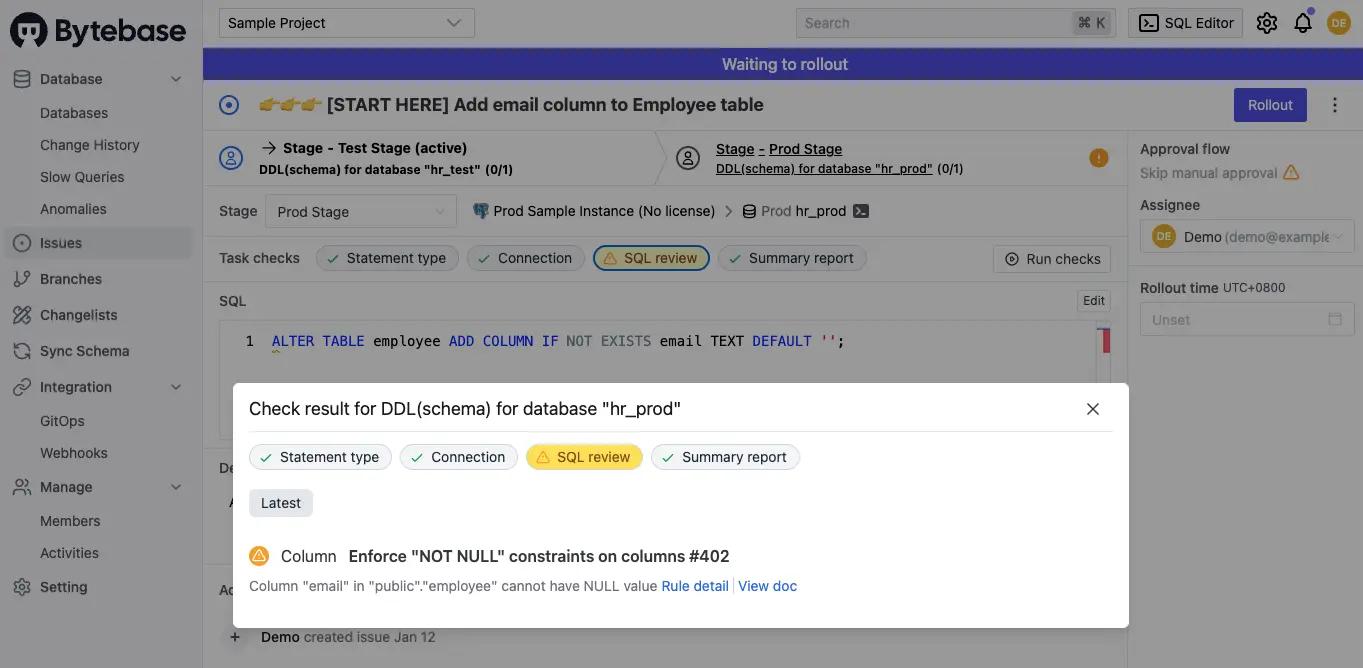
Bytebase supports both styles for Postgres: migration files via GitOps, and a state-based workflow where you commit the desired schema and it generates the diff. Statements run inside a transaction by default, with a per-plan toggle for the CONCURRENTLY case. Rollback is split the way Postgres splits it: a data change (UPDATE, DELETE) gets a pre-change backup and a one-click rollback, a schema change can be rolled back to an earlier recorded version. Around the change itself: an approval flow (rollout permissions per environment on every tier, risk-based custom approval on Enterprise), one issue that rolls the same change through dev, staging, and prod (tenant database groups from Pro up), schema sync from one database to many, and change history. On the query side, a SQL Editor with data access control, and dynamic data masking on Enterprise. And the audit log (Pro keeps 7 days, Enterprise keeps it all), which is the thing most teams actually come asking for: who ran which statement, against which database, when, for migrations and ad-hoc queries alike, exportable to your SIEM. The migration tools above can only ever log the migrations, because they never see the ad-hoc side.
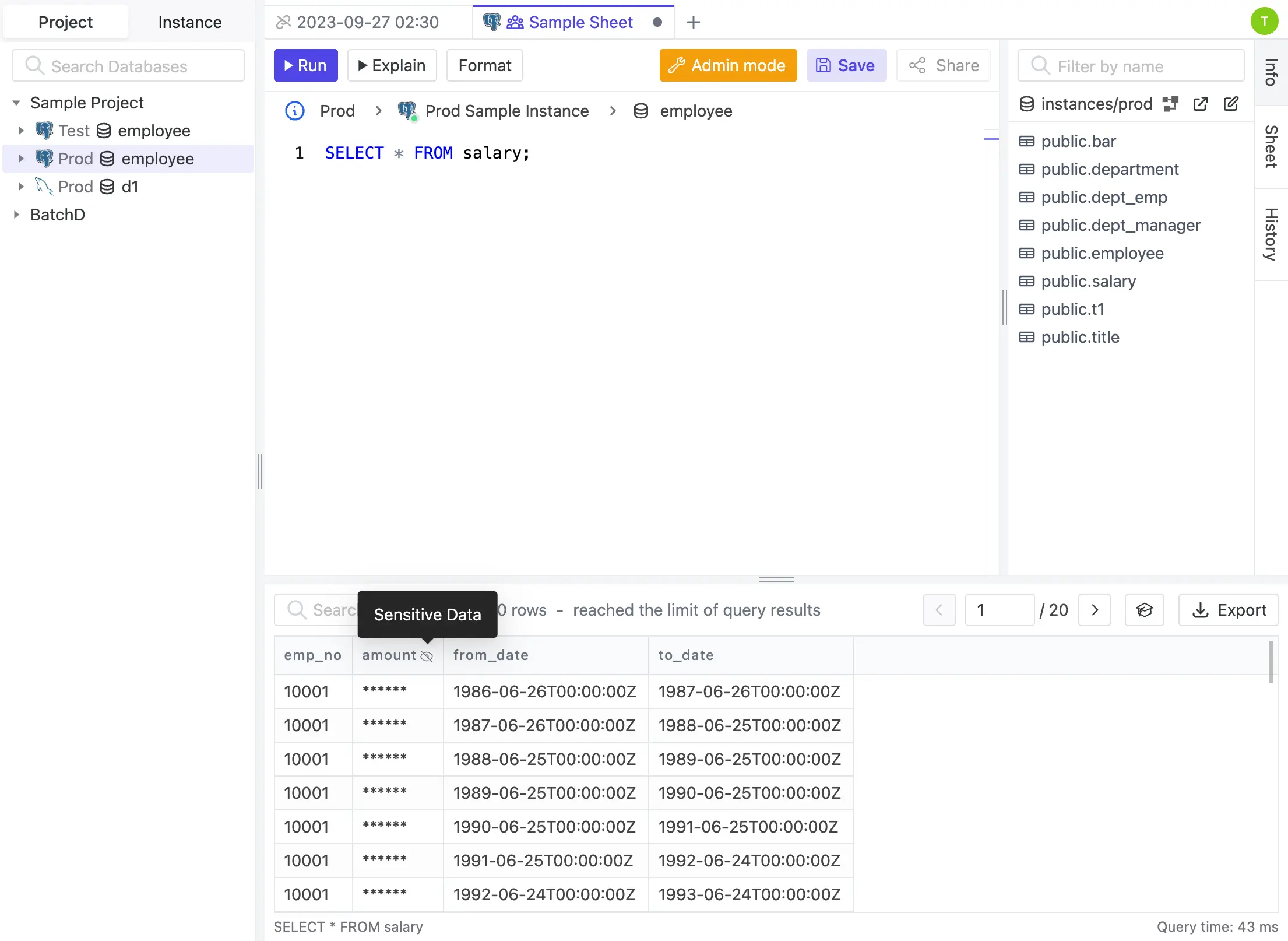
Where it stops: Bytebase does not do expand/contract on Postgres. Its online schema change integration is MySQL-only (gh-ost), so a hot-table rewrite on Postgres is still pgroll's job, run under Bytebase's review if you want both. See how to build a CI/CD pipeline for database schema migration and database version control.
Summary
| Tool | Approach | Postgres-only | License |
|---|---|---|---|
| Flyway | Versioned SQL | No | Apache-2.0 core + paid |
| Liquibase | Versioned changesets | No | FSL core + paid |
| Sqitch | Dependency-based SQL | No | MIT |
| graphile-migrate | Roll-forward SQL | Yes | MIT |
| DBLift | Versioned SQL | No | Apache-2.0 core + paid |
| Atlas | Declarative + versioned | No | Apache-2.0 core + paid |
| pgschema | Declarative | Yes | Apache-2.0 |
| pgroll | Expand/contract | Yes | Apache-2.0 |
| Reshape | Expand/contract | Yes | MIT |
| Bytebase | Governed platform | No | MIT core + paid |
My take
So which one? If I'm starting a new Postgres project today, I'd use Sqitch or Flyway for everyday versioned migrations, and put SET lock_timeout in the template file on day one. If your team thinks in desired state, pgschema is my pick for a Postgres-only shop, the only declarative tool that sees your RLS policies for free, and Atlas if you need the same model across several engines and have budgeted for Pro. The day you have a table too hot to ALTER, add pgroll next to whichever you chose.
And once more than a couple of people are touching production, the bottleneck stops being which tool applies the SQL. It becomes who's allowed to run a change, who approved it, and what actually ran. That's the unglamorous part, and it's a different job from applying SQL. Flyway Enterprise and Liquibase Secure sell it on top of their migration tools. Bytebase is built around it: SQL review, per-environment rollout, and change history in the MIT core, the audit log and risk-based approval on the paid tiers. Pair it with whichever tool above applies your SQL, or let it apply the SQL too.
It matters more now that AI agents write migrations too. An agent can produce a plausible ALTER TABLE in seconds, and it will never be the one paged when that statement locks a hot table. So it needs what any engineer needs: its own identity instead of a shared credential, a review gate before production, and an audit trail afterwards. That's the same layer, for people and agents alike, and it's why we built Bytebase.