Overview
Reviewing SQL change scripts used to be the DBA's job, and it happened too late. Developers handed migrations to the DBA just before go-live, leaving little time to review the scripts or request changes. Problems surfaced in production instead of in review.
The fix is to move SQL review left — into the pull request, where every other change is already reviewed. Bytebase does exactly that: it runs automatic SQL review on each pull request, so unsafe migrations are caught at PR time rather than at deployment.
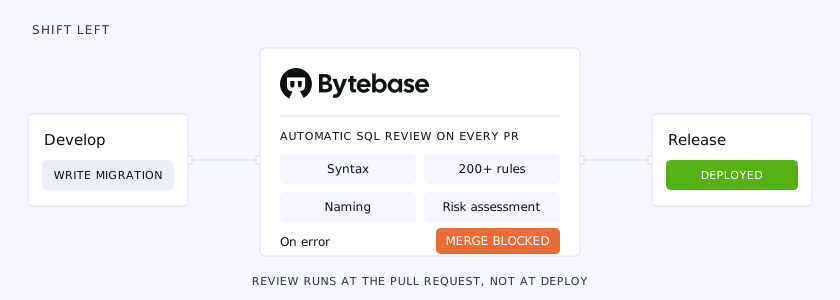 SQL review shifts left into the pull request, between develop and release
Where SQL review fits
Bytebase models database changes as a three-stage GitOps pipeline:
Develop → Review (Pull Request) → Release (Bytebase)
Developers write migration files in a feature branch and open a pull request. SQL review runs as a CI step on that pull request — this is the Review stage. Once the review passes and the PR merges, Bytebase creates a release and rolls the change out across environments in the Release stage. SQL review is the gate between writing a change and shipping it.
How it works
A single GitHub Action — bytebase/sql-review-action —
runs on pull requests that touch your migration files. It connects to your Bytebase server, which
holds two things the review needs:
- The SQL Review Policy — 200+ configurable rules covering naming, anti-patterns, indexing, and dangerous statements.
- The database connection — so the review is schema-aware. Because Bytebase can read the live schema, it catches issues that text-only linting can't: missing indexes, backward-incompatible changes, and other problems that only make sense against the actual table.
# .github/workflows/sql-review.yml
name: SQL Review
on:
  pull_request:
    paths:
      - 'migrations/**'

jobs:
  sql-review:
    runs-on: ubuntu-latest
    steps:
      - uses: actions/checkout@v4

      - name: SQL Review
        uses: bytebase/sql-review-action@v1
        with:
          bytebase-url: ${{ secrets.BYTEBASE_URL }}
          bytebase-token: ${{ secrets.BYTEBASE_SERVICE_ACCOUNT_TOKEN }}
          file-pattern: 'migrations/**/*.sql'
Setup
-
Configure the SQL Review Policy. Define your standards in Bytebase and set each rule's severity —
ERRORto block the merge,WARNINGto flag it, or off. See the SQL Review Policy docs. -
Connect Bytebase to your repository. Follow the GitOps installation guide to wire Bytebase to your VCS.
-
Create a service account. Use a dedicated account with the
GitOps Service Agentrole rather than a personal token, and store its secret in your repository's Actions secrets. -
Add the workflow. Drop the
sql-review.ymlworkflow above into.github/workflows/and pointfile-patternat your migration directory.
The full walkthrough lives in the SQL Review CI documentation and the GitHub Actions tutorial.
What gets reviewed
On every pull request, the action validates:
- SQL syntax — malformed or dialect-incompatible statements.
- Policy rules — the 200+ configurable rules from your SQL Review Policy.
- Naming conventions — table, column, and index naming compliance.
- Risk assessment — dangerous operations such as
DROP TABLEor anUPDATEwith noWHERE. - Schema compatibility — backward-incompatible changes, checked against the live schema.
Review feedback in the pull request
The review bot posts its results directly on the pull request, both as a summary and inline on the changed files:
- ✅ Passed — the migration meets every policy requirement.
- ⚠️ Warning — a best-practice violation, non-blocking by default.
- ❌ Error — a policy violation that blocks the merge by default.
- 📊 Risk assessment — the evaluated impact of the change.
- 📝 Explanations — why a rule failed, with a suggested fix.
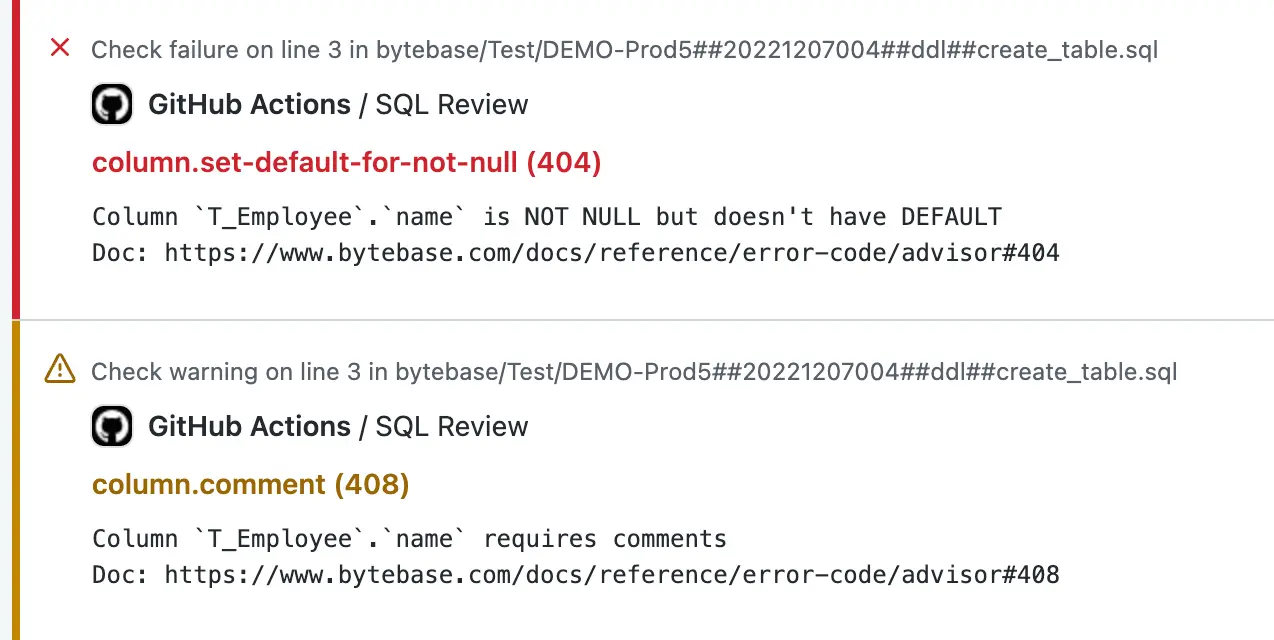
Developers fix the flagged issues and push again; the action re-runs until the review passes. Only then can the change merge.
Beyond GitHub
The same bytebase-action runs anywhere your CI does. The mechanism is identical — connect to the
Bytebase server, check the migration files, comment on the request — across GitLab CI, Azure DevOps,
and Bitbucket Pipelines, so a team on any of them gets the same review standard. See the
SQL Review CI docs for a
ready-to-use config per platform.
From review to deployment
Catching bad SQL in the pull request is half the value; the other half is that the same pipeline deploys the change. Once review passes and the PR merges, Bytebase creates a release and rolls it out across environments with approval gates where you want them — no second tool, and the same review standard applied by developers and DBAs alike. SQL review is one stage of the full database GitOps workflow.