This post is maintained by Bytebase, an open-source database governance platform that can manage both Aurora and RDS. We update the post every year.
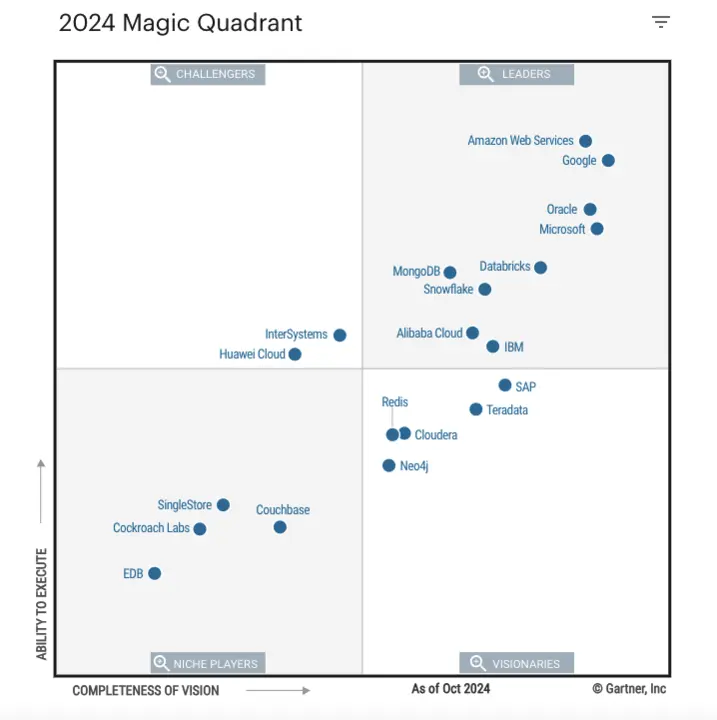
Year after year, AWS ranks among the top in Gartner's Magic Quadrant for Cloud Database Management Systems — in the latest report it was named a Leader for the 11th consecutive year and positioned highest for Ability to Execute among the 20 vendors evaluated. The AWS OLTP relational database portfolio consists of 3 products:
-
Amazon RDS(Relational Database Service) was announced by AWS on October 22, 2009 and probably is the largest database fleet in the world. -
Amazon Aurorawas announced on November 12, 2014, positioned as RDS's premium offering, providing unparalleled high performance and availability at global scale with full MySQL and PostgreSQL compatibility. Aurora passed its 10-year milestone in 2024. -
Amazon Aurora DSQLwas announced in December 2024 at AWS re:Invent and reached general availability in May 2025. It's a serverless, distributed SQL database with 99.999% multi-Region availability, strong consistency, PostgreSQL compatibility, and claims of 4x faster reads and writes compared to other distributed SQL databases.
When an engineering team onboards AWS, one of the very first tasks is to choose the right database solution for their needs (unless they decide to go NoSQL, then they need to pick between MongoDB, DynamoDB, and other options). Below we provide our engineering perspective to compare the following dimensions:
- Supported Databases
- Architecture
- Compatibility
- Performance
- Elasticity
- High Availability
- Pricing
- Recommended Setup
- Further Readings
Supported Databases
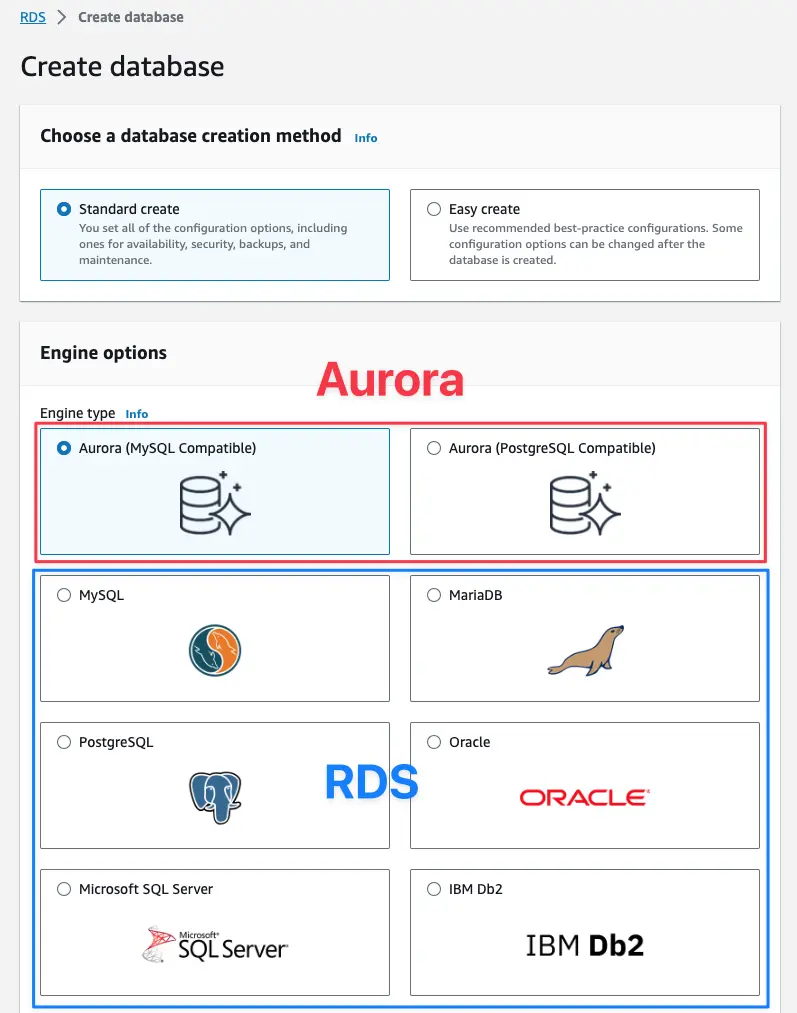
RDS supports all mainstream relational databases including MySQL, PostgreSQL, MariaDB, SQL Server, Oracle, and Db2, with Extended Support for older versions. As of 2026, RDS maintains major versions of these engines.
Aurora supports MySQL and PostgreSQL. The service has maintained its focus on these two popular open-source database engines, optimizing their performance in the cloud environment.
Aurora DSQL, the newest addition to AWS's database portfolio, is PostgreSQL-compatible only — there is no MySQL-compatible flavor.
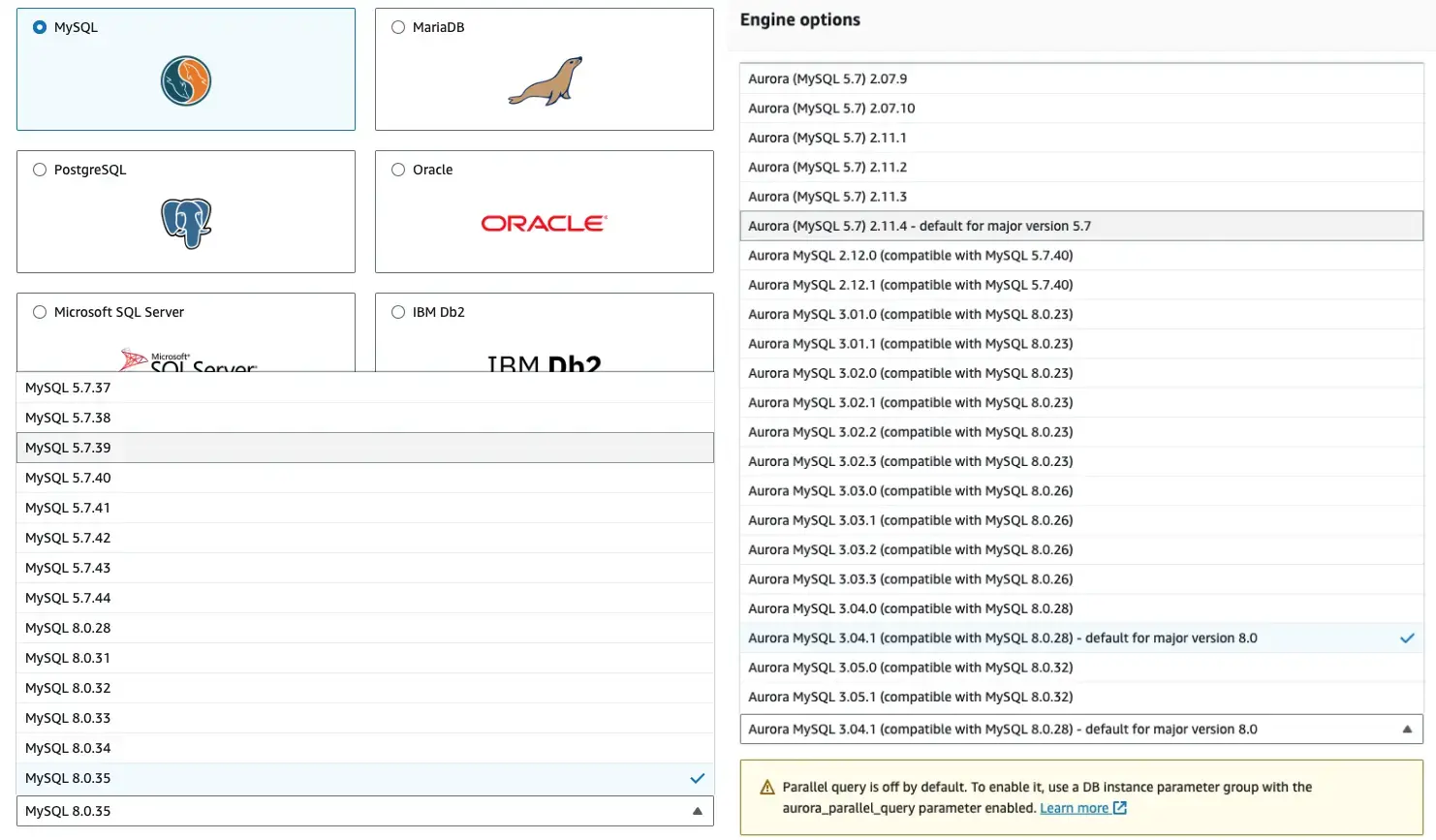
RDS offers all upstream versions, but some are reaching end of standard support, such as PostgreSQL 13 (end date: Feb 28, 2026) and MySQL 8.0 (end date: Jul 31, 2026). Extended Support is available for up to 3 years past that date at additional cost, after which RDS auto-upgrades the instance.
Aurora tracks recent upstream releases (Aurora PostgreSQL 16.x/17.x, with PostgreSQL 18.1 already in the RDS preview environment; Aurora MySQL compatible with MySQL 8.0/8.4). Aurora also doubled maximum storage to 256 TiB with no upfront provisioning. Aurora DSQL focuses on PostgreSQL compatibility and distributed workloads with strong consistency across regions.
Architecture
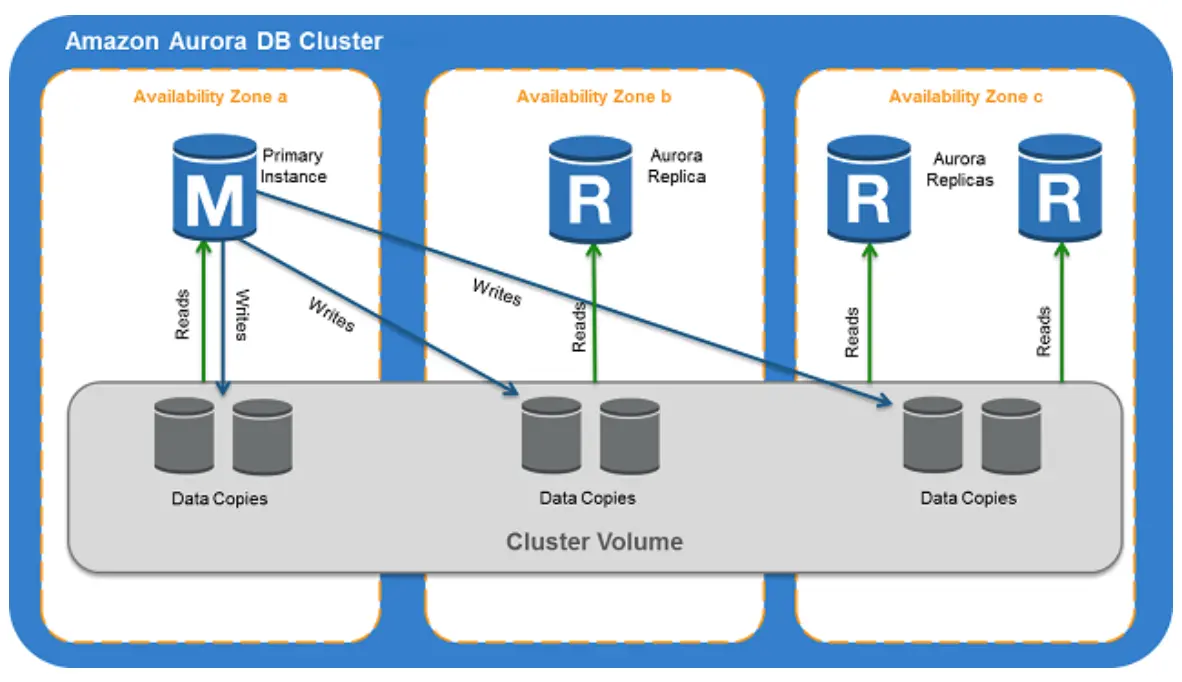
RDS mostly runs the vanilla database engines on the cloud. While Aurora is a cloud-native database service. Aurora is cloud-native because it leverages the cloud environment to separate compute and storage, uses Amazon S3 to persist data. This novel approach increase performance, high availability, and scalability.
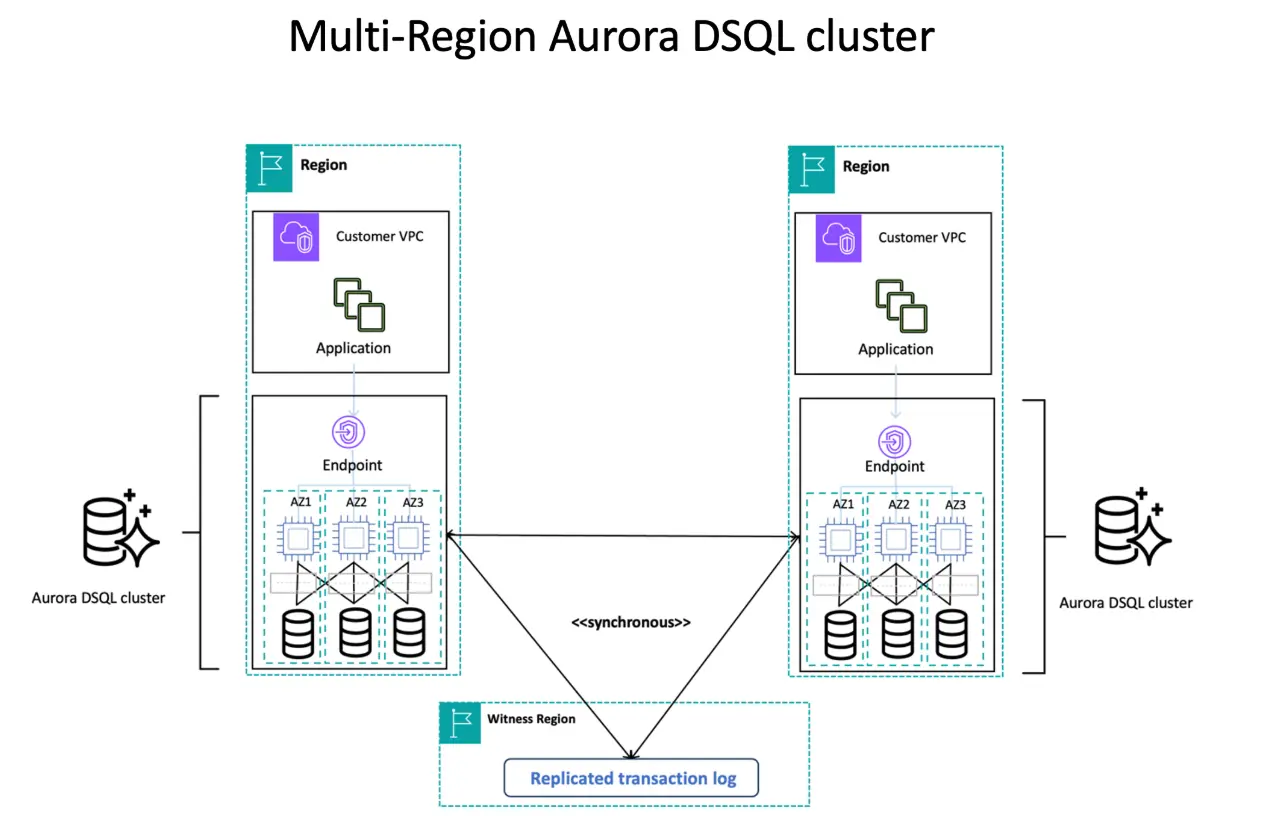
Aurora DSQL builds on this with a distributed, multi-region design, enabling active-active architecture for global operations. It ensures consistency through decoupled transaction processing and microsecond-accurate time synchronization, ideal for globally distributed, highly available applications.
Compatibility
Both Aurora and RDS bear the same limitation as a Cloud database:
- You can only have semi-super user.
- You are not allowed to access the database server file systems. For MySQL, this means you can only use
LOAD DATA LOCALto import data from your local file system, while you can't useLOAD DATAto import from the server file system.
Though Aurora is a proprietary technology, it mostly differs from the vanilla MySQL / PostgreSQL on the storage engine layer. On the other hand, the server layer, which determines most user-facing behaviors is almost identical. Thus the main compatibility gaps for Aurora is storage engine related. e.g. Aurora for MySQL only supports InnoDB, while RDS supports old engines such as MyISAM (however, you won't use MyISAM engine anyway if you start a new project).
Saying that, Aurora codebase diverges more from the vanilla MySQL/Postgres than RDS, thus you should expect more lags for the AWS team to bring in the latest upstream update. e.g. Aurora PostgreSQL added the popular pgvector extension 2 months later than RDS.


For Aurora DSQL, even after GA the extension ecosystem is still developing. It maintains core PostgreSQL compatibility and has since added PostgreSQL views along with AWS Backup, PrivateLink, CloudFormation, CloudTrail, and KMS customer-managed keys, but not all extensions available in standard PostgreSQL or Aurora PostgreSQL are supported. AWS continues to expand compatibility based on customer demand, so check the PostgreSQL compatibility reference before assuming a feature is available.
Performance
According to the official website, Aurora offers up to 5x the throughput of MySQL and 3x the throughput of PostgreSQL.
This benchmark suggesting Aurora can be 60 times faster than RDS.
Aurora provides better write performance because it reduces the write amplification by only sending the redo log to the remote storage service, which eliminates other writes during transaction commit path such as the infamous double-write buffer.
Aurora provides better read scalability because of the log-based architecture, it can support up to 15 read-replicas. RDS can only support 5, RDS doesn't support more because the classic streaming replication carries more performance penalty on the primary. Aurora also incurs much lower replication lags, especially under write-heavy load.
Aurora DSQL takes performance to a new level for distributed workloads. According to AWS, Aurora DSQL delivers 4x faster reads and writes compared to other popular distributed SQL databases. This is achieved through its innovative approach to transaction processing that parallelizes writes across regions and its use of the Amazon Time Sync Service for precise operation ordering.
RDS uses EBS, the disk performance differs based on the storage types. Since 2023, AWS has continued to improve the underlying EBS performance, but the architectural differences still give Aurora and Aurora DSQL significant advantages for most workload types.
In general, Aurora outperforms RDS considerably, and Aurora DSQL offers even greater performance for distributed workloads. But you still need to benchmark for your own specific use cases to determine the best fit.
Elasticity
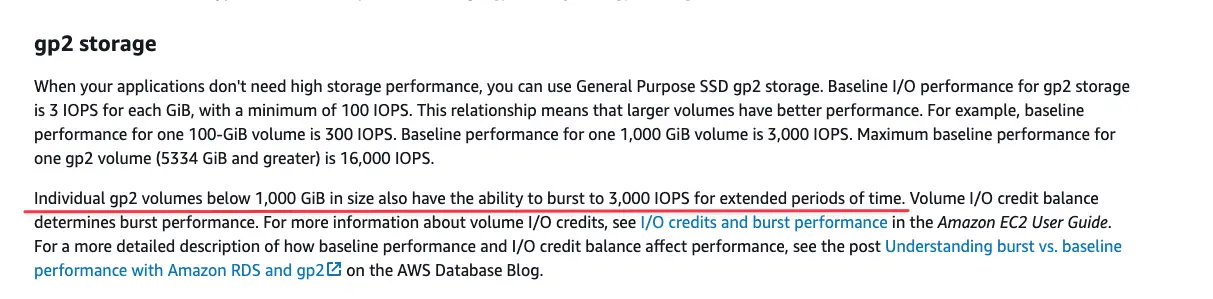
RDS doesn't have much elasticity, if you choose the gp2 SSD storage, it can be bursted and that's pretty much it.
Standard Aurora can provision read-replicas quickly, other than that, it doesn't provide elasticity out of the box. However, Aurora's architecture does allow for faster storage scaling compared to RDS.
Aurora Serverless and especially its Serverless v2 offers great elasticity to scale up/down computing resources. Great for workloads such as e-commerce. Serverless v2 keeps improving: the 2026 platform version 4 delivers roughly 27–34% higher throughput than platform version 3 and a faster ramp-up, and a new Express configuration provisions an Aurora PostgreSQL serverless database in seconds — now also available in the AWS Free Tier.
Aurora DSQL takes elasticity to a new level with its distributed architecture. It automatically scales to meet any workload demand without database sharding or instance upgrades, and can scale reads and writes independently, eliminating scaling bottlenecks while maintaining performance. This makes Aurora DSQL particularly well-suited for applications with unpredictable global traffic patterns or those requiring rapid scaling across regions.
High Availability
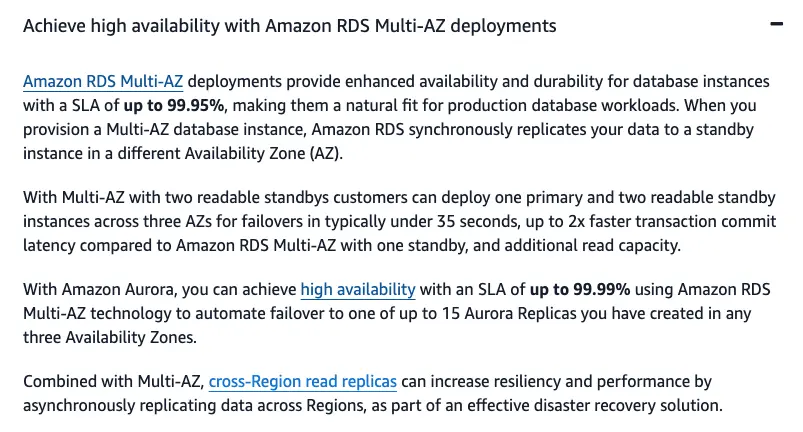
RDS offers multi-AZ HA setup with a SLA of up to 99.95%, while Aurora HA offers up to 99.99%. Aurora can failover faster because of its log-based architecture. And for write-intensive load, RDS failover are more problematic because of the high replication lag.
Aurora also has global databases to enable low latency global reads and disaster recovery from outages across an AWS Region.
Aurora DSQL takes high availability to a new level with 99.99% single-Region and 99.999% multi-Region availability (five nines for multi-Region). Its active-active architecture and automated failure recovery ensure that applications can always read and write to any Aurora DSQL endpoint, even during regional outages. All transactions written in one Region are reflected in other Regions with strong consistency, eliminating the traditional trade-offs between availability and consistency.
In 2024, AWS also enhanced Amazon DynamoDB global tables with multi-Region strong consistency, using the same underlying technology leveraged by Aurora DSQL. This indicates AWS's strategic focus on providing strongly consistent, highly available database services across its portfolio.
Pricing
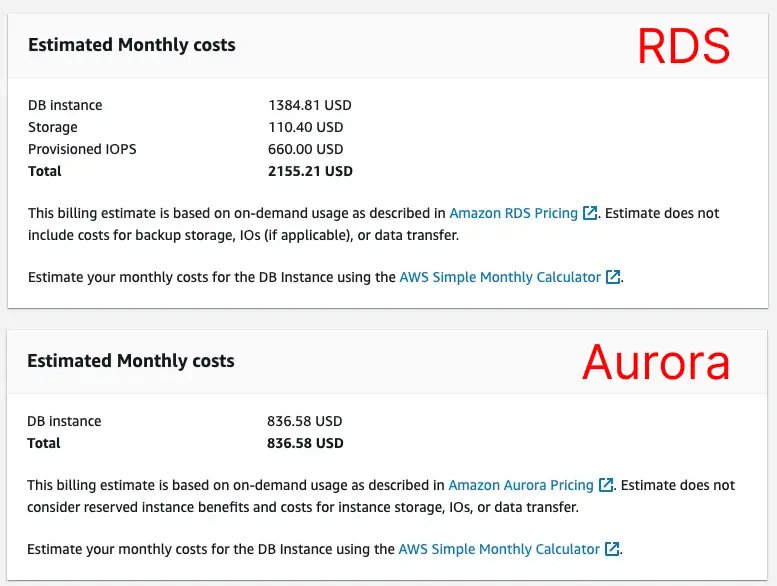
If you follow the AWS wizard to pick the production template (8c64g r6g.2xlarge + multi-AZ HA), you will find the price for Aurora is much cheaper than RDS. Too good to be true.
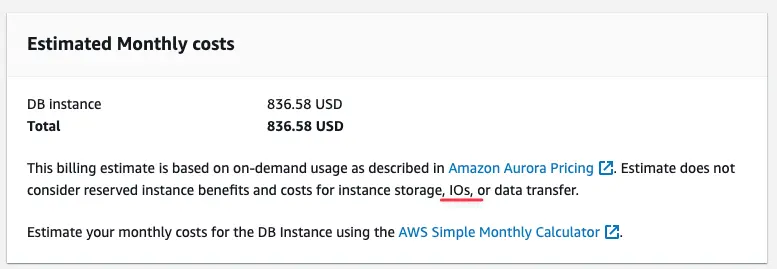
The caveat is Aurora also charges on I/O that is not included in the pricing estimate. This surprised quite a few customers when they receive a huge AWS bill. This unpredictable cost was the biggest concern for teams adopting Aurora initially. In 2023, Aurora fixed this by introducing Aurora I/O-Optimized to include the I/O cost in the storage, and this pricing model has continued to be refined through 2025.

At re:Invent 2025, AWS introduced Database Savings Plans, a commitment-based discount that spans Aurora, RDS, and other database services — up to 35% off serverless (ACU) usage and up to 20% off provisioned Gen 7+ instances (db.r7/r8g, db.m7/m7g), with the flexibility to shift across instance types, Regions, and even engines while keeping the discount. Older instance families still rely on Reserved Instances.
For RDS, starting March 2024, Extended Support fees apply (per-vCPU-per-hour, rising over three years) for outdated database versions, making version planning critical — PostgreSQL 13 and MySQL 8.0 both reach end of standard support in 2026.
Aurora DSQL bills by DPU (Distributed Processing Unit), a normalized unit covering query processing, reads, and writes — roughly $8 per million DPU plus $0.33 per GB-month of storage in US East as of July 2026, with a monthly free tier. It's more expensive per request but can be cost-effective for multi-region, strongly consistent applications compared to building custom solutions.
Besides, only RDS offers free-tier and low db instance tiers starting from 2c1g t3.micro. Standard Aurora starts from 2c16g r5.large and burstable classes start from 2c4g t3.medium. Aurora Serverless can specify 0.5 ACU as the minimum. 1 ACU provides 2 GiB of memory and corresponding compute and networking.
You should use AWS Pricing Calculator and it's also a good idea to monitor your database cost by using a specialized tool such as Vantage.
Recommended Setup
Capability-wise, AWS Aurora beats RDS in almost every aspect, and Aurora DSQL now extends these capabilities even further for distributed applications. AWS continues to invest more resources in Aurora and Aurora DSQL than in RDS since these services are key differentiators from other cloud vendors. Though Aurora is mostly MySQL / PostgreSQL compatible, it creates a different vendor lock-in by providing unmatched ROI. Aurora DSQL adds another layer of capability for applications requiring global distribution with strong consistency.
For bootstrapped or small business, Aurora is still pricy and RDS is a cost-effective solution:
| Startup | Choice |
|---|---|
| Test Instance | RDS without HA |
| Prod Instance | RDS with HA |
For growth stage business, Aurora is more suitable, and Aurora Serverless offers the extra flexibility to optimize the cost.
| Growth | Choice |
|---|---|
| Always-on Test Instance | Standard Aurora without HA |
| On-demand Test Instance | Aurora Serverless without HA |
| Prod Instance | Standard Aurora with HA |
| Prod Instance with fluctuate traffic | Aurora Serverless with HA |
For enterprise businesses with global applications requiring the highest levels of availability and consistency, Aurora DSQL provides capabilities that were previously difficult to achieve:
| Enterprise | Choice |
|---|---|
| Global applications | Aurora DSQL |
| Multi-region applications with high write throughput | Aurora DSQL |
Normally, you should start with RDS and migrate to Aurora when the business takes off, and consider Aurora DSQL when your application requires global distribution with strong consistency. AWS provides detailed guide on how to migrate from RDS to Aurora with near zero downtime, and similar migration paths are available from Aurora to Aurora DSQL.
After you decide the database product, there remains task to figure out the database development workflow:
- How developers propagate the change from dev to production?
- How to get the SQL change peer-reviewed by the DB person in an efficient manner? Or even better with automated SQL checks?
- How to enforce data access policy for PII compliance?
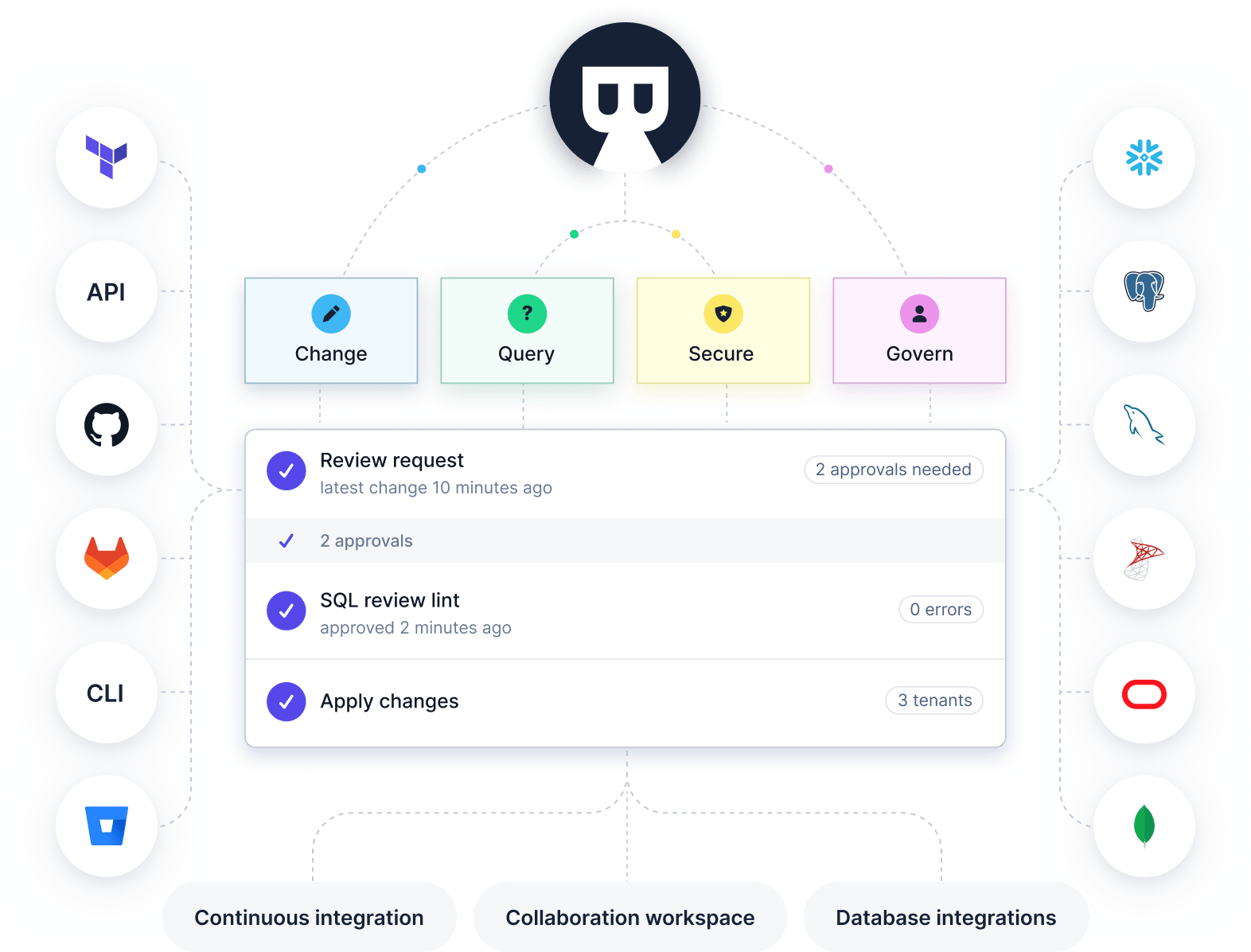
If you are thinking about these problems, please check out Bytebase. It's an all-in-one tool to centralize all human-to-db operations for heterogeneous databases.
References
- Amazon Aurora ascendant: How we designed a cloud-native relational database
- Amazon database master user account privileges
- Amazon Aurora features
- Amazon Aurora pricing
- Amazon Aurora DSQL: The fastest distributed SQL database
- Using Aurora Serverless v2
- High availability for Amazon Aurora
- Amazon RDS features
- Amazon RDS pricing
- Amazon RDS Extended Support
- Amazon RDS DB instance storage
- AWS Database Savings Plans
- Amazon RDS Extended Support engine version dates
 Ask ChatGPT