Just-in-Time (JIT) database access is a control on humans. No engineer can query production by default. Access is requested, granted for a window, and stops being obtainable when that window closes.
The human path needs three controls:
- Ephemeral credentials that expire on their own.
- Request and approval to decide who gets access.
- Audit tying the person to what they did.
AWS RDS IAM authentication gives you the first control. It replaces a stored database password with a signed token that is valid for 15 minutes. The other two controls have to be assembled around it.
This reference implementation uses RDS for PostgreSQL. MySQL and MariaDB use the same IAM model with different database-side setup.
Reference implementation
1. Create the database user
Enable IAM database authentication on the RDS instance, then create a database user for temporary read access.
CREATE USER db_jit_read;
GRANT rds_iam TO db_jit_read;
GRANT USAGE ON SCHEMA public TO db_jit_read;
GRANT SELECT ON ALL TABLES IN SCHEMA public TO db_jit_read;
ALTER DEFAULT PRIVILEGES IN SCHEMA public GRANT SELECT ON TABLES TO db_jit_read;
GRANT ... ON ALL TABLES covers only existing tables. Default privileges cover tables created later, but they belong to the role that creates the objects. If migrations run as another role, repeat the last statement with FOR ROLE <migration_role>.
IAM controls who may authenticate as db_jit_read; PostgreSQL privileges still control what that user may do. Audit any SECURITY DEFINER functions exposed to PUBLIC before calling the role read-only.
Enabling IAM authentication is an instance modification. RDS applies it in the next maintenance window unless you choose --apply-immediately. Check engine, version, and Region support first; AWS also recommends budgeting 300 to 1000 MiB of extra memory for the feature.
2. Allow one IAM role to connect as that user
The permissions policy binds an IAM role to the database user.
{
	"Version": "2012-10-17",
	"Statement": [
		{
			"Effect": "Allow",
			"Action": "rds-db:connect",
			"Resource": "arn:aws:rds-db:us-east-2:123456789012:dbuser:db-ABCDEFGHIJKL01234/db_jit_read"
		}
	]
}
db-ABCDEFGHIJKL01234 is the instance's DbiResourceId, not its console name:
aws rds describe-db-instances \
  --db-instance-identifier mydb \
  --query "DBInstances[0].DbiResourceId" \
  --output text
The last segment is the PostgreSQL user. Together they mean: this role may authenticate to this RDS instance as db_jit_read.
3. Make the role temporary and attributable
The role's trust policy controls who may assume it and until when.
{
	"Version": "2012-10-17",
	"Statement": [
		{
			"Effect": "Allow",
			"Principal": { "AWS": "arn:aws:iam::123456789012:user/alice" },
			"Action": ["sts:AssumeRole", "sts:SetSourceIdentity"],
			"Condition": {
				"StringEquals": { "sts:SourceIdentity": "alice@example.com" },
				"Bool": { "aws:MultiFactorAuthPresent": "true" },
				"DateLessThan": { "aws:CurrentTime": "2026-08-10T18:00:00Z" }
			}
		}
	]
}
Three details matter:
- The principal is Alice, not the whole AWS account.
SourceIdentityis pinned to Alice's identity. A wildcard such as*@example.comwould let her claim to be someone else.DateLessThanstops new role sessions after the approved window.
The example uses an IAM user to keep the mechanism visible. For production workforce access, AWS recommends federation through IAM Identity Center or another identity provider. The provider should assert both source identity and MFA status; do not replace them with caller-supplied strings.
Create the role with this trust policy, attach rds-connect-policy, and set a short MaxSessionDuration such as one hour.
4. Assume, mint, and connect
Alice assumes the role for 30 minutes, then signs an RDS authentication token with the returned credentials.
CREDS=$(aws sts assume-role \
  --role-arn arn:aws:iam::123456789012:role/iam_jit_read \
  --role-session-name alice-incident-4471 \
  --source-identity alice@example.com \
  --serial-number arn:aws:iam::123456789012:mfa/alice \
  --token-code 123456 \
  --duration-seconds 1800)

export AWS_ACCESS_KEY_ID=$(echo "$CREDS" | jq -r .Credentials.AccessKeyId)
export AWS_SECRET_ACCESS_KEY=$(echo "$CREDS" | jq -r .Credentials.SecretAccessKey)
export AWS_SESSION_TOKEN=$(echo "$CREDS" | jq -r .Credentials.SessionToken)

TOKEN=$(aws rds generate-db-auth-token \
  --hostname mydb.abcdef123456.us-east-2.rds.amazonaws.com \
  --port 5432 \
  --username db_jit_read \
  --region us-east-2)

PGPASSWORD="$TOKEN" psql \
  "host=mydb.abcdef123456.us-east-2.rds.amazonaws.com port=5432 dbname=app user=db_jit_read sslmode=verify-full sslrootcert=/path/to/global-bundle.pem"
generate-db-auth-token signs locally; it is not an API call. The database token is valid for 15 minutes, while the STS session above lasts 30 minutes. The grant deadline controls how long Alice may start new STS sessions.
Approval as a protected pull request
IAM has no request-and-approve primitive. Put the role trust policy in Terraform and treat a protected infrastructure pull request as the approval record.
jit_read_grants = {
+  "alice@example.com" = "2026-08-10T18:00:00Z"
 }
Terraform renders each entry into a trust statement like the one above: a pinned principal, a pinned source identity, MFA, and a DateLessThan condition. Required independent review is the approval; merge and apply is the grant. CI should reject missing incident references and deadlines beyond the permitted maximum.
There are two clocks. The entry controls how long Alice may start a session. MaxSessionDuration controls how long that session may last. A session opened just before the grant deadline can therefore continue past it.
What RDS IAM authentication does not solve
-
Uniform engine coverage. IAM database authentication supports MySQL, MariaDB, and PostgreSQL. RDS for SQL Server and Oracle need a different human authentication path, such as Kerberos and Active Directory.
-
A joined audit trail. CloudTrail records the STS role assumption, PostgreSQL
log_connectionsrecordsdb_jit_readconnecting from an address, and pgAudit can record its statements. AWS does not log the IAM database authentication itself, so tying the person to the queries still requires correlating separate logs. -
Query-level authorization. IAM grants permission to authenticate as a database user. Tables, columns, row policies, and executable functions remain the database's responsibility; IAM cannot hold one SQL statement for approval.
-
Termination of an open connection. The token is checked only when PostgreSQL authenticates the connection. The connection can outlive the token, the STS session, and the grant deadline. Immediate revocation requires blocking new sessions and terminating existing database sessions.
Where Bytebase fits
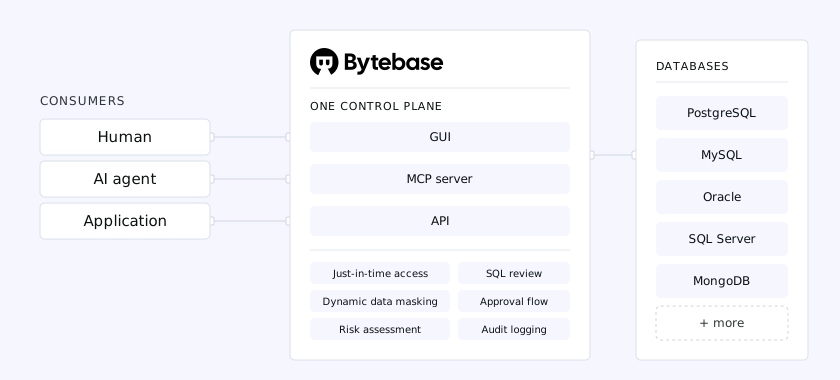 Bytebase places one control plane between engineers and databases for identity, approval, access enforcement, and audit
Bytebase sits in front of the database and holds the database connection itself. Engineers sign in with their own identity and query through it. The four gaps move into one control plane:
- The same request, approval, and expiry workflow covers PostgreSQL, MySQL, SQL Server, Oracle, and the rest of the fleet.
- The audit record contains the person, SQL statement, database, and timestamp without joining STS and database logs.
- Access can target databases or tables, sensitive columns can be masked, and a specific read-only statement can be approved.
- Engineers receive neither database credentials nor a direct database session. When access expires, the next query is refused.
The tradeoff is another component in the human access path. Bytebase must be available for engineers to query through it, while application and break-glass connections remain separate. What it buys is one place where identity, approval, expiry, enforcement, and audit agree.