Most enterprises let AI agents query the data warehouse but not the production database. The warehouse is a copy of production data in Snowflake or Databricks, and it already has access control, data masking, and an audit log. Postgres, MySQL, SQL Server, and Oracle have no equivalent, so the only way to let an agent in is to give it a database login.
The warehouse works for analytics, but its data is not current and an agent cannot use it to fix anything. I covered that in Agents Can Read the Warehouse. They Still Can't Touch Production. This post covers the five things production needs before an agent can work on it: an identity for the agent, limited permissions, data masking, an audit log, and a person who approves each change.
A safer credential is still a credential
Most teams start by making the credential safer: a read-only user, a read replica, or a vault that rotates the password every hour. The database still sees a single login. It does not know which engineer the agent is working for, so it cannot limit the agent to the task, and the audit log only says that agent_ro ran a query.
The fix is to stop giving the agent a credential. Put a self-hosted Bytebase in front of the database. The agent connects to Bytebase through the MCP server or the API, and Bytebase checks who is asking and what they are allowed to do before it runs the SQL. The database password stays in Bytebase or in your own secrets vault, so the agent never sees it.
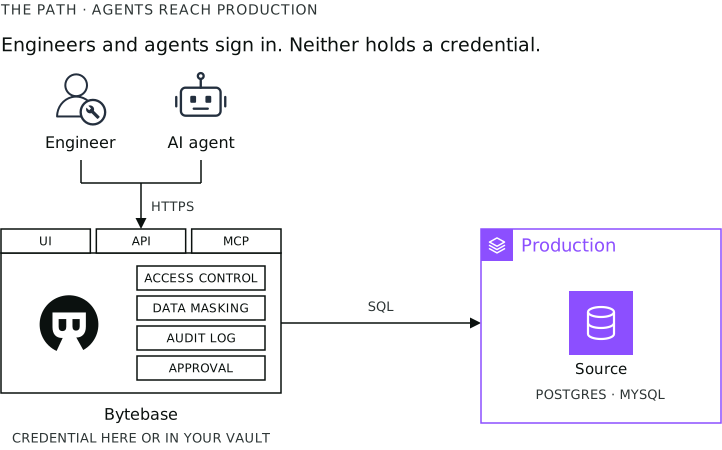 Engineers and agents connect to Bytebase, not to the database, so neither holds a credential.
Reading from production
Say the warehouse shows that order 4417 was refunded twice. The agent needs to check the order in production, because the warehouse lags and does not include every table. When the agent runs that query through Bytebase, four things happen.
- The agent signs in. A coding assistant such as Claude Code or Codex signs in as the engineer using it and gets that engineer's permissions. An agent that runs on its own gets a service account or a workload identity. No agent shares a login.
- The agent's permissions are limited. A workspace admin can restrict every AI assistant to read-only, and this policy only removes permissions. In read-only mode, Bytebase checks every statement and rejects anything that is not a read. If the agent needs a table it cannot read, it requests an access grant for one exact
SELECTstatement and a set duration, and a person approves it. - Sensitive columns are masked. A warehouse either leaves a sensitive column out or holds a second copy of it. Here the column stays in production and the agent sees a masked value. The result tells the agent which columns were masked and why, so it can request the one it needs.
- Every query is recorded in the audit log with the user, the statement, the database, and the time. For an AI assistant, the entry also records the client and a session ID, so you can filter the log to everything the agent did.
Changing production
The agent finds the duplicate refund and needs to correct it. The warehouse cannot help, because changing the warehouse does not change production. A write needs one more thing: a person approves it before it runs, whether it is a one-row fix, a backfill, or a schema change.
To enforce this, do not give DML or DDL permission on production to any role the agent uses. The agent then has to submit its UPDATE as a change request.
Bytebase runs SQL review on the request first. SQL review can dry-run the statement and flag it if it would affect more rows than a limit you set, which catches a backfill that is wider than intended. Bytebase also assigns a risk level by statement type: UPDATE, DELETE, and ALTER TABLE are moderate, and DROP and TRUNCATE are high.
Then a person approves. You can require the project owner and then the DBA for every production change, and by default the person who submitted a change cannot approve it. For an UPDATE or DELETE, Bytebase can back up the affected rows first, so you can roll the change back.
What this does not cover
- Bytebase does not cover your application. The billing service still connects to Postgres directly, so its queries are not masked or logged.
- Bytebase only enforces the rules you set up. If production has no approval rule, nobody is asked to approve.
- Bytebase does not remove existing database logins. Anyone who still has one can connect to the database directly and bypass Bytebase.
Engineers use the same setup
None of this is specific to agents. Engineers sign in to Bytebase the same way, and the same permissions, masking, audit log, and approval apply to them.
Most companies that block tools from production still let engineers keep a direct database login for emergencies. Once engineers can request temporary access through Bytebase, they no longer need that login, and the DBA can delete it.
Every query, access request, and change then goes through Bytebase, so one place records who ran what, on which database, when, and who approved it.
Agents got into the warehouse the same way. Snowflake and Databricks built access control, masking, and audit logs for analysts, and later connected agents to them. Production can follow the same order: set up controlled access for the engineers who hold credentials today, then let agents use it.
To try it, follow the tutorial: Connect an AI Assistant to Bytebase with MCP.
 Ask ChatGPT