# BigQuery Dynamic Data Masking
> Compare BigQuery data masking options — native column-level dynamic data masking (built-in masking rules via policy tags and data policies, Dataplex catalog) and Bytebase fleet-wide masking.
Tianzhou | 2026-05-24 | Source: https://www.bytebase.com/blog/bigquery-dynamic-data-masking/
---
Sensitive columns — SSNs, credit cards, emails, addresses — must stay queryable for support, analytics, and development. Broad cleartext access is not the answer. Data masking is. For some workloads (GDPR, HIPAA, PCI), masking is also a legal requirement.
BigQuery ships [dynamic data masking](https://docs.cloud.google.com/bigquery/docs/column-data-masking-intro) as part of column-level security, built on policy tags managed in Dataplex Universal Catalog. **Bytebase Dynamic Data Masking** sits in front. One policy model across every BigQuery dataset and every other engine in the fleet. Request. Review. Approve. This post compares them.
## BigQuery Dynamic Data Masking
Dynamic data masking is GA. It extends column-level security and carries no separate license charge — every BigQuery project has it. (Contrast [Snowflake](/blog/snowflake-dynamic-data-masking-and-alternatives/), which gates masking behind an Enterprise upgrade.) One caveat: masking may not apply under reservations created with certain BigQuery editions, so verify against your slot configuration.
Masking is configured in three steps:
1. Create a taxonomy of policy tags.
2. Attach a policy tag to a column.
3. Define a data policy that binds a masking rule and a set of principals to that tag.
At read time, BigQuery rewrites the column for principals who hold the Masked Reader role. The stored data is unchanged.
```mermaid
flowchart TB
T["1. Taxonomy of policy tags"] --> PT["2. Policy tag attached to column"] --> DP["3. Data policy
masking rule + principals"]
DP -.->|enforced at read time| BQ
MR(["Masked Reader queries the column"]) --> BQ["BigQuery rewrites
the column value"] --> Out["Masked result"]
Store[("Stored data
unchanged")] -.-> BQ
style BQ fill:#e0f2fe,stroke:#0369a1
```
BigQuery ships a set of built-in masking rules, plus custom routines for anything they don't cover. The same three steps in commands:
```bash
# 1. Create a taxonomy and a policy tag (Dataplex Universal Catalog).
gcloud data-catalog taxonomies create \
--location=us --display-name=pii
gcloud data-catalog taxonomies policy-tags create \
--location=us --taxonomy=$TAXONOMY_ID --display-name=ssn
# 2. Attach the policy tag to a column through the table schema.
# schema.json:
# [{ "name": "ssn", "type": "STRING",
# "policyTags": { "names": ["projects/$PROJECT/locations/us/taxonomies/$T/policyTags/$P"] } }]
bq update --schema schema.json $PROJECT:sales.customers
# 3. Create a data policy that binds a masking rule to the policy tag.
# There is no SQL DDL or bq command for this — use the Data Policy API.
curl -X POST \
"https://bigquerydatapolicy.googleapis.com/v1/projects/$PROJECT/locations/us/dataPolicies" \
-H "Authorization: Bearer $(gcloud auth print-access-token)" \
-H "Content-Type: application/json" \
-d '{
"dataPolicyId": "ssn_mask",
"dataPolicyType": "DATA_MASKING_POLICY",
"policyTag": "projects/'"$PROJECT"'/locations/us/taxonomies/'"$T"'/policyTags/'"$P"'",
"dataMaskingPolicy": { "predefinedExpression": "LAST_FOUR_CHARACTERS" }
}'
# 4. Grant the principal the Masked Reader role.
gcloud projects add-iam-policy-binding $PROJECT \
--member="user:analyst@example.com" \
--role="roles/bigquerydatapolicy.maskedReader"
```
The console drives the same flow under **Manage Data Policies**; for policy-as-code, the Terraform `google_bigquery_datapolicy_data_policy` resource wraps step 3.
### Permissions: three states
Access to a policy-tagged column resolves to one of three states, decided by the IAM role the principal holds:
- **Fine-Grained Reader** (`datacatalog.categoryFineGrainedReader`) — sees cleartext. The role sits above masking. Grant it sparingly and audit changes.
- **Masked Reader** (`bigquerydatapolicy.maskedReader`) — sees the masked value the data policy defines.
- **Neither** — the query is denied. Column-level security blocks the read outright.
A column carries one policy tag, and that tag maps to a single masking rule. Masking is per column, per tag — there is no second rule to layer on top.
### What BigQuery data masking does not do
- **Stop Fine-Grained Readers.** The role returns unmasked values. It is a plain IAM grant, so limit who holds it and audit the grants.
- **Apply more than one rule per column.** One policy tag per column; the tag's data policy selects one masking rule. No composition.
- **Subject direct or service access to review.** BI tools, scheduled jobs, and application service accounts query the warehouse with whatever role they carry. A service account granted Fine-Grained Reader reads cleartext, with no request or review.
- **Provide an approval workflow or an unmask audit trail.** Granting Fine-Grained Reader is an IAM edit. There is no Request–Review–Approve path, and the grant is not a first-class, audited masking event.
- **Work with legacy SQL, wildcard (`*`) table queries, or copy jobs.** Masking is incompatible with all three.
- **Mask partitioning or clustering columns via custom routines.** A custom masking routine does not apply to a column used for partitioning or clustering.
- **Filter rows.** Masking is column-level. For row-level control, use row-level security (row access policies).
## Bytebase Dynamic Data Masking
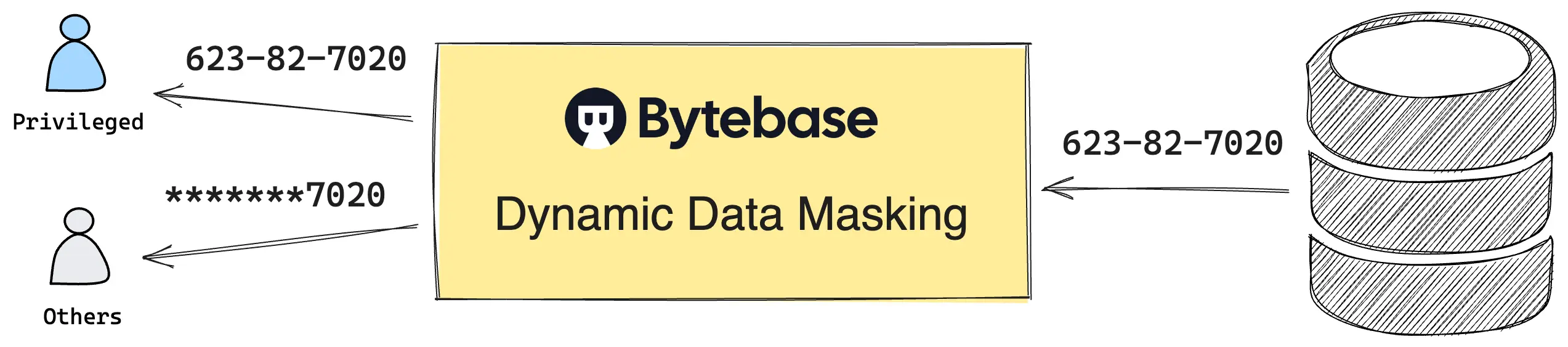
Native masking has a documented gap. `Fine-Grained Reader` grants return cleartext, and they are plain IAM edits — no request, no review, no audited unmask event. Granting access and proving who saw what are separate, manual steps. The cause is structural: masking rewrites the column inside the warehouse, but the role grant that bypasses it lives upstream, in IAM. Closing the gap requires governing the **query itself** — not just the column.
[Bytebase Dynamic Data Masking](https://docs.bytebase.com/security/data-masking/overview/) governs the query. Queries route through Bytebase's SQL Editor. Bytebase masks results before they leave the editor. A `Fine-Grained Reader` grant on the backing project does not bypass the policy. Unmasking becomes an access decision: granting `Query` rights runs through a built-in workflow — **Request. Review. Approve.** — every step audited.
Policies compose from three layers, evaluated in fixed precedence: **Masking Exemption > Global Masking Rule > Column Masking**.
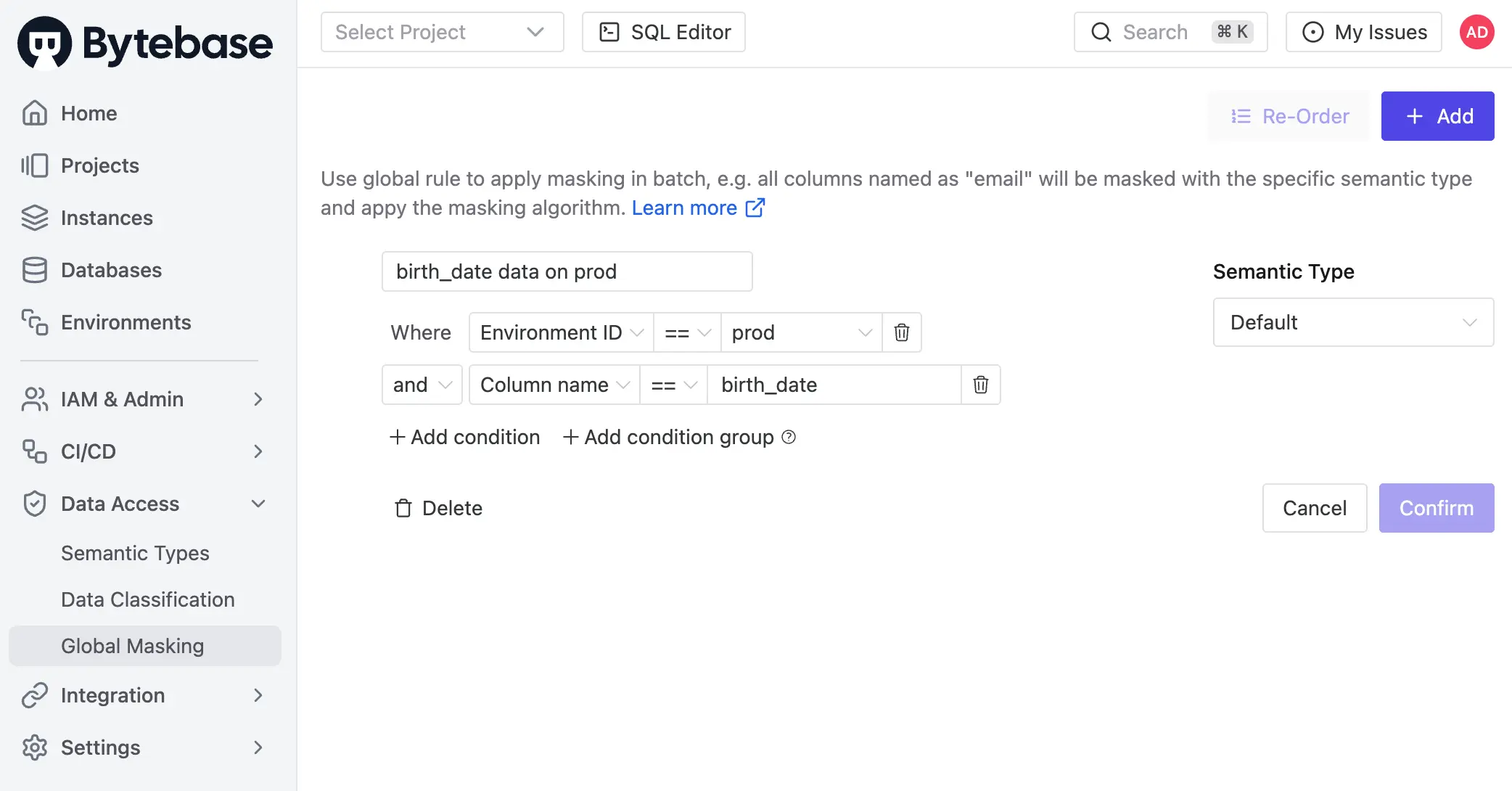
1. **Global Masking Rule.** Workspace-level. Rules evaluate top-down. First match wins. Match conditions span environment, project, database, and data classification. Each match applies a Semantic Type, which selects a masking algorithm — full, partial, MD5, range, or custom.
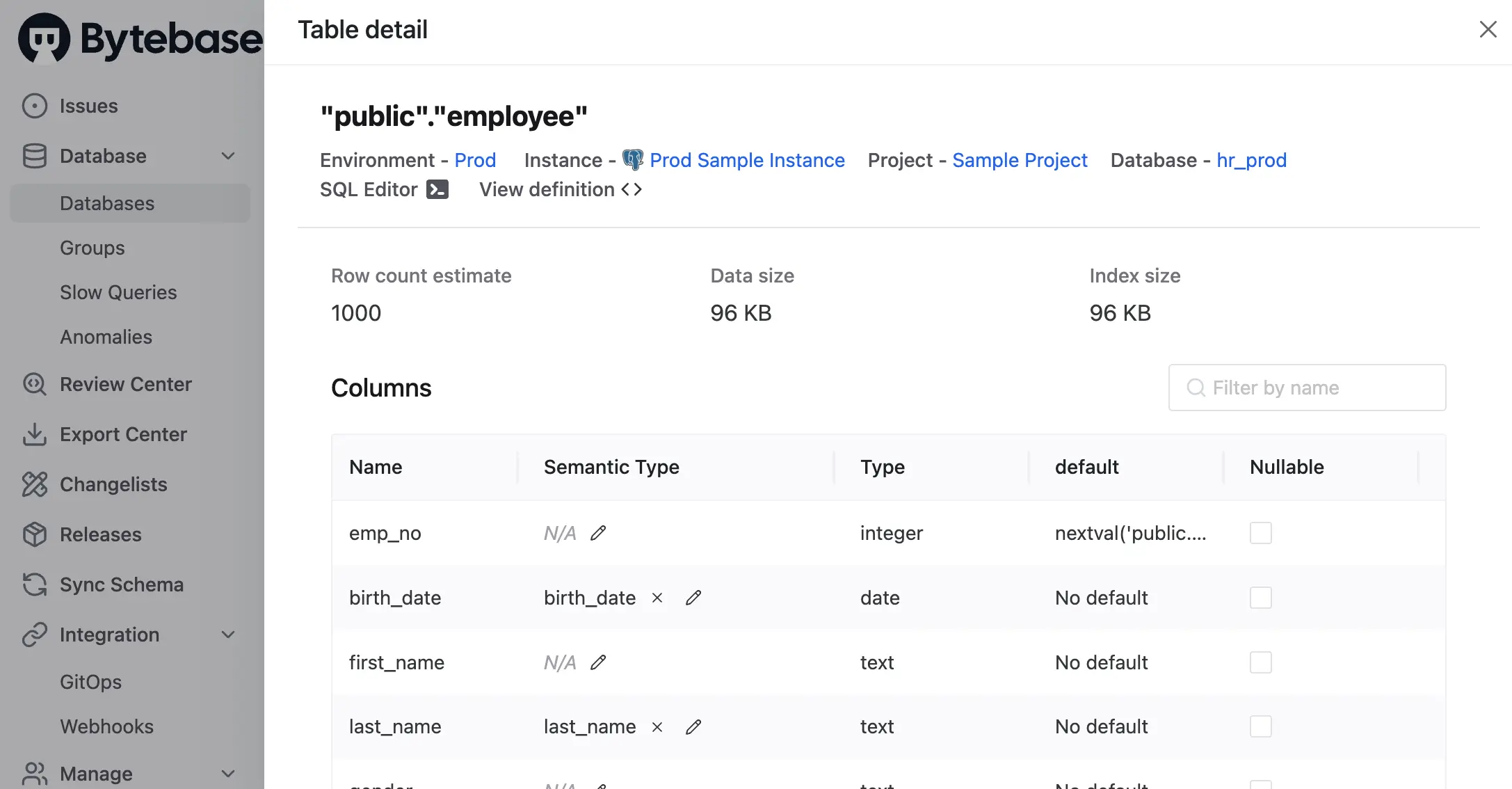
2. **Column Masking.** Project-level override on a specific column when the global rule does not apply.
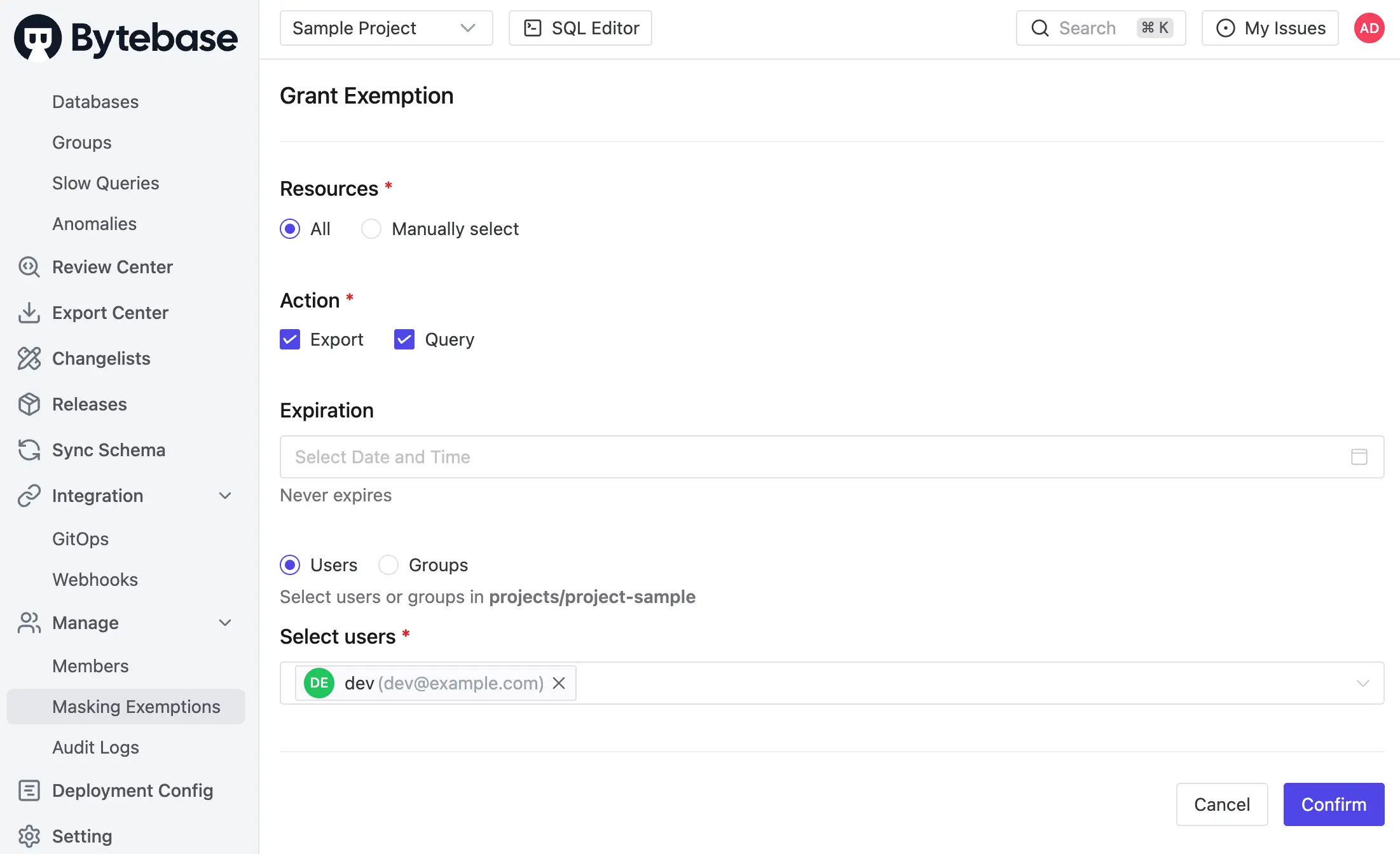
3. **Masking Exemption.** Named users receive time-bound `Query` or `Export` exemptions to specific databases or tables. Service accounts are not eligible. Every grant logged. Every access logged.
Masking propagates. When a column is masked, the policy extends to every view and derived structure that depends on it. Expressions over masked columns stay masked.
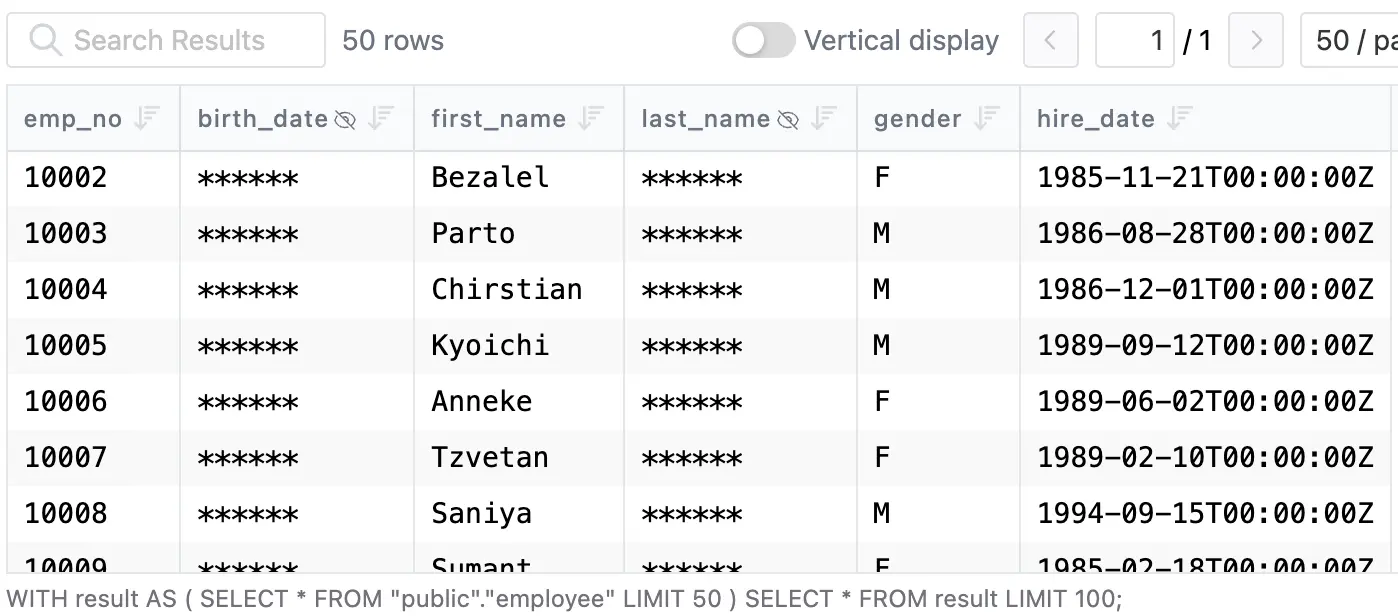
_Policies can also be codified via [GitOps](https://github.com/bytebase/example-database-security)._
Masking decisions are recorded in the [audit log](/blog/bytebase-audit-logging/#what-bytebase-records). Every SQL execution entry carries per-column masking metadata — masked columns, Semantic Type, matching rule — alongside user, source IP, statement, and row count. Granted exemptions, used exemptions, and policy edits are first-class audit events. The access decision and the proof of enforcement share the same record.
Enforcement boundary: Bytebase masks queries routed through the SQL Editor. Traffic that hits BigQuery directly bypasses it — BI tools, scheduled jobs, and service accounts, covered there by native data masking and IAM. The pattern is symmetric: native masking at the warehouse; Bytebase on the human query path, where approval and audit matter. One policy applies across BigQuery and the Postgres, MySQL, SQL Server, Oracle, and Snowflake instances next to it.
## Comparison
| | BigQuery Dynamic Data Masking | Bytebase Dynamic Data Masking |
| ---------------- | ------------------------------------------------------ | -------------------------------------------- |
| Compatibility | BigQuery only | All engines including BigQuery ⭐️ |
| Mechanism | Policy tag + data policy per column ⭐️ | Policy in Bytebase, applied at SQL Editor |
| Enforced at | Warehouse, every read path ⭐️ | SQL Editor |
| Masking rules | Built-in rules + custom routine ⭐️ | Full, partial, MD5, range, custom |
| Policy mgmt | Console / Data Policy API / Terraform | Centralized UI, grants, audit log ⭐️ |
| Permission scope | Column (one policy tag) | Project, database, table, column ⭐️ |
| Workflow | IAM grant only | Request. Review. Approve. ⭐️ |
| Row-level filter | No (pair with row access policies) | No (pair with access policy) |
| Cost | Included with BigQuery ⭐️ | Bytebase Enterprise |
## Picking one
- **Single BigQuery estate. Masking must hold across every client.** Use native data masking. In-warehouse, every read path — including the BI tools, scheduled jobs, and service accounts that connect directly. Pair with row access policies for row-level control. Keep `Fine-Grained Reader` grants few and logged.
- **You need an approval workflow and an unmask audit trail.** Native masking grants are plain IAM edits. Use Bytebase on the human query path — Request. Review. Approve. — with every exemption and access logged.
- **Mixed fleet — BigQuery alongside Postgres, MySQL, SQL Server, Snowflake.** Use Bytebase. One policy model. Every engine. Audited grants for every unmask, recorded in the same place as your access logs.
- **Both.** Native masking at the warehouse — direct connections, BI tools, service accounts. Bytebase governs the human query path through the SQL Editor with approval and audit. They compose.
---
Try Bytebase Dynamic Data Masking with [this tutorial](https://docs.bytebase.com/tutorials/data-masking/).